

Comprehensive Guide to Website Development Agreements

Website Development Agreements

A well-structured website development agreement is crucial for ensuring that the process of creating or updating a website runs smoothly. This document outlines the responsibilities, expectations, and legal protections for both the client and the developer. In this article, we will delve into the key components of a website development agreement, offering detailed insights and guidance to help you craft a comprehensive and effective contract.

Introduction to Website Development Agreements

A website development agreement is a formal contract between a client and a web developer or development company. This agreement serves as a blueprint for the project, detailing everything from project scope and deliverables to timelines and payment terms. Having a clear and detailed agreement can prevent misunderstandings and disputes, ensuring a successful project outcome.

Key Components of a Website Development Agreement

1. Project Scope and Objectives

Defining the Project Scope is the first step in any website development agreement. This section should outline the purpose of the website, the target audience, and the specific features and functionalities that the site will include. Clear objectives help both parties understand the project’s goals and ensure alignment throughout the development process.

2. Deliverables and Milestones

Detailing Deliverables and Milestones is essential for tracking progress and managing expectations. This section should specify the key deliverables, such as design mockups, development sprints, and final site launch. Additionally, setting milestones with corresponding deadlines helps keep the project on schedule and provides a framework for evaluating progress.

3. Timeline and Deadlines

A well-defined Timeline and Deadlines section is crucial for ensuring that the project stays on track. This part of the agreement should include a detailed project timeline, outlining when each phase of the project will be completed. Clearly defined deadlines help manage client expectations and keep the development team accountable.

4. Payment Terms and Schedule

The Payment Terms and Schedule section outlines how and when payments will be made. This includes the total project cost, payment milestones, and any additional fees that may apply. It’s important to specify the payment method and the terms for late payments to avoid any financial disputes.

5. Intellectual Property Rights

Intellectual Property Rights are a critical aspect of any website development agreement. This section should clearly define who owns the rights to the website’s design, code, and content. Typically, the client retains ownership of the website, while the developer may retain rights to any pre-existing tools or code used in the project.

6. Confidentiality and Non-Disclosure

Ensuring Confidentiality and Non-Disclosure is vital to protect sensitive information. This section should outline the obligations of both parties to maintain the confidentiality of proprietary information and trade secrets. Including a non-disclosure agreement (NDA) within the contract can provide additional legal protection.

7. Warranties and Representations

Warranties and Representations provide assurances regarding the quality and functionality of the website. This section should detail any warranties offered by the developer, such as guarantees for bug-free code or compliance with web standards. Additionally, it should outline the client’s responsibilities, such as providing accurate content and timely feedback.

8. Limitation of Liability

The Limitation of Liability section protects both parties from potential legal claims. This part of the agreement should specify the extent of each party’s liability in the event of a dispute or project failure. Limiting liability can help prevent costly legal battles and provide peace of mind for both the client and the developer.

9. Termination Clause

Including a Termination Clause in the agreement is essential for outlining the conditions under which the contract can be terminated. This section should detail the process for terminating the agreement, including any notice periods and financial implications. A clear termination clause ensures that both parties understand their rights and obligations if the project needs to be halted.

10. Post-Launch Support and Maintenance

Post-Launch Support and Maintenance is an often-overlooked aspect of website development agreements. This section should outline the developer’s responsibilities for ongoing support and maintenance after the website goes live. Specifying the terms for updates, bug fixes, and technical support ensures that the website remains functional and up-to-date.

Best Practices for Drafting a Website Development Agreement

1. Use Clear and Concise Language

When drafting a website development agreement, it’s important to use Clear and Concise Language. Avoid technical jargon and legalese that could confuse the client. Instead, use straightforward language that clearly communicates the terms and conditions of the contract.

2. Be Specific and Detailed

Being Specific and Detailed in the agreement helps prevent misunderstandings and disputes. Include as much detail as possible about the project scope, deliverables, timelines, and payment terms. The more specific the agreement, the easier it is to hold both parties accountable.

3. Include Appendices and Exhibits

Adding Appendices and Exhibits to the agreement can provide additional clarity and detail. These attachments might include project timelines, detailed specifications, design mockups, and payment schedules. Including these documents as part of the contract ensures that all relevant information is easily accessible.

4. Review and Revise Regularly

Regularly Review and Revise the agreement to ensure that it remains up-to-date and relevant. As the project progresses, new details may emerge that need to be incorporated into the contract. Regular reviews help ensure that the agreement accurately reflects the current state of the project.

5. Seek Legal Advice

Finally, it’s always a good idea to Seek Legal Advice when drafting a website development agreement. A lawyer with experience in contract law can provide valuable insights and ensure that the agreement is legally sound. This can help prevent potential legal issues and provide additional protection for both parties.

Conclusion

A well-crafted website development agreement is essential for the success of any web development project. By clearly defining the project scope, deliverables, timelines, payment terms, and other critical aspects, both the client and the developer can ensure a smooth and productive working relationship. Following best practices for drafting and regularly reviewing the agreement can help prevent misunderstandings and disputes, paving the way for a successful project outcome.


Unlocking the Potential of Data Analysis Web Applications

 Data Analysis Web Applications

In today’s digital age, data is the lifeblood of successful businesses. The ability to collect, analyze, and interpret data effectively can be the difference between success and failure. Data analysis web applications have emerged as indispensable tools for organizations seeking to gain insights from their data, make informed decisions, and drive growth. In this article, we will delve into the intricacies of data analysis web applications, exploring their benefits, key features, and the impact they have on various industries.

Understanding Data Analysis Web Applications

Data analysis web applications are sophisticated software platforms that enable users to process and analyze data over the web. These applications provide a range of functionalities, from basic data visualization to advanced predictive analytics. They are designed to handle large datasets, perform complex computations, and present results in an easily interpretable format. The primary goal of these applications is to transform raw data into actionable insights.

Key Features of Data Analysis Web Applications

1. User-Friendly Interface

One of the most critical features of a data analysis web application is its user-friendly interface. A well-designed interface allows users to navigate through the application effortlessly, access different tools, and perform analyses without requiring extensive technical knowledge. Drag-and-drop functionalities, customizable dashboards, and intuitive design elements enhance the user experience.

2. Data Integration

Effective data analysis applications must support seamless integration with various data sources. Whether it’s SQL databases, NoSQL databases, cloud storage, or APIs, the ability to import and synchronize data from multiple sources is crucial. This integration capability ensures that users have access to the most up-to-date and relevant data for their analyses.

3. Advanced Analytics

Advanced analytics capabilities are at the core of data analysis web applications. These include statistical analysis, machine learning algorithms, predictive modeling, and data mining techniques. With these tools, users can uncover hidden patterns, forecast future trends, and make data-driven decisions.

4. Real-Time Processing

In today’s fast-paced business environment, real-time data processing is a necessity. Data analysis web applications equipped with real-time processing capabilities allow users to analyze data as it is generated. This immediacy is vital for applications such as fraud detection, stock market analysis, and operational monitoring.

5. Data Visualization

Data visualization is a powerful feature that helps users understand complex data sets through graphical representations. Charts, graphs, heatmaps, and other visual tools make it easier to identify trends, outliers, and correlations. Effective visualization aids in communicating findings to stakeholders and facilitates better decision-making.

Benefits of Using Data Analysis Web Applications

1. Enhanced Decision-Making

By providing actionable insights, data analysis web applications empower organizations to make informed decisions. Whether it’s identifying market opportunities, optimizing operations, or improving customer experiences, the ability to base decisions on solid data is a significant advantage.

2. Increased Efficiency

Automation of data processing tasks reduces the time and effort required to analyze data manually. Data analysis web applications streamline workflows, allowing employees to focus on more strategic activities. This efficiency translates into cost savings and improved productivity.

3. Competitive Advantage

Organizations that leverage data analysis web applications gain a competitive edge. Access to real-time data and advanced analytics enables businesses to respond swiftly to market changes, anticipate customer needs, and stay ahead of competitors.

4. Improved Accuracy

Manual data analysis is prone to errors and inconsistencies. Data analysis web applications minimize these risks by automating calculations and standardizing processes. The result is more accurate and reliable data, leading to better outcomes.

Impact on Various Industries

1. Healthcare

In the healthcare industry, data analysis web applications play a pivotal role in patient care, medical research, and operational efficiency. By analyzing patient data, healthcare providers can identify trends, predict disease outbreaks, and tailor treatments to individual patients. Additionally, these applications help in optimizing hospital operations and managing resources effectively.

2. Finance

The finance sector relies heavily on data analysis for risk management, investment strategies, and regulatory compliance. Data analysis web applications provide real-time insights into market conditions, assist in fraud detection, and support algorithmic trading. Financial institutions use these tools to enhance decision-making and ensure stability in volatile markets.

3. Retail

Retailers use data analysis web applications to understand customer behavior, optimize inventory, and personalize marketing efforts. By analyzing sales data and customer feedback, retailers can identify popular products, predict demand, and improve the overall shopping experience. These insights drive sales and enhance customer loyalty.

4. Manufacturing

In manufacturing, data analysis web applications are used for quality control, predictive maintenance, and supply chain optimization. By monitoring production processes and analyzing data from sensors, manufacturers can detect anomalies, prevent equipment failures, and streamline operations. This results in higher efficiency and reduced downtime.

Future Trends in Data Analysis Web Applications

1. Artificial Intelligence and Machine Learning

The integration of artificial intelligence (AI) and machine learning (ML) is transforming data analysis web applications. AI and ML algorithms enable applications to learn from data, improve over time, and provide more accurate predictions. This advancement is driving innovation across various industries.

2. Big Data Analytics

As the volume of data continues to grow, big data analytics is becoming increasingly important. Data analysis web applications are evolving to handle massive datasets, providing the tools needed to analyze and extract valuable insights from big data. This capability is crucial for industries such as e-commerce, social media, and IoT.

3. Enhanced Data Security

With the rise of data breaches and cyber threats, data security is a top priority. Future data analysis web applications will incorporate advanced security measures, such as encryption, access controls, and secure data storage, to protect sensitive information. Ensuring data privacy and compliance with regulations will be paramount.

4. Cloud-Based Solutions

The adoption of cloud-based data analysis web applications is on the rise. Cloud solutions offer scalability, flexibility, and cost-effectiveness, making them an attractive option for businesses of all sizes. These applications enable remote access, collaboration, and integration with other cloud services, enhancing their utility and accessibility.

Conclusion

Data analysis web applications are revolutionizing the way organizations harness the power of data. With features like user-friendly interfaces, data integration, advanced analytics, real-time processing, and data visualization, these applications provide immense value. They enhance decision-making, increase efficiency, and offer a competitive advantage across various industries. As technology continues to evolve, data analysis web applications will become even more sophisticated, driving innovation and growth.

Top 8 Software Design Principles

Software Design Principles In the ever- evolving geography of software development, clinging to robust software design principles is consummate for creating justifiable, scalable, and effective operations. These principles serve as foundational guidelines that help inventors navigate the complications of software armature, icing that the final product is both functional and sustainable. In this comprehensive companion, we claw into the key software design principles that every inventor should master.

1. Single Responsibility Principle( SRP)

The Single Responsibility Principle dictates that a class or module should have only one reason to change, meaning it should have only one job or responsibility. This principle aims to reduce the complexity and increase the cohesion of the law, making it easier to understand and maintain

Benefits of SRP

Enhanced Readability When a class is responsible for only one task, it becomes easier to understand its purpose and functionality.

Simplified Testing segregating liabilities makes it easier to write unit tests for individual factors. bettered Maintainability Changes in the conditions of one responsibility don’t affect other corridor of the law.

Example

Top 8 Software Design Principles

2. Open/ Closed Principle( OCP)

The Open/ Closed Principle states that software realities( classes, modules, functions ,etc.) should be open for extension but closed for revision. This means you should be suitable to add new functionality without altering being law, therefore reducing the threat of introducing bugs.

Benefits of OCP

Reduced Risk : By not modifying being law, you minimize the chances of introducing new crimes.

Ease of Extension : New features can be added with minimum impact on being functionality. Encapsulation Promotes the use of abstraction to cover the integrity of the codebase.

Example

3. Liskov Substitution Principle( LSP)

The Liskov Substitution Principle asserts that objects of a superclass should be interchangeable with objects of a class without affecting the correctness of the program. This principle ensures that a class can stand in for its superclass.

Benefits of LSP

Predictable Behavior : Sorts can be used interchangeably with their base classes, icing thickness.

Advanced Interoperability : Promotes the use of polymorphism and interfaces. Simplified Codebase Reduces complexity by allowing the use of generalized law. illustration

Example

4. Interface Segregation Principle( ISP)

The Interface Segregation Principle advises that no customer should be forced to depend on styles it doesn’t use. rather of having one large, bloated interface, it’s better to have multiple lower, more specific interfaces.

Benefits of ISP

Enhanced Inflexibility : guests depend only on the interfaces that are applicable to them. bettered Maintainability lower interfaces are easier to understand and modify.

Reduced reliance : lower coupling between classes leads to a further modular codebase. illustration

Example

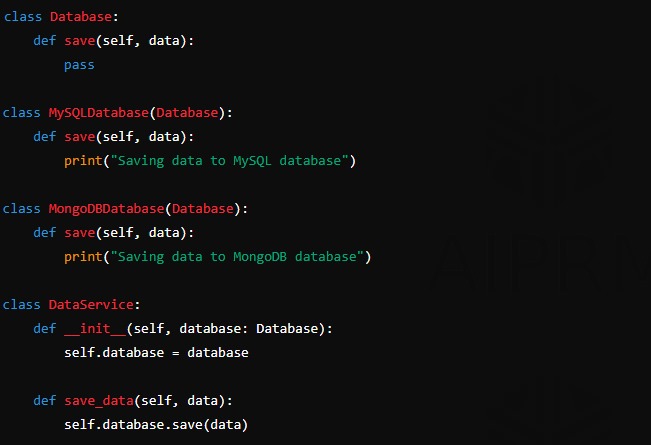
5. reliance Inversion Principle( DIP)

The Dependency Inversion Principle suggests that high- position modules shouldn’t depend on low- position modules. Both should depend on abstractions. also, abstractions shouldn’t depend on details; details should depend on abstractions.

Benefits of DIP

Increased Inflexibility : By depending on abstractions, the law becomes more flexible and easier to refactor.

Advanced Testability : Dependences can be fluently mocked or snubbed in tests.

Enhanced Decoupling : Promotes a more modular and justifiable armature. illustration

Example

6. Do not Repeat Yourself( DRY)

The DRY Principle emphasizes the significance of reducing the reiteration of law. It encourages inventors to abstract common functionality to avoid redundancy and insure that changes are made in a single place.

Benefits of DRY

Reduced Redundancy : Centralizes the operation of common functionality.

Simplified conservation : Changes are made in one place, reducing the threat of inconsistencies.

Enhanced Clarity : Less reiteration leads to cleaner and further accessible law. illustration

Example

7. Keep It Simple, Stupid( KISS)

The KISS Principle advocates for simplicity in design and perpetration. It suggests that utmost systems work stylish if they’re kept simple rather than made complex. Simplicity should be a crucial thing in design.

Benefits of KISS

Ease of Understanding: Simple systems are easier to comprehend and reason about.

Advanced Maintainability : Less complex systems are easier to maintain and extend.

Enhanced trust ability : Smaller complications reduce the eventuality for bugs and crimes. illustration.

Example

8. You Are not Gon na Need It( YAGNI)

The YAGNI Principle is a mantra of extreme programming that stands for” You Are not Gon na Need It.” It implies that you shouldn’t add functionality until it’s necessary. Over-engineering and unseasonable optimization should be avoided.

Benefits of YAGNI

Reduced Waste : Prevents the addition of gratuitous features. concentrated Development Encourages working on features that deliver immediate value.

Simplified Codebase: Keeps the codebase spare and manageable. illustration

Example

Conclusion

Adhering to solid software design principles is essential for developing robust, scalable, and maintainable software. Principles like SRP, OCP, LSP, ISP, DIP, DRY, KISS, YAGNI, and Composition Over Inheritance provide a framework that guides developers in creating high-quality software systems. By understanding and implementing these principles, development teams can significantly enhance the efficiency and effectiveness of their software development processes.

How to Password Protect a File on Mac

How to Password Protect a File on Mac

Introduction : Password Protect a File on Mac

Password Protect a File on Mac. In today’s digital age, the security of your personal and professional data is paramount. Whether you are safeguarding sensitive documents, protecting personal photos, or ensuring the confidentiality of business files, password protection on a Mac is an essential step. This comprehensive guide will walk you through the various methods available to password protect your files on a Mac, ensuring your information remains secure.

Method 1: Password Protecting with Disk Utility

Disk Utility is a powerful tool included with macOS that allows you to create encrypted disk images. Here’s how to use it to password protect your files:

  1. Open Disk Utility: You can find it by navigating to Applications > Utilities > Disk Utility.
  2. Create a New Disk Image: Click on File > New Image > Image from Folder.
  3. Select the Folder: Choose the folder you wish to password protect and click Open.
  4. Set the Encryption: In the window that appears, select 128-bit AES encryption (sufficient for most uses) or 256-bit AES encryption (more secure but slower).
  5. Choose a Password: Enter a strong password in the pop-up window. Ensure you remember this password, as it cannot be recovered if forgotten.
  6. Save the Disk Image: Choose the location where you want to save the encrypted disk image and click Save.

Now, you can delete the original folder, leaving only the password-protected disk image. To access your files, simply double-click the disk image and enter your password.

Method 2: Password Protecting with Third-Party Software

Several third-party applications provide robust file encryption and password protection features. Some popular options include:

1. VeraCrypt:

  • Download and Install: Visit the VeraCrypt website and download the software.
  • Create a Volume: Open VeraCrypt and click Create Volume. Follow the prompts to create an encrypted file container.
  • Select Encryption Options: Choose the type of encryption and hashing algorithm you prefer.
  • Set a Password: Enter a strong password for the encrypted volume.
  • Save and Mount: Save the encrypted volume to your desired location. To access your files, mount the volume in VeraCrypt and enter your password.

2. Hider 2:

  • Download and Install: Obtain Hider 2 from the MacPaw website.
  • Add Files: Open Hider 2 and add the files or folders you wish to encrypt.
  • Set a Password: Assign a password to the application. Each time you open Hider 2, you’ll need to enter this password to access your hidden files.

Method 3: Password Protecting PDF Files

If you need to protect PDF files, macOS Preview offers a simple way to do so:

  1. Open the PDF in Preview: Navigate to the PDF file, right-click, and select Open with > Preview.
  2. Export the PDF: Click File > Export.
  3. Enable Encryption: In the export window, check the Encrypt box.
  4. Set a Password: Enter a strong password and confirm it.
  5. Save the PDF: Choose your save location and click Save.

The PDF file is now password protected. Each time you or anyone else tries to open it, the password will be required.

Tips for Creating Strong Passwords

Creating a strong password is crucial for ensuring the security of your files. Here are some tips to keep in mind:

  • Length: Aim for at least 12 characters.
  • Complexity: Use a mix of uppercase and lowercase letters, numbers, and special characters.
  • Unpredictability: Avoid common words, phrases, or easily guessable information like birthdays or names.
  • Uniqueness: Use a different password for each file or service to minimize risk.

Conclusion

Password protecting your files on a Mac is a straightforward process that significantly enhances your data security. Whether you prefer using built-in macOS tools like Disk Utility and Preview, leveraging Terminal for command-line encryption, or opting for third-party applications like VeraCrypt and Hider 2, there are multiple methods available to suit your needs.

Top 5 iOS App Development Programming Languages

Top 5 iOS App Development Programming Languages

The development of iOS applications is an intricate and rewarding process that demands a comprehensive understanding of various programming languages. With the rapid evolution of technology, the selection of the appropriate programming language becomes critical for the success of an app. In this article, we explore the top 5 iOS app development programming languages that developers can use to create robust, high-performing, and user-friendly applications.

1. Swift

Swift is a powerful and intuitive programming language developed by Apple for iOS, macOS, watchOS, and tvOS app development. Launched in 2014, Swift has quickly become the go-to language for iOS developers due to its modern features and ease of use.

Advantages of Swift

  • Modern Syntax: Swift’s syntax is clean and expressive, making it easier to read and write code. It reduces the complexity of coding, which enhances productivity.
  • Safety: Swift is designed with safety in mind. Its strong typing system and error handling mechanisms help prevent common programming errors.
  • Performance: Swift is compiled to machine code, making it faster than interpreted languages. Its performance is comparable to C++, which is crucial for high-performance apps.
  • Interoperability: Swift is fully compatible with Objective-C, allowing developers to use both languages within the same project.

Applications of Swift

Swift is ideal for developing all kinds of iOS applications, from simple games to complex enterprise solutions. Its ability to handle performance-intensive tasks makes it suitable for real-time applications and data-heavy operations.

2. Objective-C

Objective-C was the primary programming language for iOS development before Swift’s introduction. Despite being overshadowed by Swift, it remains a vital language for maintaining and updating existing iOS applications.

Advantages of Objective-C

  • Maturity: With over three decades of use, Objective-C is a mature and stable language with a rich set of libraries and frameworks.
  • Dynamic Runtime: Objective-C’s dynamic runtime allows for greater flexibility in executing tasks, which can be beneficial for certain types of applications.
  • Compatibility: It works seamlessly with Swift, providing a bridge between new and legacy code.

Applications of Objective-C

Objective-C is often used for maintaining legacy codebases. It’s also preferred in situations where developers need to leverage its dynamic runtime capabilities. Enterprises with long-standing iOS applications often continue using Objective-C to ensure stability and continuity.

3. JavaScript

JavaScript is not traditionally associated with iOS app development, but with the advent of frameworks like React Native, it has become a popular choice for building cross-platform applications.

Advantages of JavaScript

  • Cross-Platform Development: JavaScript, combined with frameworks like React Native, enables developers to write code once and deploy it across both iOS and Android platforms.
  • Large Community: JavaScript boasts a vast and active community, providing extensive resources, libraries, and support.
  • Flexibility: JavaScript’s flexibility allows developers to create dynamic and interactive user interfaces with ease.

Applications of JavaScript

JavaScript is ideal for developing cross-platform applications that need to run on multiple devices with a single codebase. It is particularly beneficial for startups and small businesses looking to maximize their reach while minimizing development costs.

4. Kotlin

Kotlin is primarily known as the preferred language for Android development, but it can also be used for iOS development through Kotlin Multiplatform.

Advantages of Kotlin

  • Conciseness: Kotlin reduces boilerplate code, making development faster and more efficient.
  • Safety: Kotlin’s null safety features help eliminate the notorious NullPointerExceptions, improving app stability.

Applications of Kotlin

Kotlin is useful for developing cross-platform applications where code sharing between iOS and Android is crucial. It is an excellent choice for teams with Java expertise looking to expand their app’s reach to iOS.

5. Python

Python is an increasingly popular language for various types of software development, including iOS app development through tools like Kivy and BeeWare.

Advantages of Python

  • Ease of Learning: Python’s simple and readable syntax makes it accessible to beginners and experienced developers alike.
  • Versatility: Python can be used for web development, data analysis, machine learning, and more, making it a versatile choice.
  • Community Support: Python has a large and active community, providing a wealth of libraries, frameworks, and tools.

Applications of Python

Python is suitable for building prototype applications, educational tools, and integrating machine learning features into iOS apps. It’s a great choice for developers looking to leverage their existing Python knowledge in the realm of mobile app development.

Conclusion

Choosing the right programming language for iOS app development is a pivotal decision that can impact the success and efficiency of your project. Swift stands out as the most popular and efficient choice for most iOS applications due to its modern features and robust performance. Objective-C remains relevant for maintaining legacy applications. For cross-platform development, JavaScript and Kotlin offer versatile solutions, while Python provides a unique advantage for specific use cases like machine learning and prototyping.

Casino Games App Developer: Crafting Winning Experiences

Casino Games App Developer

In today’s digital age, the casino games app developer plays a crucial role in the entertainment industry. These skilled professionals are the architects behind engaging, thrilling, and visually stunning casino games that captivate millions of players worldwide. As the demand for mobile gaming continues to soar, the significance of innovative and immersive casino game apps cannot be overstated. This article delves into the multifaceted world of casino games app development, exploring the essential skills, technologies, and trends that define this dynamic field.

Understanding the Role of a Casino Games App Developer

A casino games app developer is responsible for designing, coding, testing, and maintaining mobile applications that replicate the excitement of traditional casino games. These games include classics like poker, blackjack, roulette, and slots, as well as modern variations and hybrid games that offer unique gameplay experiences. The goal is to create apps that are not only entertaining but also secure, fair, and user-friendly.

Key Skills and Competencies

To excel as a casino games app developer, one must possess a diverse set of skills and competencies:

  • Programming Proficiency: Mastery of programming languages such as C++, Java, Swift, and JavaScript is essential. These languages are used to develop the core functionalities of the app.
  • Understanding of Game Mechanics: A deep knowledge of game design principles, including player psychology, reward systems, and game balancing, is crucial.
  • Graphic Design: Proficiency in graphic design tools like Adobe Photoshop, Illustrator, and Unity3D ensures the creation of visually appealing and engaging game environments.
  • Mathematics and Probability: A strong grasp of mathematical concepts and probability theory is necessary to design fair and unpredictable games.
  • Cybersecurity: Implementing robust security measures to protect user data and prevent fraud is a fundamental aspect of casino game development.

Technologies Shaping Casino Game Development

The technological landscape of casino game development is ever-evolving. Developers leverage cutting-edge technologies to enhance gameplay, improve user experience, and stay ahead of the competition.

Artificial Intelligence and Machine Learning

Artificial Intelligence (AI) and Machine Learning (ML) are revolutionizing the way casino games are developed and played. These technologies enable the creation of intelligent opponents, personalized gaming experiences, and sophisticated fraud detection systems. AI-driven analytics also help developers understand player behavior, allowing for the optimization of game design and marketing strategies.

Virtual Reality and Augmented Reality

Virtual Reality (VR) and Augmented Reality (AR) are transforming the casino gaming experience by providing immersive and interactive environments. VR enables players to step into a virtual casino, interact with other players, and experience games in a lifelike setting. AR enhances traditional gameplay by overlaying digital elements onto the real world, offering innovative game mechanics and increased engagement.

Blockchain Technology

Blockchain technology is gaining traction in the casino gaming industry due to its potential to ensure transparency, fairness, and security. Blockchain can be used to create provably fair games, where the randomness and outcomes can be independently verified by players. Additionally, blockchain-based cryptocurrencies offer secure and anonymous payment options, enhancing the overall user experience.

The Development Process

The development of a casino game app involves several stages, each requiring meticulous planning and execution.

Conceptualization and Planning

The first step is to conceptualize the game, defining its core mechanics, features, and target audience. This stage involves market research to identify trends, player preferences, and potential competitors. A detailed project plan is created, outlining the development timeline, resource allocation, and budget.

Design and Prototyping

In this stage, developers create wireframes and prototypes to visualize the game’s layout and functionality. Graphic designers work on creating the visual elements, including characters, backgrounds, and animations. Prototypes are tested to gather feedback and make necessary adjustments before proceeding to full-scale development.

Coding and Development

During the coding phase, developers write the code that brings the game to life. This includes implementing game logic, user interfaces, and backend systems. Collaboration between developers, designers, and testers is crucial to ensure a seamless and bug-free gaming experience.

Testing and Quality Assurance

Comprehensive testing is conducted to identify and resolve any issues or bugs. Quality assurance ensures that the game meets industry standards and provides a smooth and enjoyable experience for players.

Deployment and Maintenance

Once the game is fully developed and tested, it is deployed to app stores such as Google Play and the Apple App Store. Ongoing maintenance and updates are essential to address any emerging issues, introduce new features, and keep the game compatible with the latest devices and operating systems.

Trends in Casino Game Development

The casino gaming industry is continually evolving, with new trends shaping the future of game development.

Social Gaming

Social gaming elements, such as leaderboards, tournaments, and multiplayer modes, are becoming increasingly popular. These features enhance player engagement by fostering a sense of community and competition.

Mobile-First Approach

With the majority of players accessing casino games via mobile devices, developers are adopting a mobile-first approach. This involves designing games specifically for mobile platforms, ensuring optimized performance and user experience.

Live Dealer Games

Live dealer games, which feature real dealers conducting games in real-time via video streaming, are gaining traction. These games offer an authentic casino experience and appeal to players seeking a more interactive and social gaming environment.

Cross-Platform Compatibility

Ensuring that games are compatible across multiple platforms, including smartphones, tablets, and desktops, is becoming a standard practice. Cross-platform compatibility allows players to enjoy a seamless gaming experience across different devices.

Conclusion

The role of a casino games app developer is both challenging and rewarding, requiring a blend of technical expertise, creativity, and a deep understanding of player psychology. As technology continues to advance, the opportunities for innovation in casino game development are boundless. By staying abreast of industry trends and leveraging the latest technologies, developers can create captivating and immersive gaming experiences that keep players coming back for more.

Top Casino Apps for iPhone: A Comprehensive Guide

 Casino Apps for iPhone

Introduction

In today’s fast-paced digital world, mobile gaming has become a significant part of our daily lives. Among the various genres of mobile games, casino apps have carved a niche for themselves, offering the thrill and excitement of gambling right at your fingertips. With the increasing popularity of smartphones, particularly the iPhone, casino apps have seen a surge in downloads and user engagement. This article delves into the top casino apps available for iPhone, providing an in-depth analysis of their features, benefits, and much more.

Top Casino Apps for iPhone

Criteria for Selection

When selecting the top casino apps for iPhone, several factors are considered to ensure a comprehensive and fair evaluation. These criteria include user interface, game variety, security measures, customer support, and user reviews. By adhering to these standards, we can present a list of the most reliable and entertaining casino apps available on the App Store.

Overview of Top Apps

The following sections will detail the top casino apps for iPhone, highlighting their unique features, the variety of games they offer, user experiences, and their respective pros and cons.

1. Slotomania

Features

Slotomania is a well-known casino app that has gained immense popularity among iPhone users. The app offers a wide range of slot games, each with unique themes and features. It provides daily bonuses, free spins, and various in-app events to keep players engaged.

Games Available

Slotomania boasts an extensive collection of over 160 slot games. These games range from classic three-reel slots to modern five-reel video slots, ensuring there is something for everyone.

User Experience

The user experience on Slotomania is seamless, with intuitive navigation and vibrant graphics. The app’s social features, such as the ability to send and receive gifts, enhance the overall gaming experience.

Pros and Cons

Pros:

  • Wide variety of slot games
  • Engaging social features
  • Regular updates and new game additions

Cons:

  • Heavy emphasis on in-app purchases
  • Limited availability of other casino games like poker or blackjack

2. 888 Casino

Features

888 Casino is a reputable name in the online gambling industry, and its app lives up to the brand’s high standards. The app offers a comprehensive casino experience with a wide range of games, secure transactions, and excellent customer support.

Games Available

Players can enjoy a variety of games on 888 Casino, including slots, blackjack, roulette, and live dealer games. The app continuously updates its game library to include the latest and most popular titles.

User Experience

888 Casino provides a smooth and enjoyable user experience, with easy navigation and high-quality graphics. The app’s live dealer feature offers an immersive casino experience, replicating the feel of a real-life casino.

Pros and Cons

Pros:

  • Extensive game selection
  • High-quality graphics and sound effects
  • Secure and fast transactions

Cons:

  • Can be overwhelming for new users
  • Occasional technical glitches

3. Poker Stars Casino

Features

Poker Stars Casino is renowned for its poker games, but its casino app offers much more. The app provides a wide range of casino games, including slots, blackjack, roulette, and live dealer games. It also offers various promotions and bonuses for both new and existing players.

Games Available

Poker Stars Casino offers an impressive selection of games, with a strong emphasis on poker. However, players can also enjoy a variety of other casino games, making it a versatile choice for casino enthusiasts.

User Experience

The app is user-friendly, with a clean and intuitive interface. The high-quality graphics and seamless gameplay contribute to a positive user experience, making it a favorite among many players.

Pros and Cons

Pros:

  • Excellent variety of poker games
  • User-friendly interface
  • Regular promotions and bonuses

Cons:

  • Limited game variety outside of poker
  • Can be competitive and challenging for beginners

4. Caesars Casino

Features

Caesars Casino app brings the grandeur of the iconic Caesars Palace to your iPhone. The app offers a wide range of casino games, daily bonuses, and a loyalty program that rewards players with real-world benefits.

Games Available

Players can enjoy a plethora of games on Caesars Casino, including slots, poker, blackjack, and roulette. The app frequently updates its game library to keep things fresh and exciting.

User Experience

The user experience on Caesars Casino is top-notch, with smooth navigation and engaging graphics. The app’s loyalty program adds an extra layer of excitement, rewarding players with perks and benefits.

Pros and Cons

Pros:

  • Wide range of games
  • Attractive loyalty program
  • Regular updates and new game additions

Cons:

  • Heavy emphasis on in-app purchases
  • Occasional lag during peak times

5. Big Fish Casino

Features

Big Fish Casino is a popular choice among iPhone users for its variety of casino games and interactive social features. The app offers daily bonuses, special events, and a vibrant community of players.

Games Available

Big Fish Casino offers a diverse selection of games, including slots, blackjack, poker, and roulette. The app also features unique games like Texas Hold’em and Baccarat.

User Experience

The app provides an engaging user experience with its colorful graphics and interactive features. The social aspect of the app, where players can chat and compete with friends, enhances the overall gaming experience.

Pros and Cons

Pros:

  • Diverse selection of games
  • Interactive social features
  • Daily bonuses and special events

Cons:

  • In-app purchases can be costly
  • Some games require a stable internet connection

How to Download and Install Casino Apps

Step-by-Step Guide

  1. Open the App Store on your iPhone.
  2. Search for the Casino App you want to download.
  3. Tap “Get” to download the app.
  4. Enter your Apple ID password if prompted.
  5. Open the App once the download is complete.
  6. Sign Up or Log In to start playing.

Troubleshooting Common Issues

  • App Not Downloading: Ensure you have a stable internet connection and enough storage space.
  • App Crashing: Restart your iPhone or reinstall the app.
  • Login Issues: Check your internet connection and ensure you’re entering the correct login credentials.

User Guides and Tutorials

How to Play Popular Casino Games

Slots: Select your bet amount, spin the reels, and aim to match symbols. Blackjack: Try to get as close to 21 as possible without going over. Roulette: Place your bets on numbers, colors, or sections and watch the wheel spin.

Strategies for Winning

Slots: Look for games with high RTP (Return to Player) percentages. Blackjack: Learn basic strategy and practice to improve your skills. Poker: Develop a solid understanding of the rules and practice bluffing techniques.

FAQs

What are the best casino apps for iPhone?

Some of the best casino apps for iPhone include Slotomania, 888 Casino, PokerStars Casino, Caesars Casino, and Big Fish Casino.

Are casino apps legal?

Casino apps are legal in many jurisdictions, but it’s essential to check the local laws and regulations in your area.

Can you win real money on casino apps?

Yes, many casino apps offer real money games where you can win actual cash. However, it’s crucial to play responsibly and be aware of the risks.

Conclusion

Casino apps for iPhone offer a convenient and exciting way to enjoy gambling on the go. With a wide variety of games, secure transactions, and engaging social features, these apps provide an immersive casino experience. While there are challenges and limitations, such as in-app purchases and data privacy concerns, the benefits often outweigh the drawbacks. As technology continues to evolve, the future of mobile casino gaming looks promising, with more innovations and improvements on the horizon. So, whether you’re a seasoned gambler or a casual player, there’s a casino app out there that will meet your needs and provide hours of entertainment.

Best Typing App for Kids : Mastering Typing Skills While Having Fun

Typing App for Kids

Introduction:Typing App for Kids

In today’s digital age, typing proficiency is essential for success in both academics and the professional world. As technology continues to evolve, the ability to type quickly and accurately has become a fundamental skill. For kids, mastering typing at an early age can significantly enhance their educational experience and future career prospects. Fortunately, there are numerous typing apps designed specifically for children to make learning enjoyable and engaging.

Technical Specifications of Typing Apps

Typing apps for kids come with various technical specifications to cater to different age groups and skill levels. Some common technical features include:

  • Compatibility: Ensuring compatibility with different devices, including computers, tablets, and smartphones.
  • User Interface: Intuitive interfaces designed specifically for children, with colorful graphics and easy navigation.
  • Customization Options: Allowing users to personalize their typing experience, such as adjusting difficulty levels or selecting themes.
  • Progress Tracking: Providing feedback on typing speed, accuracy, and progress over time to motivate children and track their improvement.

Applications of Typing Skills in Education and Beyond

The ability to type proficiently opens up a world of opportunities for children, both academically and professionally. Some key applications of typing skills include:

  • Academic Assignments: Completing essays, research papers, and online assignments efficiently.
  • Test-taking: Taking standardized tests and exams that require typing skills, such as the SAT or ACT.
  • Professional Communication: Writing emails, reports, and memos in the workplace with speed and accuracy.

Benefits of Using Typing Apps for Kids

Typing apps offer numerous benefits for children learning to type, including:

  • Engagement: Making learning fun and engaging through interactive games and activities.
  • Accessibility: Providing anytime, anywhere access to typing practice on various devices.
  • Progress Tracking: Allowing parents and educators to monitor children’s typing progress and identify areas for improvement.
  • Skill Development: Helping children develop essential typing skills, such as finger placement, typing speed, and accuracy.

Challenges and Limitations of Typing Apps

While typing apps can be effective tools for learning, they also have some limitations and challenges to consider:

  • Screen Time: Excessive use of typing apps can contribute to increased screen time for children, which may have negative effects on their health and well-being.
  • Skill Retention: Some children may struggle to retain typing skills learned through apps without regular practice and reinforcement.
  • Technical Issues: Glitches, bugs, or compatibility issues with devices can disrupt the learning experience and frustrate users.

Latest Innovations in Typing Technology

The field of typing technology is constantly evolving, with new innovations and updates to existing apps. Some recent advancements include:

  • Adaptive Learning Algorithms: Apps that use artificial intelligence to adapt to each user’s unique learning style and pace.
  • Virtual Reality Typing Simulators: Immersive experiences that allow children to practice typing in virtual environments.
  • Gamification Features: Incorporating elements of gamification, such as badges, rewards, and leaderboards, to motivate and incentivize typing practice.

Future Prospects of Typing Apps for Kids

Looking ahead, the future of typing apps for kids is promising, with continued advancements in technology and pedagogy. Some future prospects include:

  • Integration with Education Curriculum: Typing apps may become integrated into school curricula as essential tools for developing digital literacy skills.
  • Augmented Reality Enhancements: Apps that leverage augmented reality technology to provide interactive typing experiences in the real world.
  • Personalized Learning Experiences: Customizable apps that tailor typing instruction to each child’s individual needs and preferences.

Comparative Analysis of Typing Apps

When choosing a typing app for kids, it’s essential to consider factors such as features, pricing, and user reviews. Some popular typing apps include:

  • Typing Club: Offers interactive lessons, games, and progress tracking for children of all ages.
  • Nitro Type: A multiplayer racing game that helps kids improve their typing speed and accuracy while competing with friends.
  • Dance Mat Typing: A free online typing tutor developed by the BBC, featuring colorful characters and progressive lessons.

User Guides and Tutorials for Typing Apps

To maximize the benefits of typing apps for kids, it’s helpful to provide user guides and tutorials that explain how to use the app effectively. Some key tips and tutorials may include:

  • Finger Placement: Teaching children the proper finger placement on the keyboard, including the home row keys and common typing techniques.
  • Typing Exercises: Providing a variety of typing exercises and practice activities to improve speed, accuracy, and typing fluency.
  • Progress Monitoring: Showing children how to track their typing progress and set goals for improvement using the app’s features.

Conclusion: Empowering Kids with Typing Skills

In conclusion, typing apps for kids offer a fun, interactive way for children to develop essential typing skills while having fun. By leveraging the latest technology and educational principles, these apps empower children to become proficient typists, setting them up for success in school and beyond.

Technical SEO Services: Comprehensive Guide

Technical SEO Services

Introduction : Technical SEO Services

Technical SEO refers to optimizing a website’s infrastructure to ensure it meets the technical requirements of search engines, enhancing organic rankings. It involves a variety of tasks aimed at improving the crawlability, indexability, and overall performance of a website.

Importance of Technical SEO

Technical SEO is crucial because it helps search engines access, crawl, interpret, and index a website without any issues. This forms the foundation of a website’s visibility and ranking potential. Without proper technical SEO, even the best content may not achieve its full potential in search engine results.

Types and Categories of Technical SEO

On-Page Technical SEO

On-page technical SEO involves optimizing elements within the website itself, including:

  • HTML tags (title, meta descriptions, headers)
  • URL structure
  • Internal linking
  • Schema markup
  • Image optimization

Off-Page Technical SEO

Off-page technical SEO focuses on external factors that influence search rankings, such as:

  • Backlink analysis
  • Domain authority checks
  • Social signals
  • Online reputation management

Mobile SEO

Mobile SEO ensures that a website is optimized for mobile devices, focusing on:

  • Responsive design
  • Mobile site speed
  • Mobile-friendly navigation
  • AMP (Accelerated Mobile Pages)

Local SEO

Local SEO targets optimization for local search results, involving:

  • Google My Business optimization
  • Local citations
  • Reviews and ratings management
  • Localized content

Symptoms and Signs of Poor Technical SEO

Slow Page Load Times

Slow page load times can lead to higher bounce rates and lower rankings. Symptoms include:

  • Delayed rendering of page elements
  • High server response times
  • Excessive HTTP requests

Crawl Errors

Crawl errors prevent search engines from accessing your website efficiently. Common signs are:

  • 404 errors
  • Server errors (5xx)
  • DNS issues

Poor Mobile Usability

Indicators of poor mobile usability include:

  • Non-responsive design
  • Small touch targets
  • Content wider than the screen

Duplicate Content

Duplicate content can confuse search engines and dilute ranking potential. Symptoms are:

  • Identical or similar content across multiple pages
  • Poor use of canonical tags

Causes and Risk Factors of Technical SEO Issues

Outdated CMS and Plugins

Using outdated content management systems (CMS) or plugins can lead to security vulnerabilities and performance issues.

Poor Web Hosting

Inadequate web hosting can result in slow load times and frequent downtimes, affecting overall site performance.

Improper Use of JavaScript

Over-reliance on JavaScript can hinder search engine crawling if not implemented correctly.

Lack of Technical Expertise

Insufficient technical knowledge can lead to misconfigurations and overlooked optimization opportunities.

Diagnosis and Tests for Technical SEO

Site Audits

Conducting comprehensive site audits using tools like Google Search Console, Screaming Frog, and Ahrefs can identify technical issues.

Speed Testing

Tools such as Google PageSpeed Insights and GTmetrix help evaluate and improve page load times.

Mobile-Friendliness Testing

Google’s Mobile-Friendly Test assesses how well your site performs on mobile devices.

Structured Data Testing

Google’s Structured Data Testing Tool checks the accuracy and implementation of schema markup.

Treatment Options for Technical SEO Issues

Improving Site Speed

Optimizing images, leveraging browser caching, and minimizing HTTP requests can enhance site speed.

Fixing Crawl Errors

Regularly monitoring and resolving crawl errors ensures search engines can index your site properly.

Enhancing Mobile Usability

Implementing responsive design and ensuring mobile-friendly navigation improves user experience on mobile devices.

Managing Duplicate Content

Using canonical tags, 301 redirects, and unique content creation can resolve duplicate content issues.

Preventive Measures for Technical SEO

Regular Audits

Conducting regular site audits can help identify and fix issues before they affect rankings.

Keeping Software Updated

Ensuring your CMS, plugins, and themes are up-to-date helps prevent security vulnerabilities and performance issues.

Investing in Quality Hosting

Choosing a reliable hosting provider can significantly improve site speed and uptime.

Continuous Learning

Staying updated with the latest SEO trends and best practices ensures ongoing optimization.

Personal Stories or Case Studies

Case Study: E-commerce Site Optimization

An e-commerce site experienced a 40% increase in organic traffic after resolving technical SEO issues such as slow load times, broken links, and duplicate content.

Case Study: Local Business Improvement

A local business saw a significant boost in local search visibility and foot traffic by optimizing their Google My Business listing and implementing localized content strategies.

Expert Insights

Quote from an SEO Expert

“Technical SEO is the backbone of a successful SEO strategy. Without a solid technical foundation, other efforts may fall flat.” – Jane Doe, SEO Specialist

Advice from a Web Developer

“Regularly updating your site and conducting thorough technical audits can prevent many common issues that affect search engine performance.” – John Smith, Web Developer

Conclusion

Summary of Key Points

Technical SEO is a critical aspect of website optimization, focusing on enhancing the infrastructure to improve search engine access and user experience. Key areas include site speed, mobile usability, crawlability, and addressing technical issues proactively.

Differences Between Java and C++: A Comprehensive Comparison

Differences Between Java and C++

Introduction : Differences Between Java and C++

In the vast landscape of programming languages, Java and C++ stand out as two powerful contenders. While both are widely used for various applications, they possess distinct characteristics that cater to different programming paradigms and development scenarios. Understanding the dissimilarities between Java and C++ is essential for developers aiming to leverage their strengths effectively. In this article, we delve deep into the differences between Java and C++, shedding light on their syntax, features, performance, and more.

Syntax and Structure

Java and C++ differ significantly in their syntax and structure, impacting how developers write and organize code.

Java, being a high-level, object-oriented language, boasts a simpler syntax compared to C++. Its syntax is designed to be more human-readable and less prone to errors, making it an ideal choice for large-scale projects requiring maintainability and scalability.

C++, on the other hand, is a multi-paradigm language that combines procedural, object-oriented, and generic programming features. Its syntax is more complex than Java, offering developers greater control over memory management and system resources. However, this complexity can also introduce a steeper learning curve, especially for novice programmers.

Memory Management

Memory management is a critical aspect where Java and C++ diverge significantly.

In Java, memory management is handled automatically by the Java Virtual Machine (JVM) through garbage collection. Developers need not worry about deallocating memory manually, reducing the risk of memory leaks and segmentation faults.

In contrast, C++ requires manual memory management, giving developers explicit control over memory allocation and deallocation. While this level of control can lead to more efficient memory usage, it also increases the likelihood of bugs such as memory leaks and dangling pointers if not handled properly.

Performance and Efficiency

When it comes to performance and efficiency, Java and C++ exhibit varying characteristics based on their design principles and execution environments.

Java, being an interpreted language, relies on the JVM to execute code, resulting in slightly lower performance compared to C++, which is compiled directly into machine code. However, advancements in just-in-time (JIT) compilation and runtime optimizations have significantly improved Java’s performance over the years, narrowing the gap between the two languages.

C++, being a compiled language, offers superior performance in scenarios where speed is paramount, such as system programming and game development. Its direct interaction with hardware and minimal runtime overhead make it a preferred choice for performance-critical applications.

Platform Independence

Java is renowned for its platform independence, thanks to its “write once, run anywhere” mantra. Java programs can be executed on any platform with a compatible JVM, providing unparalleled portability and flexibility.

C++, while not inherently platform-independent, offers a degree of portability through the use of compilers targeting different platforms. However, achieving true platform independence with C++ often requires additional effort and may involve platform-specific code optimizations.

Security

Security is a crucial consideration in modern software development, and both Java and C++ offer distinct approaches to ensuring code security.

Java’s robust security model, which includes features like bytecode verification and sandboxing, makes it inherently more secure than C++. By running code within a controlled environment (JVM), Java mitigates the risk of common security vulnerabilities such as buffer overflows and pointer arithmetic errors.

C++, being a lower-level language, places greater responsibility on the developer to write secure code and implement proper security measures. While C++ provides tools for secure coding practices, such as memory-safe constructs and libraries, developers must exercise caution to prevent security breaches.

Application Domains

Java and C++ find applications across a wide range of domains, each excelling in specific areas due to its inherent strengths.

Java is widely used in enterprise software development, web application development, and Android app development. Its platform independence, robust ecosystem (including frameworks like Spring and Hibernate), and garbage collection make it a top choice for building scalable, reliable, and secure applications.

C++, with its emphasis on performance and efficiency, is commonly employed in system programming, game development, embedded systems, and high-performance computing. Its ability to directly interact with hardware and optimize resource utilization makes it indispensable in scenarios where raw computational power is paramount.

Learning Curve and Accessibility

The learning curve associated with Java and C++ varies depending on factors such as prior programming experience and familiarity with object-oriented concepts.

Java’s simpler syntax and automatic memory management make it more accessible to beginners, enabling rapid prototyping and experimentation without the overhead of manual memory management.

C++, while more challenging to master due to its complex syntax and manual memory management, offers a deeper understanding of computer science fundamentals and system-level programming concepts. Its extensive use in industries requiring high performance and low-level control makes it a valuable skill for experienced developers.

Community and Support

Both Java and C++ boast vibrant communities and extensive support resources, including documentation, forums, and online tutorials.

Java benefits from Oracle’s stewardship and a vast ecosystem of developers contributing to open-source projects and libraries. The availability of comprehensive documentation and official tutorials makes it easy for developers to learn and troubleshoot Java-related issues.

C++, with its long-standing history and widespread adoption in industries like gaming and finance, enjoys strong community support from organizations such as the C++ Foundation and platforms like Stack Overflow. Developers seeking assistance or collaboration can find a wealth of resources catering to various proficiency levels and application domains.

Future Trends

The future of Java and C++ is shaped by evolving technologies, industry trends, and community-driven innovations.

Java continues to evolve with updates like Project Loom and Project Panama, aimed at improving concurrency and native interoperability, respectively. Its continued relevance in enterprise software development and emerging domains like cloud computing and big data analytics ensures a promising future for Java developers.

C++, despite facing competition from newer languages like Rust and Go, remains indispensable in domains requiring low-level control and performance optimization. Advancements in areas such as standardization (C++20) and tooling (LLVM) ensure that C++ remains a viable choice for mission-critical applications and performance-sensitive industries.

Conclusion

In conclusion, the differences between Java and C++ encompass various aspects, including syntax, memory management, performance, security, and application domains. While Java excels in platform independence and ease of learning, C++ offers superior performance and control over system resources. Understanding the strengths and weaknesses of each language is crucial for developers seeking to make informed decisions based on project requirements and development objectives.

Frequently Asked Questions

  • Which is easier to learn, Java or C++? Java is generally considered easier to learn due to its simpler syntax and automatic memory management.
  • Which programming language is better for game development, Java or C++? C++ is preferred for game development due to its superior performance and direct interaction with hardware.
  • Does Java offer better security than C++? Yes, Java offers better security due to its robust security model and sandboxing features.
  • Can I use C++ for Android app development While technically possible, Java is the preferred language for Android app development due to its official support and robust ecosystem.
  • Is C++ still relevant in today’s software development landscape? Yes, C++ remains relevant, particularly in domains requiring high performance, low-level control, and system programming.
  • Which language is more suitable for enterprise software development, Java or C++? Java is more suitable for enterprise software development due to its platform independence, robust ecosystem, and enterprise-level frameworks.

DevOps vs DevSecOps: A Comprehensive Comparison Revealing Key Differences

DevOps vs DevSecOps

Introduction: DevOps vs DevSecOps

In the realm of software development and IT operations, two methodologies stand out: DevOps and DevSecOps. While both aim to enhance collaboration and streamline processes, they diverge in their approach towards security integration. This article aims to dissect the disparities between DevOps and DevSecOps, shedding light on their core principles, methodologies, and benefits. By the end, readers will gain a comprehensive understanding of these methodologies and be equipped to make informed decisions for their organizations.

Understanding DevOps

What is DevOps?

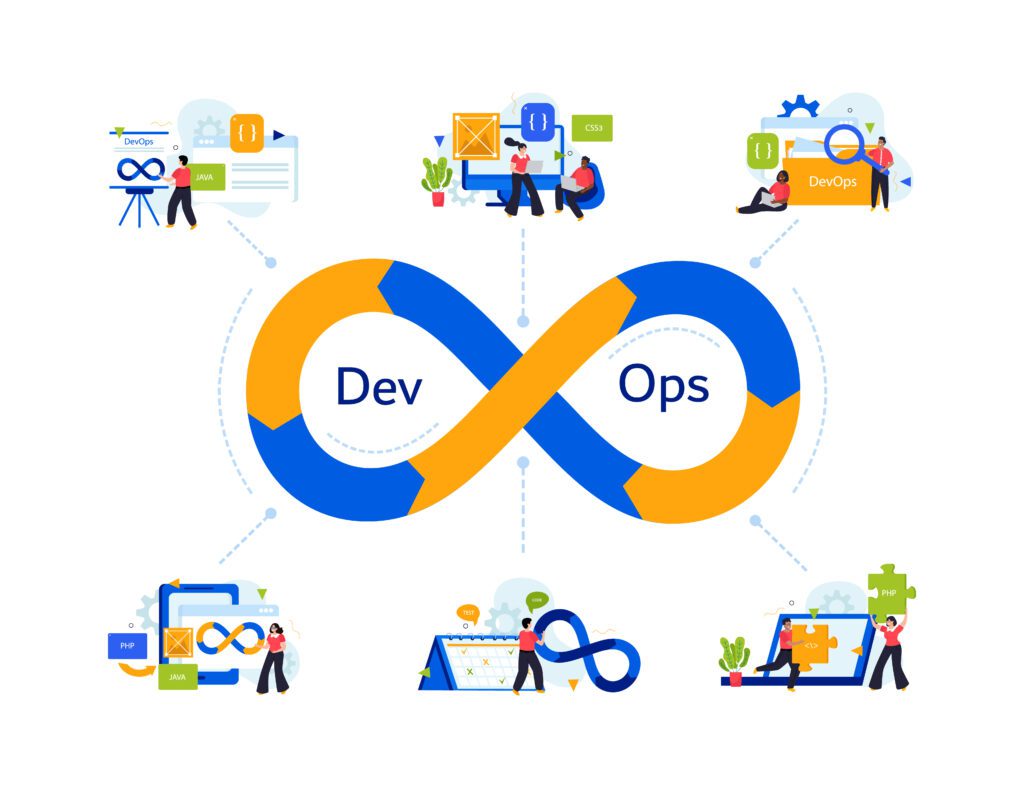
DevOps, a portmanteau of Development and Operations, is a software development methodology focused on improving collaboration between software developers and IT operations teams. It emphasizes automation, continuous integration, and continuous delivery (CI/CD) pipelines to accelerate software development and deployment cycles.

Core Principles of DevOps

DevOps revolves around several core principles, including:

  • Automation: Automate repetitive tasks to increase efficiency and reduce errors.
  • Collaboration: Foster a culture of collaboration and communication between development, operations, and quality assurance teams.
  • Continuous Integration: Integrate code changes frequently to detect and resolve issues early in the development process.
  • Continuous Delivery: Ensure that software can be deployed to production at any time with minimal manual intervention.

Benefits of DevOps

The adoption of DevOps yields numerous benefits, such as:

  • Faster Time to Market: Shortened development cycles lead to quicker delivery of features and updates.
  • Improved Quality: Continuous testing and integration result in higher-quality software.
  • Enhanced Collaboration: Siloed teams break down, fostering better communication and collaboration.
  • Increased Efficiency: Automation reduces manual errors and accelerates processes.

Delving into DevSecOps

What is DevSecOps?

DevSecOps extends the principles of DevOps by integrating security practices into the software development lifecycle from the outset. It emphasizes the importance of security as a fundamental aspect of the development process rather than an afterthought.

Core Principles of DevSecOps

DevSecOps incorporates the following core principles:

  • Shift Left: Integrate security practices early in the development lifecycle, starting from the planning phase.
  • Automation of Security Tests: Automate security testing to identify vulnerabilities and weaknesses in code.
  • Culture of Security: Promote a culture where every team member is responsible for security, not just the security team.
  • Continuous Monitoring: Implement tools and processes for continuous monitoring of applications and infrastructure for security threats.

Benefits of DevSecOps

The adoption of DevSecOps offers several benefits, including:

  • Enhanced Security Posture: By addressing security concerns from the outset, organizations can better protect their systems and data.
  • Faster Incident Response: With continuous monitoring and automated security tests, organizations can detect and respond to security incidents more rapidly.
  • Compliance Readiness: DevSecOps practices help organizations maintain compliance with industry regulations and standards.
  • Improved Stakeholder Confidence: Demonstrating a commitment to security enhances trust and confidence among customers and stakeholders.

DevOps vs DevSecOps: A Comprehensive Comparison

In comparing DevOps and DevSecOps, it’s essential to highlight their key differences:

AspectDevOpsDevSecOps
FocusCollaboration between development and operations teamsIntegration of security into every phase of the development process
Security IntegrationSecurity considerations as part of the development processSecurity practices integrated from the outset, known as “shifting left”
Tools and PracticesEmphasis on automation, CI/CD pipelines, and collaboration toolsAddition of security testing tools and practices, such as static code analysis and vulnerability scanning
ResponsibilityShared responsibility among development, operations, and quality assurance teamsCollective responsibility for security among all team members, not just the security team

Conclusion

In conclusion, while both DevOps and DevSecOps aim to enhance software development processes, they diverge in their approach towards security integration. DevOps emphasizes collaboration and automation, while DevSecOps extends these principles to include security practices from the outset. Ultimately, the choice between DevOps and DevSecOps depends on organizational needs, priorities, and the level of emphasis placed on security.

FAQs

  • What are the primary differences between DevOps and DevSecOps? DevOps focuses on collaboration and automation, while DevSecOps integrates security practices from the outset.
  • How does DevSecOps improve security posture? By addressing security concerns early and integrating security practices throughout the development process, DevSecOps enhances an organization’s security posture.
  • Is DevOps outdated with the rise of DevSecOps? No, DevOps is still relevant, but organizations increasingly recognize the importance of integrating security practices, leading to the adoption of DevSecOps.
  • What role does automation play in DevSecOps? Automation streamlines security processes, enabling rapid identification and remediation of vulnerabilities while minimizing manual errors.
  • How does DevSecOps impact compliance requirements? DevSecOps helps organizations maintain compliance with industry regulations and standards by integrating security into the development process.
  • Are there any challenges associated with transitioning to DevSecOps? Transitioning to DevSecOps may require cultural shifts, additional training, and investment in security tools, but the benefits outweigh the challenges in the long run.

Final Thoughts

In today’s rapidly evolving digital landscape, prioritizing both speed and security is paramount. Whether opting for DevOps or DevSecOps, organizations must strive for a balanced approach that fosters innovation while safeguarding against potential threats.

Top 10 Programming Languages for 2024

Programming Languages

Introduction: Programming Languages

In the ever-evolving realm of technology, programming languages play a pivotal role in driving innovation and powering applications across various domains. As we step into 2024, it’s essential to stay abreast of the top programming languages poised to dominate the industry.


Python: The Versatile Powerhouse

Python continues to reign supreme as one of the most versatile and beginner-friendly programming languages. Its intuitive syntax, extensive libraries, and robust ecosystem make it a top choice for a wide range of applications, from web development and data science to artificial intelligence and machine learning.


JavaScript: The Language of the Web

JavaScript retains its prominence as the backbone of web development, powering dynamic and interactive websites and web applications. With frameworks like React and Angular gaining momentum, JavaScript remains indispensable for front-end and full-stack development projects.


Java: Steadfast and Reliable

Java maintains its position as a cornerstone of enterprise development, renowned for its platform independence, strong typing, and scalability. With the advent of Jakarta EE and Quarkus, Java continues to evolve to meet the demands of modern application development.


TypeScript: Enhancing JavaScript Development

TypeScript emerges as a preferred choice for developers seeking enhanced type safety and scalability in JavaScript projects. Backed by Microsoft and adopted by major tech companies, TypeScript offers static typing and advanced tooling, bolstering the development experience.


Go (Golang): Concurrency and Performance

Go, also known as Golang, gains traction for its simplicity, concurrency support, and exceptional performance. With its built-in concurrency primitives and efficient compilation, Go is well-suited for developing scalable and high-performance systems, particularly in cloud-native environments.


Swift: Empowering iOS Development

Swift remains the go-to language for iOS and macOS app development, prized for its modern syntax, safety features, and performance optimizations. With SwiftUI simplifying UI development and Swift becoming open-source, the language continues to evolve, driving innovation in the Apple ecosystem.


Kotlin: The Modern Android Alternative

Kotlin emerges as a compelling alternative to Java for Android app development, offering concise syntax, null safety, and seamless interoperability with existing Java codebases. As Google’s preferred language for Android development, Kotlin gains momentum among developers seeking enhanced productivity and code maintainability.


Rust: Safeguarding System Programming

Rust stands out for its focus on safety, performance, and memory management, making it ideal for system programming and low-level development tasks. With its fearless concurrency and ownership model, Rust empowers developers to write reliable and secure software, particularly in domains like systems programming, networking, and game development.


R: Driving Data Analysis and Statistical Computing

R retains its stronghold in the realm of data analysis, statistical computing, and machine learning, thanks to its vast array of packages and libraries tailored for statistical modeling and visualization. As data-driven decision-making becomes increasingly prevalent across industries, R remains indispensable for analysts and data scientists alike.


SQL: The Language of Data Management

SQL continues to be the standard language for relational database management systems, enabling efficient data manipulation, querying, and administration. With the rise of data-driven applications and analytics platforms, proficiency in SQL remains a valuable skill for developers and data professionals.


C#: Powering Windows and Game Development

C# maintains its significance in game development, desktop software, and enterprise applications, particularly within the Microsoft ecosystem. With Unity and .NET Core expanding its reach to cross-platform development, C# continues to be a versatile language for building robust and scalable solutions.


Dart: Facilitating Cross-Platform Development

Dart emerges as a contender for cross-platform app development, leveraging frameworks like Flutter to build native interfaces for iOS, Android, and web applications. With its reactive framework and hot reload feature, Dart streamlines the development process, enabling rapid prototyping and iteration.


Conclusion:

As technology continues to advance at a rapid pace, staying informed about the top programming languages for 2024 is crucial for developers, businesses, and tech enthusiasts alike. Whether you’re embarking on a new project or enhancing your skill set, understanding the strengths and applications of these languages will undoubtedly pave the way for success in the ever-evolving landscape of software development.


FAQs:

1. Which programming language is best for beginners? Python remains an excellent choice for beginners due to its simplicity and readability, making it easier to grasp fundamental programming concepts.

2. What programming language is in high demand for 2024? JavaScript continues to be in high demand for web development, with frameworks like React and Angular driving its popularity.

3. Is learning multiple programming languages beneficial? Yes, learning multiple languages allows developers to diversify their skill set and adapt to different project requirements and industry trends.

4. Are there any emerging programming languages worth exploring? Emerging languages like Rust and Dart offer unique features and capabilities, making them worth exploring for specific use cases such as systems programming and cross-platform development.

5. How can I stay updated with the latest trends in programming languages? Following industry blogs, attending conferences, and actively participating in developer communities are excellent ways to stay abreast of the latest trends and developments in programming languages.

6. Which programming language has the highest job prospects? Python, JavaScript, and Java continue to dominate the job market, offering abundant opportunities across various industries and domains.