Salesforce is the name most people think of first when they hear the word CRM. It is powerful, it has been around forever, and it can pretty much do anything you throw at it. But that power comes at a cost, literally. Between licensing fees, the need for trained developers, and add ons that quietly pile up on your bill, a lot of businesses start wondering if there is a simpler, cheaper, or just better fit for what they actually need.
The good news is you have options. Some businesses want to move away from Salesforce entirely and use a different CRM altogether. Others love their Salesforce setup but want a better way to let customers or partners interact with it, without paying Experience Cloud prices. So this list covers both kinds of alternatives, full CRM replacements and smarter portal solutions that work alongside Salesforce.
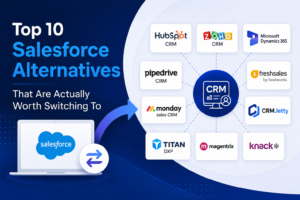
Here are ten Salesforce Alternatives that are genuinely worth a look.
HubSpot CRM
HubSpot is probably the most talked about Salesforce alternative out there, and for good reason. It offers a free tier that is actually usable, not just a stripped down demo, and the paid plans scale up nicely as your team grows. The interface feels a lot less intimidating than Salesforce, which makes onboarding new team members much faster. It is a strong pick for marketing and sales teams that want everything, email, pipelines, reporting, in one place without a steep learning curve.
Zoho CRM
Zoho has built a name for itself by offering an enormous amount of functionality at a fraction of Salesforce’s cost. It covers sales automation, analytics, and workflow management, and it plays nicely with the rest of the Zoho suite if you are already using their other tools. For small and mid sized businesses that want enterprise style features without an enterprise style price tag, Zoho is hard to beat.
Microsoft Dynamics 365
If your company already lives inside the Microsoft ecosystem, Dynamics 365 makes a lot of sense. It connects smoothly with Outlook, Teams, and Excel, so your sales and support teams are not constantly switching between apps. It is a more serious enterprise tool, similar in scale to Salesforce, but many businesses find the integration with tools they already use every day makes the transition worth it.
Pipedrive
Pipedrive was built with one goal in mind, helping sales teams manage their pipeline without extra clutter. It is visual, simple, and does not try to be everything for everyone. If your team finds Salesforce overwhelming and just wants a clean way to track deals and follow ups, Pipedrive is one of the easiest transitions you can make.
Freshsales by Freshworks
Freshsales brings built in phone and email tracking along with AI powered lead scoring, all wrapped in an interface that does not require a manual to figure out. It is a solid option for growing teams that want smart automation without needing a dedicated admin just to keep the system running.
monday sales CRM
monday.com expanded into CRM territory and brought its signature visual, flexible style with it. Teams that already use monday for project management often adopt the sales CRM because everything lives in one connected workspace. It is highly customizable, which makes it appealing to businesses with unique workflows that do not fit neatly into a traditional CRM structure.
Now, if switching your entire CRM feels like too big a leap, there is another path. A lot of businesses are perfectly happy with Salesforce as their core system but want a better, more affordable way to build customer and partner portals on top of it, instead of paying for Salesforce Experience Cloud. This next group of tools focuses on exactly that.
CRMJetty
CRMJetty specializes in building customer, partner, and vendor portals that connect directly to Salesforce, Dynamics 365, and Business Central. Instead of building a portal from scratch or paying for Experience Cloud licenses, businesses can get a launch-ready, no-code portal up and running in days. It comes with a drag-and-drop builder, flat fee pricing, and integrations with tools like Stripe, DocuSign, and SharePoint. Companies using it have reported things like fewer support tickets and faster partner onboarding, since customers and partners can self serve instead of waiting on your team. For businesses that want Salesforce data but not Salesforce-level portal costs, CRMJetty is worth a serious look.
Titan DXP
Titan DXP is built specifically for Salesforce and offers a strong no code, drag and drop portal builder. It is a great option if you know you want to stay fully inside the Salesforce ecosystem and just need a more flexible way to design portals and forms without writing code. The tradeoff is that it is Salesforce only, so it will not help if you are working with multiple CRMs.
Magentrix
Magentrix focuses heavily on partner relationship management, things like deal registration, partner training, and content sharing. It connects with several CRMs including Salesforce, SAP, Dynamics, and HubSpot, which makes it a good fit for companies that care about partner collaboration and community features as much as basic portal functionality.
Knack
Knack takes a different approach entirely. It is not tied to any single CRM, which gives you full control over how you build your portal or app and which systems you connect it to. That flexibility does come with a bit more setup work, since you will likely need some technical involvement to wire everything up. But for businesses that do not want to be locked into one CRM ecosystem long term, that independence can be a real advantage.
Which one is right for you
There is no single best answer here, it really depends on what problem you are trying to solve. If Salesforce itself feels too expensive or too complex for your team, HubSpot, Zoho, Pipedrive, Freshsales, monday sales CRM, or Dynamics 365 are all solid full replacements depending on your size and existing tools. If you actually like Salesforce and just want a better, more affordable portal experience for your customers or partners, CRMJetty, Titan DXP, Magentrix, and Knack each bring something different to the table depending on whether you need multi CRM flexibility, deep Salesforce integration, or strong partner focused features.
Take the time to think about your budget, how technical your team is, and what you actually need the tool to do day to day. The right fit usually becomes pretty obvious once you know what you are solving for.
Tech professionals cannot be categorised as either passive or active candidates; they are always on. They are aware of their values and prepared to take the next opportunity at a moment’s notice, but this is bad news for you as a tech recruiter.
This scenario describes the “always-on” candidate, a high-value professional in the 2026 tech market who is continuously gauging their career value, making them nearly impossible to lock down until an offer is formally accepted.
So, how to succeed in the era of the always-on candidate? Let us know what professionals have to say about this. The expert tech recruiter tips are coming in this guide that can help you know how to hire top candidates.
How to Hire Top Candidates
Developing a Sourcing Strategy helps Engage Candidates Effectively.
Developing a proactive sourcing strategy improves candidate engagement by enabling targeted, personalized outreach to passive talent, reducing time-to-fill, and building diverse talent pipelines before vacancies occur. It moves beyond reactive, post-and-pray methods to establish meaningful, long-term relationships that increase the likelihood of attracting top-tier talent.
Tailoring communications to highlight candidate-specific skills rather than generic roles, which fosters higher response rates, is needed. Researching and nurturing potential candidates ahead of demand ensures a ready pipeline of qualified prospects, here is more:
A structured approach enables recruiters to spend their time on higher-value activities and provides a better experience for the candidate, leading to better hiring outcomes.
Analyzing which channels provide the best talent to refine and improve future engagement efforts needs to be done while recruiting.
Utilizing employee networks and previous applicants to find candidates who are already familiar with the company culture.
Engaging Potential Candidates on their Turf: Online Forums
Engaging potential candidates on their turf, such as online forums, niche communities, and discussion boards like Reddit or Discord, is important because it enables recruiters to connect with highly specialized, passive talent in an authentic, non-corporate environment. This approach fosters trust, improves candidate quality, and lowers the cost of acquisition compared to traditional job boards.
Top candidates often don’t browse job boards. They spend time in niche forums, GitHub, or Discord discussing industry trends, solving problems, and sharing work. Unlike cold LinkedIn messages, engaging in forums allows recruiters to connect in a more authentic, community-driven way. This builds rapport before asking for a resume.
Get Personal, Fast to build Alliances.
To succeed in the long term, every tech recruiter needs to dig in and build strong alliances with candidates, but how? By showing candidates that you are invested in their future and growth, not just the gig at hand.
Offering training and knowledge to the candidates, free tutoring can help them learn and grow along with the organization. Getting personal and building alliances fast is critical for top recruitment because it shifts the process from a transactional, resume-swapping activity to a trust-based partnership. In a competitive market, this approach, often referred to as strategic alliance building, allows recruiters to access passive talent, secure higher quality candidates, and fill roles 40-60% faster.
Massive Opportunity in Tech Equals High Turnover
The good news? Millions of coders, software architects, and CIOs are out there right now with a “never say never” attitude to new career opportunities. As of early 2026, this high turnover is fueled by a desire for new challenges, AI-driven opportunities, and the need for specialized skills, rather than just dissatisfaction. Median employee tenures at top tech companies have been very low, sometimes around 1 year.
While turnover is high, companies are shifting toward skills-based hiring, prioritizing specific expertise over degrees. The talent market is seen less as “frozen” and more as “redistributed,” with urgent demand for roles involving infrastructure, security, and AI.
Recruiters Must Get More Technical Than Ever
In the rapidly evolving talent landscape of 2026, recruiters must move beyond traditional “resume shuffling” and become deeply technical, both in their understanding of, and interaction with, new technologies.
With AI redefining hiring workflows, recruiters who succeed are those who build “AI twins” to handle manual tasks, allowing them to focus on high-value human interaction and complex, technical talent sourcing.Modern “Tech Recruitment Agencies” are building AI counterparts to handle 24/7 sourcing, screening, and follow-up, saving roughly 15 hours a week.
Recruiters must understand basic terminology like DevOps, backend/frontend, and specific frameworks like React or Node.js to convey credibility with candidates. These things will help hire top candidates for the organisation.
Video conferencing is no longer just a business tool. It has become part of everyday communication across industries and personal life. Teams collaborate remotely, doctors consult patients virtually, teachers conduct online classes, businesses close deals over video calls, and families stay connected across countries through communication platforms.
What changed over the past few years is not simply technology — it is user expectation.
People now expect communication to feel immediate, smooth, and effortless. If meetings freeze, audio breaks, or users struggle to join calls, frustration builds instantly. Communication problems feel more personal than most software issues because they interrupt real human interaction.
That is why successful conferencing platforms are not built only around features. They are built around reducing friction in conversations.
Businesses investing in webrtc development services increasingly focus on creating communication experiences that feel natural rather than technical.
High-Quality Audio and Video
The foundation of every conferencing platform is communication clarity.
Users may occasionally tolerate minor visual imperfections, but poor audio immediately damages the experience. Human conversations rely heavily on timing, vocal tone, pauses, and subtle interaction patterns. Even small interruptions make communication feel exhausting over time.
Modern conferencing platforms prioritize:
HD video quality
Noise cancellation
Echo reduction
Adaptive streaming
Audio synchronization
Network optimization
Interestingly, users rarely compliment these technical improvements directly. Instead, they simply continue using platforms that “feel reliable.”
That emotional trust matters more than many companies initially realize.
The best communication technology becomes almost invisible because users focus entirely on the conversation itself.
Low-Latency Real-Time Communication
One of the most important features in conferencing apps is low latency.
Latency refers to the delay between sending and receiving communication. In real-time conversations, even small delays affect how natural interactions feel.
When delays occur:
People accidentally interrupt each other
Conversations lose rhythm
Meetings feel awkward
Collaboration slows down
This is why modern platforms increasingly rely on WebRTC technology.
Businesses working with a webrtc app development company often prioritize low-latency infrastructure because real-time responsiveness directly affects user satisfaction.
Real-time communication matters across industries:
This simplicity may sound basic, but it strongly affects adoption rates.
Many businesses underestimate how quickly users abandon platforms that feel unnecessarily complicated.
Users today compare communication platforms against the smoothest digital experiences they already use daily. Convenience is no longer considered a bonus feature — it is expected.
Screen Sharing and Collaboration Tools
Modern conferencing platforms are no longer just communication tools.
They are collaborative work environments.
Users increasingly expect features like:
Screen sharing
File sharing
Virtual whiteboards
Collaborative annotation
Presentation controls
Shared workspaces
This shift reflects how remote work and digital collaboration evolved over time.
Meetings today are often focused on solving problems, reviewing documents, brainstorming ideas, or presenting information visually. Communication apps must support active collaboration instead of passive conversation alone.
As video conferencing became mainstream, security concerns increased dramatically.
Businesses now conduct sensitive conversations involving:
Financial planning
Healthcare consultations
Legal discussions
Enterprise strategy meetings
Customer data
through video conferencing platforms.
Essential security features include:
End-to-end encryption
Secure authentication
Meeting passwords
Waiting rooms
Participant moderation
Compliance support
But security is not only technical.
Users also judge platforms emotionally. If an app feels unstable, unreliable, or poorly designed, people subconsciously question whether their conversations are safe.
Trust in communication technology is built through both technical protection and consistent reliability.
Scalability for Large User Volumes
One major challenge in conferencing app development is scalability.
A platform supporting 100 users operates very differently from one handling thousands of simultaneous participants globally.
Scalable systems must manage:
High traffic volumes
Global server distribution
Bandwidth optimization
Device performance variation
Network instability
What users experience externally may seem simple — they click a meeting link and expect everything to work instantly.
Behind that simplicity is highly complex infrastructure managing enormous amounts of real-time communication data continuously.
Someone may start a meeting on a laptop, continue it on a smartphone, and later access recordings through a tablet.
Modern conferencing apps must work smoothly across:
Android devices
iOS devices
Windows systems
macOS platforms
Web browsers
Poor compatibility creates inconsistent experiences that reduce user trust.
People expect communication continuity regardless of which device they are using.
That expectation continues shaping how conferencing platforms are developed.
AI-Powered Features Are Becoming Standard
Artificial intelligence is increasingly integrated into conferencing platforms.
Many modern apps now include:
AI-generated meeting summaries
Live transcription
Automatic captions
Real-time translation
Speaker tracking
Background noise suppression
These features improve both accessibility and productivity.
But there is also a deeper human reason behind this trend.
Virtual meetings create cognitive fatigue. People spend hours processing conversations, managing notes, and multitasking during calls. AI tools help reduce mental overload by automating repetitive tasks and improving meeting organization.
Technology is evolving from simply enabling communication toward supporting how humans manage digital interaction itself.
Recording and Playback Features
Recording functionality has become essential for businesses and educational organizations.
Users often need to:
Review important discussions
Share sessions with absent participants
Archive training materials
Revisit decisions
Maintain documentation
Recording extends the value of meetings beyond the live conversation itself.
However, transparency matters. Users should clearly understand when recordings are active and how session data is stored.
Again, trust plays a central role in long-term platform adoption.
User Experience Matters More Than Technical Complexity
Many businesses focus heavily on feature lists while overlooking usability.
But successful conferencing platforms reduce mental friction.
Users should never feel overwhelmed managing controls, navigating settings, or troubleshooting problems during active conversations.
Good user experience design helps communication feel natural rather than technical.
The most successful communication apps are often the ones users barely notice because the platform itself fades into the background.
That simplicity is difficult to achieve.
Final Thoughts
Modern video conferencing apps require far more than basic calling functionality. Users now expect low-latency communication, secure infrastructure, seamless collaboration, scalability, AI-powered productivity tools, and intuitive usability.
But beyond the technical requirements, successful communication platforms understand something more important: people are not using these apps simply to exchange information.
They are using them to collaborate, teach, solve problems, support customers, maintain relationships, and stay connected across physical distance.
Technology succeeds when it supports those human interactions naturally.
That is why the best conferencing apps are not necessarily the ones with the longest feature lists.
They are the ones that make communication feel smooth, effortless, and human — even through a screen.
FAQ
1. What are the most important features in a video conferencing app?
Key features include HD video, low-latency communication, screen sharing, security, scalability, recording functionality, and cross-platform compatibility.
2. Why is low latency important in video conferencing?
Low latency helps conversations feel natural by reducing delays between participants during real-time communication.
3. How does WebRTC improve video conferencing apps?
WebRTC enables secure, real-time audio and video communication directly through browsers and apps without requiring plugins.
4. Why is security important for conferencing platforms?
Businesses and users often share sensitive information during virtual meetings, making encryption and secure access controls essential.
5. What role does AI play in modern conferencing apps?
AI helps improve meeting productivity through features like transcription, automatic captions, meeting summaries, and noise suppression.
CTA Section
Planning to Build a Real-Time Video Conferencing Platform?
Whether you need secure communication systems, telemedicine apps, virtual classroom platforms, or enterprise collaboration software, scalable WebRTC solutions can power seamless real-time communication experiences.
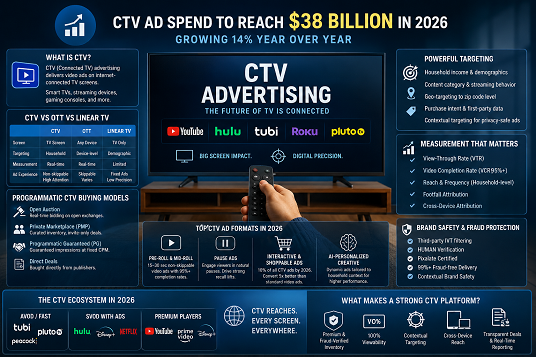
CTV ad spend is projected to reach$38 billion in 2026, growing 14% year over year. Linear TV budgets are shifting fast. Brands and media planners that understand connected TV advertising today will hold a clear screen advantage for the rest of this decade.
What Is CTV Advertising?
The Simple Definition
CTV stands for Connected TV. CTV advertising means delivering video ads on television screens that connect to the internet. These screens include smart TVs with built-in streaming apps, Amazon Fire TV Sticks, Roku players, Apple TV, Chromecast, and gaming consoles like PlayStation and Xbox.
CTV ads run during streaming content on platforms like YouTube TV, Peacock, Tubi, Pluto TV, and ad-supported tiers of major streaming services. Unlike traditional cable TV, CTV is fully digital. Every impression is measurable, and every campaign is targetable at the household level.
CTV vs OTT vs Linear TV: The Difference That Matters
Many media planners use these three terms interchangeably. They are not the same.
OTT (Over-the-Top) refers to any video content delivered over the internet, bypassing traditional cable or satellite. OTT content reaches audiences on any device: phone, laptop, tablet, or TV screen.
CTV is a subset of OTT. CTV refers specifically to OTT content viewed on a television screen, whether through a smart TV or a connected streaming device.
Linear TV is traditional broadcast or cable television. Ads run at fixed time slots, targeting broad demographic groups with no real-time measurement or campaign optimization.
Feature
CTV
OTT
Screen Type
TV screen only
Any device (TV, phone, tablet)
Targeting
Household-level, contextual
Device-level, behavioral
Measurement
Real-time, cross-device
Real-time, device-based
Ad Format
Non-skippable video, pause ads
Pre-roll, mid-roll, display overlays
vs Linear TV
Digital precision on big screen
Broader reach, any screen
The practical difference for advertisers: CTV combines the big-screen impact of traditional TV with the precision targeting and measurability of digital. Linear TV offers neither.
How CTV Advertising Works: Step by Step
How Ads Get Delivered on Streaming Screens
The CTV ad delivery chain moves fast and involves several layers. Understanding it helps media planners make smarter buying decisions.
An advertiser sets up a campaign through a DSP (Demand-Side Platform). The DSP sends bid requests across multiple SSPs (Supply-Side Platforms), which aggregate inventory from streaming publishers. When a viewer starts watching content, the streaming platform uses SSAI (Server-Side Ad Insertion) to stitch the ad seamlessly into the video stream. The ad plays on the TV screen, and the impression is recorded in real time.
This entire process happens in milliseconds. The result is a TV-quality ad experience with digital-level measurement and attribution.
Programmatic CTV Buying Models Explained
Most competitor articles list these terms without explaining them. Here is what each model means for media planners in practice:
Open Auction: Advertisers bid in real time across open exchanges. Inventory is widely available. CPMs are competitive, but brand safety controls are lighter than in premium environments.
Private Marketplace (PMP): A curated deal between a publisher and selected advertisers. Inventory is premium and pre-negotiated, with stronger brand safety parameters than open auctions.
Programmatic Guaranteed (PG): The closest programmatic equivalent to a traditional TV direct buy. The advertiser and publisher agree on a fixed CPM and a reserved volume of impressions in advance. This is the preferred model for high-stakes campaigns, product launches, and seasonal pushes where guaranteed delivery matters.
Direct Deals: Inventory purchased directly from a streaming publisher outside of programmatic infrastructure. Offers the highest editorial control but the least operational flexibility.
In 2026, PMP and PG deals are the preferred choice for premium advertisers because they combine the automation of programmatic with the quality controls of direct buying.
CTV Ad Formats Brands Use in 2026
Pre-roll and mid-roll video spots (15 to 30 seconds) remain the dominant format and regularly achieve completion rates above 95% on streaming platforms.
Pause ads appear when a viewer pauses content, placing a brand message in a natural, uninterrupted moment. These ads deliver strong unaided recall lifts without disrupting the viewing experience.
Interactive and shoppable CTV ads are the fastest-growing format. According toDemand Local, by 2026, interactive shoppable ads are projected to represent 10% of all CTV ads, and CTV shoppable ads convert 5x better than standard video ads. QR codes embedded in CTV ads tripled year over year, bridging the gap between the TV screen and mobile purchase.
AI-personalized dynamic creative is moving from experimental to essential. Campaigns that tailor the ad message based on household context, content category, or time of day consistently outperform static one-size creatives.
CTV Targeting Capabilities: Why It Beats Traditional TV
Household-Level and Contextual Targeting
Traditional linear TV targeting stops at broad age and gender demographics, the classic model of women 18 to 49 or men 25 to 54. CTV targeting operates at a fundamentally different level.
CTV platforms allow advertisers to target by household income, content category, streaming behavior, device type, geographic location down to the zip code level, purchase intent signals, and first-party audience data. A brand running a luxury auto campaign targets households with relevant income profiles watching automotive or lifestyle content, rather than paying to reach every viewer of a broadcast primetime slot.
Contextual targeting adds another layer. Ads appear adjacent to content that matches the brand’s category, increasing relevance without relying on personal data and keeping campaigns privacy-compliant as third-party cookie deprecation continues.
For a deeper look at how contextual targeting works in programmatic environments, theXapads blog covers the principles and practical applications in detail.
Cross-Device Targeting: CTV Plus Mobile
CTV does not operate in isolation. The most effective campaigns in 2026 treat CTV as the awareness layer of a broader digital strategy.
Research from Paramount Ads shows that paid social conversion rates improve by 8.5% when audiences have previously seen a brand on streaming TV. And 51% of heavy CTV viewers search online after seeing something on TV.
Advertisers that connect CTV targeting with mobile retargeting activate a sequential messaging strategy: brand awareness on the big screen, followed by a performance-focused mobile touchpoint that converts the same household.
CTV Measurement and Brand Safety in 2026
How Brands Measure CTV Campaign Performance
CTV offers measurement capabilities that linear TV never could. The key metrics advertisers track include view-through rate (VTR), video completion rate (VCR), reach and frequency at the household level, footfall attribution (tracking whether a CTV-exposed household later visited a physical location), and cross-device attribution that maps the full path from TV impression to conversion.
Standard pre-roll and mid-roll ads on streaming platforms regularly achieve completion rates above 95%, driven by the non-skippable nature of most CTV inventory. This makes CTV one of the highest-attention advertising formats available, significantly ahead of display, social video, and most mobile formats.
Brand Safety and Fraud Prevention: What to Look For
This section is what most competitor articles skip entirely, and it represents one of the most important evaluation criteria for media planners.
CTV ad fraud takes multiple forms: device spoofing (a bot imitates a connected TV), app spoofing (a low-quality app falsely claims to be a premium streaming app), and SSAI stitching fraud (ads are injected into streams that no real viewer ever watches). Without fraud verification, a meaningful portion of CTV impressions can be wasted on invalid traffic.
Media planners evaluating CTV platforms should look for third-party fraud verification through recognized providers. IVT (Invalid Traffic) filtering, HUMAN verification, Pixalate certification, and 99%+ fraud-free delivery standards are the baseline markers of a trustworthy CTV buying environment. Contextual brand safety tools also matter: ads should not appear next to content that conflicts with a brand’s guidelines, regardless of how programmatically efficient the inventory appears on paper.
Which Platforms Power CTV Advertising in 2026?
Major Streaming Inventory Sources
The CTV inventory market is concentrated at the top. According toAdwave’s 2026 CTV Market Forecast, YouTube commands nearly 12% of all CTV ad revenues. Amazon through Prime Video, Fire TV, and Freevee captures over 10%. Disney through Hulu, Disney+, and ESPN holds over 10%. Netflix is the fastest-growing major platform, with ad revenue expected to more than double from its 2025 base.
The Hulu and Disney+ integration in 2026 creates a combined ad-supported streaming audience with significant scale, simplifying planning for advertisers who previously managed both services separately.
Beyond the top tier, FAST platforms including Tubi, Pluto TV, Peacock free tier, and Rakuten TV serve a large share of ad-supported viewing hours. These platforms typically offer broader reach at lower CPMs, making them attractive for campaigns that prioritize scale over editorial prestige.
AVOD, FAST, and SVOD: The Three Models Brands Buy Across
AVOD (Ad-Supported Video on Demand): Platforms offering free content in exchange for ad viewing. Tubi, Peacock, and Pluto TV operate on this model. Advertisers reach audiences who actively chose free, ad-supported access.
FAST (Free Ad-Supported Streaming TV): Linear-style streaming channels with continuous programming and ad breaks similar to traditional TV. FAST channel audiences have grown 55% year over year. The viewing experience closely resembles cable TV, which makes FAST attractive for linear TV budget transitions.
SVOD with ads (Subscription Video on Demand with an ad tier): Platforms like Netflix, Disney+, and Max now offer lower-cost subscription tiers with limited advertising. These audiences tend to have higher household incomes and stronger purchase intent, making them particularly valuable for premium brand campaigns.
Understanding the monetization model behind each platform helps media planners set realistic CPM expectations and audience quality benchmarks before allocating budget.
DSPs and CTV Ad-Buying Platforms
A DSP (Demand-Side Platform) for CTV allows advertisers to buy inventory programmatically across multiple streaming publishers from a single interface. Rather than negotiating separate direct deals with each streaming service, a DSP aggregates inventory from hundreds of publishers through integrated SSPs, applies audience targeting, and optimizes bids in real time.
For brands and agencies running multi-market or global CTV campaigns, the choice of DSP determines the quality of available inventory, the reliability of fraud filtering, the depth of targeting options, and the accuracy of measurement and attribution reporting.
What Makes a Strong CTV Platform for Brands and Media Planners?
Not all CTV platforms operate at the same standard. Media planners should evaluate any CTV buying platform against these criteria before committing campaign budget: premium and fraud-verified inventory with third-party IVT filtering, high viewability guarantees across all placements, strong view-through rates driven by non-skippable ad formats, contextual targeting at the content level, cross-device reach that connects CTV audiences with mobile retargeting, global inventory access for multi-market campaigns, and transparent deal structures including PMP and PG options with real-time reporting.
Unwire, a dedicated programmatic CTV platform, meets these benchmarks with 120M+ global reach, 100% viewability across premium channels, 85%+ view-through rate through non-blockable video ad formats, 99%+ fraud-free delivery verified by HUMAN and Pixalate, approximately 10 contextual ad placements per minute, OTT header bidding, and a Smart Media Planner that enables transparent PMP and PG deal execution with real-time campaign reporting.
For brands running a full-funnel strategy, Unwire operates as the awareness layer within theXapads ecosystem, building premium CTV reach that feeds into consideration and conversion stages across complementary channels.
Key Takeaways for Brands and Media Planners
CTV is now the default screen for video audiences. Streaming surpassed linear TV viewing time in 2026, and that gap will continue to widen through the decade.
Programmatic buying makes CTV accessible at any scale. PMP and PG deals give premium advertisers brand-safe access to curated inventory without the inefficiency of open-auction CPM waste.
Measurement, brand safety, and fraud protection matter as much as reach. Media planners should treat fraud verification and viewability guarantees as non-negotiable criteria when evaluating any CTV platform.
The right CTV platform combines premium inventory, contextual targeting, cross-device attribution, and transparent deal structures. These four capabilities determine whether CTV spend delivers measurable brand outcomes or simply reaches a large but unmeasured audience. CTV advertising is not a future trend. It is the operational reality of 2026. Brands and media planners that understand how it works, which platforms to trust, and how to measure it correctly will run campaigns that perform from the first impression through the last conversion.
There’s something deeply human about a conversation.
A pause before answering.
A question asked not just for information, but for reassurance.
A tone that tells you someone is listening—even if they don’t say it directly.
Healthcare has always depended on this.
But as telehealth scales, one quiet challenge emerges: How do you preserve the feeling of being heard—when interactions are digital?
This is where dialogue-based AI is beginning to play a meaningful role—not by replacing conversations, but by extending them intelligently and at scale.
The Shift: From Interfaces to Conversations
Early telehealth systems were functional—but impersonal.
Patients:
Filled out forms
Clicked through rigid workflows
Waited for responses
It worked. But it didn’t feel natural.
Dialogue-based AI transforms this experience.
Instead of navigating systems, patients:
Speak or type naturally
Receive guided responses
Engage in real-time interaction
It’s a subtle shift—but it changes everything.
What is Dialogue-Based AI in Telehealth?
Dialogue-based AI refers to systems that can:
Understand human language
Interpret intent
Respond contextually
In telehealth, this includes:
AI chat assistants
Voice-enabled virtual agents
Symptom-checking conversational tools
The goal is not complexity.
It’s simplicity—making healthcare interactions feel like a conversation, not a process.
Where It Fits in the Patient Journey
Dialogue-based AI is not a standalone feature. It supports the entire care lifecycle.
1. Pre-Consultation: Structuring the Conversation
Before meeting a doctor, patients often struggle with:
Explaining symptoms clearly
Knowing what information matters
Deciding urgency
AI assistants guide patients through structured conversations:
Asking relevant follow-up questions
Identifying symptom patterns
Creating summaries for clinicians
This leads to better consultations—because doctors start with context, not confusion.
2. During Consultation: Supporting Doctors
Doctors often juggle:
Listening to patients
Taking notes
Making decisions
Dialogue-based AI can assist by:
Transcribing conversations
Highlighting key medical terms
Suggesting structured documentation
The result?
Less screen time.
More patient focus.
3. Post-Consultation: Extending Care Beyond the Call
Healthcare doesn’t end after a consultation.
Patients need:
Medication reminders
Follow-up guidance
Quick answers to new concerns
AI systems provide continuous support by:
Checking in with patients
Answering routine queries
Escalating critical cases
This creates a sense of ongoing care, rather than isolated interactions.
Accessibility at Scale: The Real Impact
Healthcare accessibility remains a global challenge.
Limited specialists in rural areas
Overburdened healthcare systems
Delays in response time
Dialogue-based AI helps address these gaps:
Instant responses
24/7 availability
Reduced dependency on manual triage
Organizations working with a Telemedicine App Development Company are increasingly embedding these capabilities into their platforms to improve accessibility without overwhelming healthcare providers.
Designing Conversations That Feel Human
Not all AI conversations are equal.
Some feel robotic.
Some miss context.
Some fail to understand intent.
The difference lies in design.
Effective systems:
Interpret meaning, not just words
Adapt tone based on patient context
Handle uncertainty with care
For example:
A patient saying “I feel strange today” needs guidance—not assumptions.
Because healthcare is not just clinical.
It’s emotional.
The Risk: Over-Reliance on AI
While AI enhances care, over-reliance can create risks:
Accepting AI responses without verification
Skipping professional consultation
Misinterpreting guidance
That’s why the best systems are designed to:
Support, not replace
Guide, not decide
Assist, not diagnose
The goal is balance.
The Future: Hybrid Care Models
The future of telehealth is not AI versus doctors.
It’s AI with doctors.
Dialogue-based AI will:
Handle initial interactions
Provide continuous support
Reduce operational load
Healthcare professionals will:
Make critical decisions
Offer empathy and expertise
Handle complex cases
Together, they create a system that is:
Scalable
Efficient
Human-centered
Final Thoughts
Dialogue-based AI is not about replacing conversations.
It’s about making them possible—at scale.
In telehealth, where distance can create barriers, this matters more than ever.
Because at the heart of healthcare is something simple:
The need to feel heard.
And if AI can help deliver that—consistently, responsibly, and at scale—it’s not just innovation.
It’s meaningful progress.
FAQs
1. What is dialogue-based AI in telehealth?
It is AI technology that interacts with patients through conversations, helping with symptom checks, guidance, and ongoing support.
2. Can AI replace doctors in telehealth?
No, AI supports healthcare professionals but cannot replace their expertise, judgment, and empathy.
3. Is dialogue-based AI secure for patient data?
Yes, when built with proper encryption, compliance frameworks, and secure infrastructure.
4. How does AI improve telehealth accessibility?
By providing instant responses, reducing wait times, and offering 24/7 support.
5. What is the role of development companies in telehealth AI?
They design and build scalable, secure, and compliant platforms that integrate AI into healthcare workflows.
CTA
Looking to build intelligent, secure, and scalable telehealth platforms?
Partner with a trusted Telemedicine App Development Company to create AI-powered solutions that enhance patient care and accessibility.
Instead of switching tools, users interact within the same environment.
This is where efficiency becomes visible—not in speed, but in workflow continuity.
3. Scalability Without Compromise
As businesses grow, communication systems must scale.
WebRTC supports:
Peer-to-peer for small interactions
SFU (Selective Forwarding Units) for large meetings
Cloud-based scaling for global reach
Companies offering webrtc consulting often focus on designing scalable architectures that maintain performance under load.
4. Cost Efficiency
Traditional systems often involve:
Licensing fees
Vendor lock-in
Expensive infrastructure
WebRTC allows organizations to:
Build custom solutions
Optimize infrastructure
Reduce dependency on third-party platforms
Efficiency here is not just operational—it’s financial.
Compliance: The Layer That Defines Enterprise Readiness
In industries like healthcare, finance, and education, compliance is critical.
Real-time communication introduces unique challenges:
Sensitive data transmission
Session recording and storage
Identity verification
Key Compliance Requirements
Data Privacy Regulations
GDPR, HIPAA, and regional laws
Auditability
Tracking user activity and interactions
Consent Management
Informing users about recording and data usage
Organizations working with a top webrtc development company in india or globally distributed teams often prioritize compliance as a core design principle—not an afterthought.
Building Compliance into WebRTC Systems
Secure APIs
Logging and monitoring
Data retention policies
Encryption standards
Without these, even the best-performing system may fail regulatory checks.
And those who invest early will build systems that scale with confidence.
Final Thoughts
Corporate WebRTC adoption is not just a technical decision.
It’s a strategic one.
Done right, it enables:
Secure communication
Seamless workflows
Scalable interaction
But success depends on thoughtful implementation.
Because in enterprise environments:
Safety builds trust
Efficiency drives adoption
Compliance ensures longevity
And together, they determine whether WebRTC becomes just another tool—or a true competitive advantage.
FAQs
1. What is WebRTC used for in enterprises?
WebRTC is used for real-time communication, including video conferencing, telehealth, customer support, and collaboration tools.
2. Is WebRTC secure for enterprise applications?
Yes, it includes built-in encryption, but additional security layers are required for enterprise-grade systems.
3. How does WebRTC improve efficiency?
It enables instant communication, reduces tool dependency, and integrates seamlessly into workflows.
4. What compliance challenges exist with WebRTC?
Data privacy, session recording, and regulatory compliance are key challenges.
5. Can WebRTC scale for large organizations?
Yes, with proper architecture and infrastructure, it can support large-scale deployments.
CTA
Looking to build secure, scalable, and high-performance real-time communication platforms?
Partner with a Best WebRTC App Development Company to create tailored solutions that align with your business needs.
#WebRTC #RealTimeCommunication #EnterpriseTech #VideoConferencing #Telehealth #DigitalTransformation #EnfinTechnologies
Artificial Intelligence is no longer a future ambition. It is now a present-day differentiator.
Yet, the most important realization for enterprises today is this: AI is not universal—it is deeply contextual.
A hospital, a retail chain, a manufacturing unit, and a financial institution may all invest in AI, but the way they extract value from it is fundamentally different. This is where the role of an experienced AI Development Company becomes critical—one that understands not just the technology, but the industry it is being applied to.
Let’s explore how industry-specific AI strategies are shaping real-world impact across healthcare, retail, manufacturing, and BFSI.
Healthcare: Intelligence That Supports Human Judgment
In healthcare, AI is not about replacing doctors—it is about empowering them.
Modern AI Development Servicesin healthcare are focused on improving diagnostic accuracy, predicting patient risks, and enabling proactive care. From analyzing medical imaging to monitoring chronic conditions remotely, AI is quietly becoming a clinical assistant.
But what truly defines success here is trust and transparency.
Doctors need systems they can interpret. Patients need systems they can trust. That is why explainable AI and compliant architectures are essential when working with an ai development company in us or globally.
Key strategic applications include:
AI-assisted diagnostics for faster decision-making
Predictive analytics for early disease detection
Remote patient monitoring for continuous care
Intelligent hospital workflow optimization
The real advancement is not automation—it is better care, delivered with confidence.
Retail: Data-Driven Personalization with a Human Touch
Retail has always been about understanding people. AI simply enhances that understanding at scale.
Today, leading retailers rely on ai model development services to power recommendation engines, demand forecasting, and customer engagement platforms. But there is a fine balance to maintain.
Customers want personalization, not surveillance.
An effective AI strategy in retail focuses on context, timing, and relevance, not just data.
Modern implementations include:
Real-time product recommendations based on behavior
AI-powered chat assistants that feel conversational
Smart inventory and supply chain optimization
Visual and voice-based search experiences
Retailers that succeed are those who use AI to enhance human connection, not replace it.
Manufacturing: From Automation to Intelligence
Manufacturing is undergoing a shift from automation to intelligence.
With the support of an ai development Company for enterprises, organizations are moving toward smart factories where systems learn, adapt, and optimize continuously.
AI enables:
Predictive maintenance to prevent downtime
Computer vision for quality inspection
Supply chain forecasting and optimization
Robotics enhanced with adaptive intelligence
But the most overlooked aspect is the workforce.
AI does not eliminate jobs—it transforms them. Workers evolve into operators of intelligent systems, requiring new skills and new thinking.
The real strategy lies in combining human expertise with machine precision.
BFSI: Innovation Within Boundaries
The BFSI sector presents a unique challenge. It demands innovation—but within strict regulatory frameworks.
AI is transforming banking and financial services through fraud detection, credit scoring, and personalized financial products. However, these systems must remain transparent and auditable.
Real-time fraud detection using behavioral analytics
AI-driven risk assessment and underwriting
Personalized banking experiences
Intelligent virtual assistants for customer support
In BFSI, AI success is defined not just by performance—but by trust, compliance, and accountability.
The Strategic Role of the Right AI Partner
Across all industries, one pattern is clear.
Technology alone does not create impact. Strategy does.
Partnering with the right AI Development Services provider ensures that AI is not just implemented, but aligned with business goals, user behavior, and long-term scalability.
At Enfin, we approach AI differently.
Instead of building isolated solutions, we design integrated systems that fit seamlessly into your workflows—secure, scalable, and tailored to your industry.
Explore our enterprise-grade solutions here:
A Human Perspective on AI Adoption
Behind every AI system is a human story.
A doctor making a life-saving decision. A customer finding exactly what they need. A factory worker preventing a costly breakdown. A banking user trusting a digital transaction.
These moments define the true success of AI.
The companies that lead are not the ones that deploy AI fastest—but the ones that understand where it matters most.
In healthcare, AI improves outcomes. In retail, it enhances experiences. In manufacturing, it drives efficiency. In BFSI, it builds trust.
The future belongs to organizations that treat AI not as a tool, but as a strategic capability shaped around people, processes, and purpose.
FAQs
1. Why is industry-specific AI strategy important? Because each industry has unique challenges, regulations, and workflows. A one-size-fits-all AI approach often fails to deliver meaningful results.
2. How do AI Development Services help enterprises? They provide tailored solutions, from data modeling to deployment, ensuring AI aligns with business goals and delivers measurable ROI.
3. What is the role of an AI Development Company in enterprise transformation? An experienced AI Development Company helps design, build, and scale AI systems that integrate seamlessly with existing infrastructure.
4. How does AI improve healthcare outcomes? AI enables early diagnosis, predictive care, and better patient monitoring, leading to faster and more accurate treatment decisions.
5. What are the biggest challenges of AI in BFSI? Regulatory compliance, data security, model explainability, and maintaining customer trust.
6. How is AI used in retail personalization? Through recommendation engines, behavioral analytics, and real-time engagement systems that tailor experiences for each customer.
7. What is predictive maintenance in manufacturing? It uses AI to analyze machine data and predict failures before they happen, reducing downtime and costs.
8. Can small businesses benefit from AI? Yes. With the right AI Development Services, even small businesses can leverage AI for efficiency and growth.
9. What makes enterprise AI different? Enterprise AI focuses on scalability, security, compliance, and integration with complex systems.
10. How do I choose the right AI partner? Look for domain expertise, proven experience, scalable solutions, and a strong focus on security and compliance.
There’s a moment every product team hits when working with AI.
It’s not when the model works.
It’s not when the demo impresses everyone.
It’s when someone asks: “How do we actually build this into a real product?”
Because that’s where things get complicated.
AI isn’t just about models anymore.
It’s about everything around them—the stack that makes them usable, scalable, and reliable.
AI Is No Longer Just a Model Problem
A few years ago, building AI meant focusing on algorithms.
Today, it’s different.
You can access powerful models instantly.
You can prototype in days.
But turning that into a production-ready system?
That’s where the real work begins.
This is why many organizations partner with an AI Development Company early in their journey—to move beyond experimentation and into scalable execution.
Because a modern AI application is not just a model.
It’s a system.
Start With the Foundation: Data
Before anything else, there’s data.
Most teams underestimate this.
They focus on models—but ignore data quality.
And the result?
A system that performs well in testing but fails in real-world conditions.
A strong AI stack begins with:
Clean and structured datasets
Real-time data pipelines
Secure storage and access
Teams offering AI Development Services often spend more time fixing data pipelines than building models—and for good reason.
Because no model can fix bad data.
The Model Layer: Practical Over Perfect
There’s always a temptation to chase the most advanced model.
But in production, practicality wins.
The best model is one that:
Performs consistently
Is cost-efficient
Integrates easily
Responds quickly
Modern teams typically choose between:
Hosted APIs for speed
Open-source models for control
Fine-tuned models for specialization
Organizations working with an ai development company in usa or globally often focus less on “the best model” and more on “the right model for the use case.”
Because in production, consistency beats complexity.
Orchestration: Turning AI Into a System
A single model call is not a product.
You need orchestration.
This includes:
Prompt management
Workflow automation
Context handling
Tool integration
This is where AI becomes usable.
Without orchestration, systems feel unpredictable.
With it, they feel reliable.
This is a critical layer in ai model development services, where multiple components must work together seamlessly.
Backend Infrastructure: The Silent Backbone
Users never see your backend—but they feel it.
Latency.
Downtime.
Inconsistency.
These are backend problems.
A strong stack includes:
Scalable APIs (FastAPI, Node.js)
Microservices or modular architecture
Queue systems for async processing
Caching layers for performance
This is especially important in enterprise use cases, where systems built by an ai development Company for enterprises must handle large-scale workloads reliably.
Frontend: Where AI Becomes Human
This is where AI meets reality.
Even the most powerful system fails if the experience feels awkward.
Employing AI programmers is not just another recruitment decision—it’s a strategic investment that can shape how your business thinks, decides, and grows.
Unlike traditional development, AI introduces a layer of intelligence that evolves over time. It learns from data, adapts to patterns, and influences outcomes in ways that are not always immediately visible. That’s precisely why hiring the Custom AI Development Services talent requires more than just reviewing resumes or technical portfolios.
Before you bring AI programmers into your team, there are critical inquiries you need to make—not just about their capabilities, but about your own readiness.
1. What Problem Are We Truly Trying to Solve?
Many organizations start with a vague ambition: “We want to implement AI.”
But AI is not a goal. It is a tool.
The real question is whether you are trying to:
Predict outcomes
Automate decisions
Enhance user experiences
Optimize operations
Clarity at this stage defines everything that follows. Without it, even the most advanced AI solution risks becoming an expensive experiment with no tangible value.
2. Do We Have the Right Data Foundation?
AI systems are only as strong as the data they learn from.
Before hiring AI programmers, evaluate your data ecosystem:
Is your data structured and accessible?
Is it clean and consistent?
Do you have enough historical data to train models effectively?
Many businesses underestimate this step. In reality, Custom AI Development Services often spend more time preparing data than building models.
If your data is not ready, your AI journey will start with friction.
3. What Type of AI Expertise Do We Need?
AI is not a single discipline—it is a spectrum.
You may need:
A machine learning engineer for production systems
A data scientist for insights and modeling
An AI application developer for integration
A researcher for advanced innovation
Hiring the wrong role can slow down progress or lead to overcomplicated solutions.
If AI is part of your future strategy, you need to think beyond immediate implementation.
This is where partnering with experts in Enfin Technologies AI Development Services becomes valuable, especially when building scalable, production-ready systems that evolve with your business.
A strategic approach ensures that AI becomes a core capability—not just a temporary experiment.
A Human Perspective: What Really Matters
There’s something rarely discussed in AI hiring.
You are not just hiring someone to build systems—you are hiring someone to influence decisions your system will make on behalf of people.
That changes everything.
A strong AI programmer doesn’t just ask:
“Can we build this?”
They ask:
“Should we build this?”
They think about consequences, fairness, and long-term impact.
Hiring Custom AI Development Services is not just about technical evaluation—it’s about clarity, alignment, and foresight.
The right questions, asked early, can:
Prevent costly mistakes
Improve project outcomes
Ensure long-term value
Before you move forward, reflect honestly:
Are we ready for AI?
Do we understand what we’re building?
Are we thinking beyond the first version?
Because in AI, success is not defined by how advanced your system is—but by how meaningful it is.
FAQs
1. What should I look for when hiring AI programmers?
Look beyond technical skills. Evaluate their problem-solving approach, ability to work with data, communication skills, and experience in deploying AI solutions in real-world environments.
2. Do I need a data scientist or an AI developer?
It depends on your goal. If you need insights and modeling, a data scientist is ideal. For integrating AI into applications, an AI developer or machine learning engineer is more suitable.
3. How important is data quality in AI projects?
Extremely important. Poor-quality data can lead to inaccurate models, biased outcomes, and failed implementations.
4. Can small businesses benefit from hiring AI programmers?
Yes, but the approach should be strategic. Starting with focused use cases and scalable solutions is more effective than large, undefined AI initiatives.
5. How long does it take to build an AI solution?
It varies depending on complexity, data readiness, and scope. A simple implementation may take weeks, while advanced systems can take several months.
Enterprise learning has transformed dramatically over the past decade. Organizations are no longer relying on occasional workshops or isolated training sessions. Today, learning is continuous, digital, and deeply integrated into everyday work environments. Companies now expect their learning platforms to support thousands of employees, integrate with enterprise systems, track learning outcomes, and deliver engaging content across devices.
Behind these seamless learning experiences lies a powerful technological foundation known as the Enterprise Learning Management System (LMS) framework. A well-designed LMS must support identity management, content delivery, learning analytics, and integrations with external learning tools.
Three key technologies form the backbone of this framework: SSO (Single Sign-On), LTI (Learning Tools Interoperability), and SCORM/xAPI standards. Together, they enable secure access, seamless integration, and accurate tracking of learning experiences across an organization.
Many organizations collaborate with a best e-learning app development company to build LMS platforms that combine these standards into a unified learning ecosystem.
The Role of Enterprise LMS Platforms in Modern Organizations
Learning has become a strategic priority for businesses across industries. Companies must constantly upskill employees, train new hires, comply with regulatory requirements, and keep pace with technological advancements.
An enterprise LMS typically supports multiple learning scenarios such as:
Employee onboarding programs
Compliance and certification training
Professional skill development
Leadership training initiatives
Partner and customer education
Managing these programs at scale requires sophisticated learning platforms designed with flexibility and integration in mind. This is why many organizations invest in custom elearning app development services that allow them to tailor LMS features to their unique training needs.
Core Components of an Enterprise LMS Framework
An enterprise learning platform typically consists of several interconnected layers:
Identity and access management
Learning content management
Integration with external learning tools
Learning activity tracking and analytics
Reporting and performance insights
Each of these layers plays an important role in delivering effective digital learning experiences. Technologies such as SSO, LTI, SCORM, and xAPI ensure that these layers function together smoothly.
Organizations often work with experienced elearning app developers to design platforms that can support these complex learning infrastructures.
Single Sign-On (SSO): Simplifying Access to Learning Platforms
One of the most common frustrations employees face with enterprise software is managing multiple logins. Imagine having separate usernames and passwords for email, HR systems, project tools, and learning platforms.
Single Sign-On (SSO) eliminates this problem by allowing users to access multiple applications through a single authentication process.
In enterprise LMS environments, SSO connects the learning platform with identity management systems such as:
Active Directory
Azure AD
Okta
Google Workspace
Once employees log into their company network, they can access the LMS without entering additional credentials.
Benefits of SSO in Enterprise Learning
Improved user experience
Employees can access training materials instantly without managing multiple passwords.
Enhanced security
Organizations can enforce centralized authentication policies, including multi-factor authentication.
Streamlined IT management
User accounts can be created, updated, or removed through centralized identity systems.
Faster onboarding
New employees gain immediate access to training resources once their company credentials are activated.
From a human perspective, this simplicity matters. When accessing training platforms becomes effortless, employees are more likely to engage with learning programs.
Modern learning environments rarely rely on a single platform. Organizations use various tools for content creation, video learning, assessments, and virtual classrooms.
Without integration standards, managing these tools becomes complex.
Learning Tools Interoperability (LTI) is a global standard that allows LMS platforms to connect seamlessly with external learning tools.
With LTI, learners can launch external applications directly from within the LMS interface without needing separate logins.
For example, an employee participating in a training program might access:
Interactive simulations
Virtual classroom sessions
Assessment platforms
External certification tools
All within a single LMS dashboard.
This integration creates a unified learning experience.
Companies developing enterprise learning platforms often rely on an elearning application development company to implement LTI integrations that support diverse learning tools.
SCORM: Standardizing Digital Learning Content
Before e-learning standards were introduced, training content created for one LMS often failed to function properly on another platform.
To solve this issue, the Sharable Content Object Reference Model (SCORM) was developed as a standardized framework for creating digital learning content.
SCORM ensures that training modules behave consistently across different LMS platforms.
Key Capabilities of SCORM
SCORM allows LMS platforms to track various learning activities, including:
Course completion
Quiz scores
Progress through learning modules
Time spent on training materials
When a learner finishes a course, the SCORM package communicates this information back to the LMS.
This allows organizations to maintain training records and compliance reports.
Many organizations collaborate with a mobile e learning app development company to build LMS platforms capable of delivering SCORM-compliant learning content across devices.
xAPI: Expanding Learning Analytics Beyond Traditional Training
While SCORM works well for structured learning modules, modern learning environments have become far more diverse.
Employees now learn through:
Video tutorials
Podcasts
Webinars
Discussion forums
Mobile learning apps
Microlearning platforms
Tracking these learning experiences requires more flexible analytics.
This is where Experience API (xAPI) comes into play.
xAPI allows organizations to capture learning interactions across multiple platforms and environments.
How xAPI Works
xAPI records learning events using statements structured as:
Actor – Verb – Object
Examples include:
“John completed leadership training.”
“Priya attended a cybersecurity webinar.”
“Michael viewed a product training video.”
These events are stored in a Learning Record Store (LRS), allowing organizations to analyze learning activity across various platforms.
Technology is only part of the equation in enterprise learning. The real goal is to empower people with knowledge, skills, and confidence.
When learning platforms are intuitive and integrated into daily workflows, employees are more likely to participate in training programs.
Consider an engineer learning a new programming language, a marketing professional mastering analytics tools, or a manager improving leadership skills. Behind each of these learning journeys is a platform quietly managing content delivery, authentication, integrations, and analytics.
Organizations investing in elearning app development companies often aim to create learning environments where technology supports people rather than complicates their experience.
The Future of Enterprise LMS Platforms
Enterprise learning platforms are evolving rapidly. Emerging technologies are reshaping how organizations deliver training.
Future LMS platforms will likely include:
AI-powered personalized learning recommendations
Adaptive learning pathways
immersive training using AR/VR
real-time learning analytics
deeper integration with collaboration tools
However, even as new technologies emerge, foundational standards such as SSO, LTI, SCORM, and xAPI will remain essential for maintaining interoperability across learning ecosystems.
Conclusion
An enterprise Learning Management System is far more than a platform for hosting training materials. It is a dynamic learning ecosystem designed to support employee development, organizational growth, and continuous innovation.
Technologies such as SSO, LTI, SCORM, and xAPI provide the structural framework that allows LMS platforms to function effectively across complex enterprise environments.
When implemented correctly, these technologies enable organizations to deliver secure, scalable, and engaging learning experiences that empower employees to grow and succeed.
FAQ
1. What is an enterprise LMS?
An enterprise LMS is a learning platform designed for organizations to deliver training, manage learning content, track employee progress, and support professional development programs.
2. What is SSO in LMS platforms?
SSO (Single Sign-On) allows users to access the LMS using existing corporate credentials without needing separate login details.
3. What is LTI in e-learning systems?
LTI (Learning Tools Interoperability) is a standard that enables LMS platforms to integrate with external learning tools and content providers.
4. What is SCORM used for?
SCORM is a standard for delivering and tracking digital learning content across LMS platforms.
5. What is xAPI in e-learning?
xAPI is a learning analytics standard that tracks learning experiences across multiple platforms, devices, and environments.
CTA
Looking to build a scalable and feature-rich LMS platform?
Partner with a trusted best e-learning app development company to create secure, scalable, and engaging learning solutions for enterprises.
Healthcare in India is undergoing a major transformation. For decades, access to quality healthcare has been uneven across the country. While major cities like Delhi, Mumbai, and Bangalore have world-class hospitals and specialists, millions of people in rural and semi-urban areas still struggle to access basic medical services.
Long travel distances, overcrowded hospitals, delayed appointments, and lack of specialists have historically been some of the biggest barriers in the Indian healthcare system. However, in recent years, telemedicine has emerged as a powerful solution to these challenges. With the help of digital technologies and mobile applications, patients can now connect with doctors without needing to physically visit a hospital.
Driving this transformation are innovative healthcare technology providers and a new generation of Telemedicine App Development Company partners that build scalable, secure, and user-friendly telehealth platforms.
These companies are not simply developing applications—they are reshaping how healthcare services are delivered across India.
Bridging the Healthcare Gap Between Urban and Rural India
One of the biggest challenges in India’s healthcare system is the uneven distribution of doctors and medical facilities. According to various healthcare reports, a significant percentage of doctors are concentrated in urban areas, leaving rural populations underserved.
Telemedicine applications are helping solve this imbalance.
Through secure digital platforms built by experienced telemedicine app Development company developers, patients in smaller towns and villages can connect with doctors in major cities through video consultations.
Instead of traveling long distances for medical advice, patients can consult specialists directly from their homes. This improves access to healthcare and ensures that people receive medical attention earlier, preventing complications that arise from delayed treatment.
Making Healthcare More Convenient for Patients
Modern lifestyles often make it difficult for people to visit hospitals for every medical concern. Busy schedules, long waiting times, and travel challenges discourage many patients from seeking timely medical care.
Telemedicine platforms address this problem by allowing patients to book appointments, consult doctors online, receive prescriptions, and access medical advice through their smartphones.
For patients, this means healthcare becomes more accessible, flexible, and convenient.
Reducing Pressure on Hospitals and Clinics
Indian hospitals often face high patient volumes, especially in public healthcare facilities. Doctors frequently manage hundreds of consultations daily, which can affect both efficiency and quality of care.
Telemedicine applications reduce this burden by enabling virtual consultations for non-emergency cases.
Follow-up appointments, prescription renewals, minor illnesses, and routine check-ups can be handled remotely. This allows hospitals to focus their physical resources on patients who require immediate or complex medical attention.
In many parts of India, patients struggle to access specialists such as cardiologists, neurologists, dermatologists, and mental health professionals. These specialists are usually concentrated in major hospitals located in urban centers.
Telemedicine applications remove geographical barriers by connecting patients with specialists regardless of location.
A patient living in a rural town can consult a top specialist in a metropolitan hospital through a secure digital platform. Medical reports, diagnostic images, and prescriptions can be shared instantly.
This capability has significantly improved access to specialized healthcare services and second opinions.
Healthcare organizations often rely on telehealth app development services to create platforms capable of supporting these advanced consultations.
Encouraging Preventive Healthcare
Traditionally, healthcare systems have focused primarily on treating diseases after symptoms appear. Telemedicine platforms are encouraging a shift toward preventive care.
Through digital health applications, patients can receive reminders for routine checkups, vaccinations, medication schedules, and lifestyle improvements.
Doctors can also provide ongoing guidance on nutrition, fitness, and chronic disease management.
Preventive healthcare reduces long-term medical costs while improving overall public health. Telemedicine applications are playing an important role in making preventive care more accessible and consistent.
Supporting Remote Patient Monitoring
Another revolutionary aspect of telemedicine is remote patient monitoring.
Patients with chronic conditions such as diabetes, hypertension, or heart disease often require regular monitoring. Instead of visiting hospitals frequently, these patients can use connected devices that track health metrics such as:
Heart rate
Blood pressure
Oxygen saturation
Blood glucose levels
This data can be transmitted to doctors in real time, allowing them to monitor patients remotely and intervene if necessary.
Such systems are typically integrated into telemedicine platforms developed through advanced telehealth app development services that combine mobile technology, IoT devices, and cloud infrastructure.
Transforming Mental Healthcare Access
Mental health services have historically been difficult to access in India due to social stigma and limited availability of trained professionals.
Telemedicine applications are helping overcome these challenges by offering confidential and convenient access to mental health professionals through virtual consultations.
Patients can schedule therapy sessions online, communicate privately with counselors, and receive ongoing psychological support without needing to visit clinics physically.
This has significantly improved awareness and accessibility of mental healthcare services across the country.
The Human Impact of Telemedicine
Beyond technology and innovation, telemedicine has a deeply human impact.
For a patient living in a remote village, telemedicine may mean finally speaking with a specialist doctor without traveling hundreds of kilometers. For an elderly patient managing a chronic illness, it means receiving regular medical guidance from the comfort of home.
For busy professionals juggling work and family responsibilities, telemedicine offers convenience without compromising healthcare quality.
These human experiences highlight the true value of telemedicine technology—it brings healthcare closer to people.
The Future of Telemedicine in India
India’s digital ecosystem is expanding rapidly. Smartphone usage, internet connectivity, and digital literacy are growing every year. Government initiatives such as the Ayushman Bharat Digital Mission are also promoting the development of digital health infrastructure across the country.
As these initiatives continue to grow, telemedicine platforms will become an integral part of India’s healthcare system.
Future telemedicine platforms may include innovations such as:
AI-assisted diagnostics
Remote surgery guidance
Real-time health monitoring through wearable devices
Integrated national health record systems
Telemedicine development firms will play a crucial role in building these next-generation healthcare platforms.
Conclusion
Telemedicine application development firms are revolutionizing healthcare in India by making medical services more accessible, efficient, and patient-centric. By leveraging digital technologies, these platforms are bridging the gap between doctors and patients across geographical boundaries.
From remote consultations and specialist access to preventive healthcare and continuous patient monitoring, telemedicine applications are transforming how healthcare is delivered across the country.
As technology continues to evolve, telemedicine will become an even more powerful tool in building a healthcare system that is inclusive, scalable, and accessible to everyone.
FAQ
1. What is a telemedicine application?
A telemedicine application is a digital platform that allows patients to consult doctors remotely through video calls, messaging, and secure data sharing.
2. How does telemedicine improve healthcare in India?
Telemedicine improves healthcare by making medical consultations accessible to patients in remote areas, reducing travel time, and enabling faster access to specialists.
3. Are telemedicine consultations secure?
Yes. Modern telemedicine platforms include strong security features such as encryption, authentication, and compliance with healthcare data protection standards.
4. What features should a telemedicine app include?
Key features include video consultations, appointment scheduling, electronic medical records integration, secure messaging, prescription management, and payment systems.
5. Can telemedicine replace hospital visits?
Telemedicine complements traditional healthcare but does not completely replace hospital visits, especially for emergencies or complex medical procedures.
CTA
Planning to build a scalable telehealth platform?
Partner with a trusted Telemedicine App Development Company to create secure, high-performance healthcare solutions that connect doctors and patients seamlessly.
Healthcare delivery has evolved dramatically over the past decade. What once required physical hospital visits can now happen through secure digital platforms connecting doctors and patients in real time. Telehealth is no longer an experimental technology—it has become an essential part of modern healthcare infrastructure.
At the heart of this transformation lies WebRTC (Web Real-Time Communication), a powerful technology that enables secure voice, video, and data communication directly through browsers and mobile applications without requiring additional plugins. WebRTC allows healthcare providers to deliver real-time consultations, remote monitoring, and collaborative diagnostics with minimal latency and high reliability.
However, healthcare organizations quickly realize that generic video conferencing tools cannot fully meet medical requirements. Hospitals, clinics, and telemedicine platforms require systems designed specifically for clinical workflows, regulatory compliance, and patient experience. This is why tailored WebRTC solutions have become a strategic investment for healthcare providers worldwide.
Organizations seeking expertise often partner with a Best WebRTC App Development Company capable of building secure, scalable telehealth platforms that align with healthcare regulations and real-world medical workflows.
This article explores how customized WebRTC technologies are transforming telemedicine and why tailored real-time communication solutions are shaping the future of healthcare.
The Rapid Growth of Telehealth
Telehealth adoption has grown rapidly across the globe. Patients increasingly expect healthcare services that are accessible from anywhere, whether from home, workplaces, or remote locations.
For example:
A working professional can consult a doctor during a lunch break.
A parent can connect with a pediatrician without taking a child out of school.
Elderly patients can receive follow-up consultations without traveling long distances.
These conveniences have significantly improved healthcare accessibility, but delivering virtual care requires more than a simple video call. Medical consultations involve sensitive data, diagnostic collaboration, and secure communication channels.
That is why healthcare platforms require reliable infrastructure such as webrtc based video conferencing technologies that ensure real-time communication with high-quality audio and video.
Understanding WebRTC in Healthcare
WebRTC is an open-source framework that enables peer-to-peer communication directly between browsers and applications. Unlike traditional communication systems, WebRTC supports ultra-low latency interactions without requiring complex installations.
In telemedicine environments, WebRTC can power multiple healthcare services, including:
Virtual doctor consultations
Remote medical diagnostics
Online mental health counseling
Telehealth follow-up appointments
Emergency remote assistance
The flexibility of WebRTC allows developers to design platforms tailored specifically for healthcare providers. Many hospitals collaborate with a webrtc app development company that specializes in building secure medical communication platforms.
These platforms go beyond basic video meetings—they integrate medical records, appointment systems, prescriptions, and diagnostic tools within a unified digital ecosystem.
Healthcare is a complex industry with strict regulatory and operational requirements. Off-the-shelf communication tools rarely address these needs effectively.
Customized WebRTC platforms enable healthcare organizations to design telemedicine systems that match clinical workflows.
Secure Patient–Doctor Communication
Patient privacy is one of the most critical aspects of healthcare technology. Medical platforms must comply with regulations such as HIPAA and GDPR to ensure patient information remains confidential.
A tailored WebRTC solution allows healthcare providers to implement:
End-to-end encryption
Secure login authentication
Controlled consultation sessions
Compliance-ready infrastructure
With the right architecture, telehealth platforms can maintain strong security standards while delivering seamless patient experiences.
Integration with Healthcare Systems
Doctors rely on multiple digital systems during consultations. These include Electronic Health Records (EHR), appointment management systems, and prescription tools.
A well-designed telehealth platform integrates WebRTC communication directly with these systems.
For example, during a virtual consultation a doctor may:
Access patient medical history
Review previous diagnoses
Upload test results
Send prescriptions
Such integrations are possible when healthcare organizations collaborate with a top webrtc development company in india that understands both WebRTC architecture and healthcare technology ecosystems.
Multi-Specialist Collaboration
Complex medical cases often require multiple healthcare professionals to collaborate. Telehealth platforms powered by webrtc video conferencing development enable doctors from different specialties to join consultations in real time.
For instance:
A radiologist can review scans during a consultation.
A specialist can join a live case discussion.
Medical teams can collaborate remotely during emergencies.
These real-time collaboration tools significantly improve clinical decision-making and patient outcomes.
Remote Monitoring and Medical Data Sharing
Modern telehealth platforms go beyond video consultations. Many healthcare providers now rely on wearable devices and IoT sensors to monitor patient health remotely.
Through webrtc telemedicine platforms, real-time patient data such as heart rate, oxygen levels, or glucose readings can be transmitted directly during consultations.
Doctors can analyze these readings instantly, enabling more accurate diagnoses and faster interventions.
Scalability for Large Healthcare Networks
Healthcare systems may serve thousands of patients daily. A telehealth platform must handle large volumes of concurrent consultations without compromising performance.
Healthcare organizations often rely on webrtc consulting services to design infrastructure capable of handling large-scale telemedicine operations.
Enhancing Patient Experience with Telehealth
Technology alone cannot define successful telemedicine. The experience of both doctors and patients plays a critical role in adoption.
Patients expect telehealth platforms to be:
Simple to access
Easy to navigate
Reliable during consultations
For elderly patients or individuals unfamiliar with digital tools, joining a consultation should be as simple as clicking a secure link.
Similarly, doctors need platforms that integrate smoothly with their workflow rather than forcing them to learn complicated software systems.
Well-designed webrtc mobile app development solutions ensure that consultations can happen across smartphones, tablets, and desktops with consistent quality.
Expanding Access to Healthcare Globally
One of the most powerful benefits of telehealth is its ability to expand access to medical care.
In rural areas or developing regions, access to specialized healthcare professionals can be limited. Telemedicine platforms powered by WebRTC enable patients to connect with specialists from major hospitals without traveling long distances.
These platforms can also support adaptive video streaming and low-bandwidth optimization, ensuring stable communication even with slower internet connections.
For patients who previously struggled to access care, telehealth technology can make life-changing improvements in healthcare accessibility.
The Future of WebRTC in Telemedicine
Telemedicine technology continues to evolve rapidly. Future telehealth platforms may integrate advanced capabilities such as:
AI-assisted diagnostics
Real-time language translation during consultations
Augmented reality guidance for remote procedures
Continuous patient monitoring through smart devices
As these innovations develop, WebRTC will remain a foundational technology powering real-time healthcare communication.
Healthcare organizations that invest in tailored WebRTC solutions today are building the infrastructure needed for the next generation of digital medicine.
Conclusion
Telehealth has transformed from a convenience into a critical healthcare service. Patients increasingly expect flexible and accessible medical care, while healthcare providers seek technologies that improve efficiency and patient outcomes.
Tailored WebRTC solutions provide the foundation for modern telemedicine platforms by enabling secure communication, real-time collaboration, and seamless integration with healthcare systems.
By investing in customized real-time communication infrastructure, healthcare organizations can deliver more responsive, accessible, and patient-centered care. As digital healthcare continues to evolve, WebRTC technologies will remain a driving force behind the future of telemedicine.
FAQ
What is WebRTC in telemedicine?
WebRTC in telemedicine enables real-time audio, video, and data communication between doctors and patients directly through web browsers or mobile apps without requiring additional software installations.
Why is WebRTC important for healthcare platforms?
WebRTC enables secure, low-latency communication, making it ideal for virtual consultations, remote diagnostics, and collaborative medical discussions.
Can WebRTC support mobile telehealth applications?
Yes. With proper webrtc mobile app development, healthcare platforms can deliver secure telehealth services across smartphones, tablets, and desktop devices.
Is WebRTC secure for medical communication?
Yes. WebRTC supports encryption and secure communication protocols, making it suitable for healthcare environments when implemented correctly with compliance frameworks.
CTA
Build Secure Telehealth Platforms with WebRTC Experts
If you’re planning to develop a telemedicine platform or upgrade your healthcare communication infrastructure, partnering with an experienced WebRTC development team is critical.
Explore how a Best WebRTC App Development Company can help you build secure, scalable, and high-performance telehealth solutions tailored to your organization.