You just imagine conducting a transport and logistics business; generally, you will see that there are trucks rolling on, warehouses operating, and drivers making the deliveries. At that moment, your customers expect updates, and you also see your operational team get confused with calls and sheets; at that time, you need to go totally digital. A logistics app could automate deliveries, optimize routes, and also keep the customers informed. But also, one question stands: “How much does it cost to develop a logistics app?”
In this comprehensive blog, you will explore the overview of the logistics industry, logistics app development cost, what affects it, and how you can build an efficient app without any overspending. While you are exploring transport & logistics app development, thinking about the cost of the logistics app development, or estimating your logistics mobile app development cost, this insightful blog can be your go-to resource.
Market Overview of Transport & Logistics Industry
The global logistics industry is growing a lot, with a market size estimated to grow from $11.23 trillion in 2025 to $23.14 trillion by 2034, with an estimated CAGR of 8.4%. On the contrary, the digital logistics market is estimated to reach about $93 billion by 2030, as per the statistical data.
As the customer expectations are so high, transparent delivery is enhanced a lot with the massive investment in digital tools that clearly state that the logistics app development cost is not just a budget thing but totally a strategic move to capture the business growth.
How Much Does Logistics App Development Cost in 2025?
The cost of logistics app development is based on how complex your app is, the location type, and the features. Let’s see the breakdown of the cost of app types as per the cost.
Simple App In this basic app, the cost ranges from around $11,000 to $50,000 approximately in the logistics space.
Mid-Level App The medium- or mid-level app costs around $200,000 or more based on the medium-level features, like route optimization and an admin dashboard, and much more. Customized App This custom or advanced type of app costs approximately $200,000-$300,000 or more. It is totally based on the features like AI integration, IoT integrations & multi-region support. So, if you are thinking of establishing an app in countries like Vietnam or India, the estimated cost ranges from $11,000. On the other hand, in the USA and Western Europe regions, it is generally higher due to the developer’s hourly rate.
Major Factors Affecting Logistics App Development Cost
The key factors that affect the transport and logistics app development cost are as follows:
Complexity of App
So, the more you go for the advanced app, the higher the cost. A basic app may consist of:
User Registration
Delivery Scheduling
Real-Time Tracking
Payment Integration Modes
A more enhanced version of the app will have features like tracking routes, warehouse management, automated invoice systems, and driver performance analysis, which, as a result, upscale the logistics mobile app development cost.
Choice of Platform
So, the selection of a platform between Android, iOS, and the cross-platform development approaches can also affect the total transport and logistics app development cost. Some of the popular frameworks that are associated with the cross-platform or hybrid type, like Flutter or React Native, help in minimizing the cost while maintaining the performance level without any compromise.
Development Team Location
There are hourly rates that mainly differ as per the regions; in the case of the North American region, it is almost $80–$150/hr, in Europe, it is $50–$100/hr, and in the Asian region, it is around $25–$60/hr. And the outsourcing can help you to minimize the logistics app development cost without any quality compromise.
Tech Stack
The tech stack tends to play an important role in the case of affecting the logistics app development cost and also defines how your app performs, scales, and integrates with the other systems. On the contrary, cross-platform ones are cost-effective and let you build for iOS and Android simultaneously.
Post-Launch Maintenance
The maintenance is very important, which involves supporting it, updating it, and also handling new OS versions and even security patches. Add-on features also become a part of the cost of ownership. You should set aside about 15-20% of your total budget annually for maintenance and new features. This, as a result, affects the logistics app development cost.
Strategies to Build an Efficient Logistics App Without Overspending
The building of a logistics app doesn’t need to drain all your resources and budget. The key lies in strategic and smarter choices from the very start that tend to balance the cost efficiency and the long-term scalability, which bring great productivity and success to your app journey. The approaches are
Initiate with MVP Development
Start with Cross-Platform Frameworks
Utilize Cloud Infrastructure
Incorporate Ready To Use APIs
Selecting the Right Development Partner
Final Thoughts
Overall, the minimization of the cost of transportation and logistics app development is not only about spending the money but also about being smarter and strategic a lot. So, with every decision you make, you have to choose the right tech stack, which impacts the scalability, return of investment, and also the efficiency.
You should start with a lean MVP approach, adopting cross-platforms that leverage the cloud infrastructure and also implement reliable APIs, which tends to establish a robust logistics app without any unnecessary expenses. Collaborating with the ideal startup app development agency can help you to build strategically and execute cost-effectively, bringing logistics to reality without any kind of overspending.
There’s a moment every leader hits with GenAI: the demos look magical, the slideware is convincing, and yet… you still need a partner who can turn “wow” into a working product you can defend to legal, explain to customers, and scale in production. Choosing that partner in 2025 isn’t about who talks best about models—it’s about who ships dependable outcomes, week after week. This guide shows you how to evaluate a generative AI development company with a clear, business-first lens.
1) Start with the outcome, not the model
Ask: What should change if this works? Faster response times, higher conversion, lower handle time, better recall@k? Tie the goal to a single KPI with a target window (e.g., “reduce average handle time by 20% in one quarter”). A strong partner will push for baselines and staged milestones, then apply generative AI development services where they actually move the metric.
Red flag: Pitching “state-of-the-art accuracy” before discussing your KPI.
2) Check end-to-end capability (beyond model talk)
Great GenAI is 70% data and engineering. Look for depth in:
Data engineering: ingestion, quality checks, lineage, PII handling
4) Choose the right model strategy for risk and scale
Not every use case needs a frontier model. Your partner should navigate:
Hosted frontier models for speed to value
Open models for cost control and privacy
Domain-tuned small models for narrow tasks at ultra-low latency
The best AI development company in India will propose a portfolio approach: start hosted for speed, then graduate high-volume/low-risk workloads to open or small models.
5) Evaluate LLM/RAG craft and monitoring
Ask to see real retrieval quality and evaluation practice:
High-quality chunking, grounding, citations, and guardrails
Eval sets that mirror production queries
Canary releases, automatic rollback when metrics dip
Full prompt/context/model version traceability for every answer
Agree on unit economics (e.g., cost per conversation or per generated document). A mature generative AI development company will map cost to business value, not just hours.
8) Collaboration hygiene: where projects live or die
Look for:
Weekly demos (not status PDFs)
A single shared backlog with ruthless prioritization
If yes, you’ve likely found a partner—not just a supplier.
FAQs
Q1. What should I prioritize when choosing a GenAI partner? Start with KPIs, then validate end-to-end capability across data, retrieval, LLMOps, app engineering, and safety—hallmarks of a capable generative AI development company.
Q2. Do I need frontier models? Not always. Many use cases perform well with tuned open or small models. A pragmatic generative AI consulting services partner will propose a portfolio.
Q3. How fast can we see value? With a focused scope, 8–12 weeks to MVP is common: baseline → RAG MVP → guardrails/HITL → hardening, led by an experienced AI development company in India.
Q4. How do we control hallucinations? Ground answers via RAG with citations, maintain eval sets, enforce guardrails, and monitor live metrics—core to good LLM and RAG development.
Q5. How should we model cost? Use TCO: build, run (tokens/vector DB), monitoring, and continuous improvement. Align on unit economics with your custom AI development company.
Insurance is no longer just about policies and payouts—it’s about experience. In an industry historically bogged down by paperwork, delayed communications, and opaque processes, customers now expect clarity, speed, and convenience. Enter Insurance Portal Solutions: the new digital front doors for insurers, brokers, and underwriters aiming to win in a customer-first world.
From policyholders managing claims to agents accessing real-time commission reports, these portals are redefining every touchpoint in the insurance journey. But this transformation isn’t just about going digital—it’s about aligning digital tools with rising customer expectations.
Let’s dive into how modern Insurance Portal Solutions are elevating customer experience (CX) and what that means for your organization.
1. Self-Service Is Now the Starting Point, Not an Add-On
Today’s policyholders expect to:
Access policy documents anytime
Initiate and track claims without a call center
Make premium payments or change contact details seamlessly
Insurance Portal Solutions deliver on these expectations by offering always-on access, personalized dashboards, and secure document handling.
For insurers, this translates into reduced support load and increased customer satisfaction. For customers, it means less friction and more empowerment.
2. Real-Time Claims Tracking Builds Trust
One of the biggest pain points in insurance CX? The black hole of claims processing. Customers want transparency.
With modern Insurance Portal Solutions, customers can:
File a claim with guided forms
Upload supporting documents
Track the status of their claim in real time
Receive notifications at every stage
This real-time visibility doesn’t just reduce anxiety—it strengthens trust and loyalty.
3. Personalization Drives Engagement
Whether it’s a young driver, a small business owner, or a retiree with health concerns, no two policyholders are the same. Insurance Portal Solutions that support role-based access and dynamic content deliver a tailored experience for every customer segment.
Portals can adapt interfaces based on:
Customer profile and policy type
Product bundles (e.g., auto + home)
Preferred language or region
Claims history and service requests
4. Agent and Broker Enablement Accelerates Sales
Customers aren’t the only users who benefit from portal transformation. Insurance Portal Solutions also serve agents, brokers, and third-party administrators (TPAs).
A dedicated partner interface can provide:
Access to policy documentation and updates
Lead and referral tracking
Commission status and reports
Tools for quoting and cross-selling
The more empowered your intermediaries, the faster they can respond to customer needs—and the more value they bring to your brand.
5. Mobile-First Experience Is Non-Negotiable
Customers manage every aspect of their life through mobile devices—insurance should be no exception.
Modern Insurance Portal Solutions are:
Mobile-responsive by default
Capable of push notifications
Integrated with biometric authentication for secure access
Optimized for small-screen workflows like quick claims or document uploads
This isn’t about checking a box. It’s about meeting your customers where they are.
6. Omnichannel Continuity Enhances Convenience
A customer might start a quote on desktop, upload a document via mobile, and call in for a query. Insurance Portal Solutions that offer unified data and session continuity eliminate repetition and frustration.
By syncing portal activity with your CRM and contact center systems, you ensure:
No lost context
Smarter support handoffs
Better data for predictive service
7. Compliance and Security as Experience Enhancers
Security isn’t just a backend concern—it’s a CX issue. Customers want to feel confident that their personal and financial data is protected.
Modern Insurance Portal Solutions prioritize:
GDPR and HIPAA-ready architecture
Encrypted document uploads and e-signatures
Multi-factor authentication (MFA)
Full audit trails for legal accountability
8. Data-Driven CX Improvement Loops
Insurance portals capture massive customer behavior insights—from most-used features to drop-off points in claims workflows.
Forward-thinking insurers use this data to:
Optimize portal design and content
Identify training needs for agents
Predict churn risks and policy upsell opportunities
It turns your portal from a passive tool into a proactive experience engine.
In Summary
Insurance Portal Solutions are no longer back-office utilities. They are frontline experience platforms that shape how customers perceive your brand, how quickly they get service, and how likely they are to renew.
By prioritizing real-time visibility, personalization, secure self-service, and partner enablement, insurers can finally break the cycle of reactive service and deliver the kind of modern, frictionless experience today’s policyholders expect.
The US healthcare system is increasingly adopting digital health technologies. Telemedicine apps are playing a major role in this industry since they make it easier, more affordable, and more efficient for everyone to receive healthcare services. Developing secure HIPAA-compliant platforms that enable patients to manage their medications, interact with doctors remotely, and monitor their health in real time requires a US-based telemedicine app development business.
This blog explores:
Why is telemedicine growing in the US How a telemedicine app development company contributes to this growth Essential features of a successful telemedicine app Challenges in telemedicine app development and solutions How to choose the right telemedicine app developer in the US
Let’s dive in.
Why is telemedicine growing in the US?
Increased Demand from Patients
According to a 2023 survey, 80% of Americans now prefer telemedicine for non-emergency medical appointments, just because of shorter wait times, financial savings, and convenience.
– Virtual consultations can lower healthcare costs by up to 60%. – Rural patients and seniors now have greater access to specialists. – Managing chronic diseases has become easier with consistent virtual check-ins.
Government Support and Insurance Expansion
Through Medicare and Medicaid, the US government has made great progress in increasing access to telehealth. This has reduced the cost and increased accessibility of virtual care for millions of patients. Several telehealth services are now covered by Medicare.
Physicians are permitted to practice across state lines under the interstate medical licensure compact.
.
Technological Advancements in Healthcare
Innovations in technology have paved the way for more effective and reliable telemedicine services.
– 5G networks provide the bandwidth needed for high-quality video consultations. – AI and IoT devices are enhancing the capabilities of remote patient monitoring. – Cloud platforms enable patients and healthcare providers to securely access medical data from anywhere.
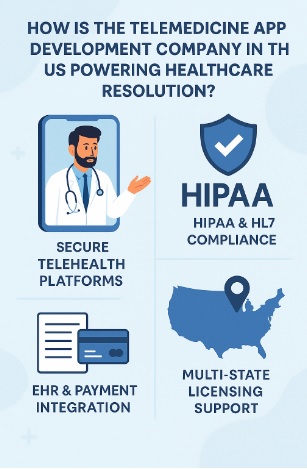
Role of a telemedicine app development company in the us healthcare system
A telemedicine app development company in the US helps healthcare providers, hospitals, and startups build secure, scalable, and feature-rich telehealth platforms
HIPAA & HL7 Compliance – Ensures patient data security (HIPAA Guide). EHR & Payment Integration—Connects electronic health records & billing systems. Multi-State Licensing Support – Helps providers expand services across different US states (State Licensing Guide). Scalable Infrastructure—Uses cloud-based deployment for high performance (Google Cloud for Healthcare).
Healthcare providers can increase efficiency, lower expenses, and improve patient experience by working with a telemedicine software development company with experience.
Key Features of a Top-Rated Telemedicine App
A top-rated telemedicine app must be user-friendly, secure, and loaded with essential features.
1. High-Quality Video & Voice Calls
Encrypted & HIPAA-compliant for secure consultations.
Supports HD video conferencing for improved doctor-patient interactions.
2. AI-Powered Virtual Assistants
AI chatbots assist in booking appointments and answering FAQs.
Symptom checkers provide initial assessments before consultations.
3. E-Prescriptions & Integrated Payments
Doctors can generate digital prescriptions (eRx) in real time.
Secure payment gateways simplify billing and insurance processing.
4. integration of iot & Remote Patient Monitoring (RPM)
Wearables track blood pressure, heart rate, glucose levels, and other parameters.
Doctors are instantly notified when there are major changes in patient health.
Voice commands & screen readers make the app accessible to visually impaired users.
6. Seamless EHR & Third-Party Integrations
Secure electronic health record (EHR) integration.
FHIR & HL7 standards ensure smooth data exchange with hospitals.
By integrating these features, telemedicine apps improve patient engagement and healthcare outcomes.
Challenges in Telemedicine App Development & Solutions
There are certain challenges in developing a telemedicine app for the US market, but a correct strategy can solve these.
1. Data Security & HIPAA Compliance
Challenge: Protecting sensitive patient health data from breaches. Solution: Implement end-to-end encryption, multi-factor authentication, & cloud security
2. Platform Compatibility
Challenge: Apps must function seamlessly on iOS, Android, & Web. Solution: Develop with React Native or Flutter for cross-platform performance (Flutter vs. React Native).
3️. Licensing & Regulatory Compliance
Challenge: State & federal laws vary for telehealth providers. Solution: Work with a development partner experienced in US healthcare regulations.
How to Choose the Right Telemedicine App Development Company in the US?
When selecting a partner for telemedicine software development, consider:
Experience in Healthcare App Development Compliance with HIPAA, HL7, FDA, & FHIR Standards Portfolio of Successful Telemedicine Projects EHR & Third-Party API Integration Expertise Cloud-Based Deployment and scalability
What is the future of telemedicine in the US?
The following will be part of the upcoming telemedicine wave.
AI-Powered Predictive Healthcare, 5G-Enabled Virtual Consultations Blockchain for Secure Patient Records
IoT-Based Remote Monitoring Devices
As AI, IoT, and cloud computing continue to improve, telemedicine will continue to transform the US healthcare system.
Conclusion
Telemedicine is changing healthcare in the US by increasing the accessibility, affordability, and effectiveness of medical treatment. The right telemedicine app development company can help healthcare providers take advantage of the digital revolution with AI-powered HIPAA-compliant telehealth solutions.
Best Local Development Environment for WordPress. When it comes to developing a WordPress site locally, having the right tools and environment is crucial. Let’s dive deep into the best local development environments for WordPress that will help you streamline your workflow and enhance productivity.
Why Use a Local Development Environment for WordPress?
Using a local development environment offers numerous benefits. Speed, security, and testing without impacting the live site are just a few reasons why developers prefer local setups.
What Makes a Great Local Development Environment?
Several factors contribute to a top-notch local development environment:
Ease of setup
Performance
Features and flexibility
Support and community
Top Local Development Environments for WordPress
1. Local by Flywheel
Local by Flywheel is a powerful, user-friendly tool tailored for WordPress development.
Key Features
One-click WordPress installation: Set up WordPress sites with a single click.
SSL support: Easily create and manage SSL certificates.
Live Links: Share your local site with clients or collaborators.
Database management: Integrated tools for easy database access and management.
2. MAMP
MAMP (Macintosh, Apache, MySQL, PHP) is a popular choice among developers for its flexibility and power.
Key Features
Cross-platform: Available for both Mac and Windows.
Apache and Nginx support: Choose your preferred server.
PHP versions: Switch between different PHP versions seamlessly.
Integrated tools: Includes phpMyAdmin and MySQL for robust database management.
3. XAMPP
XAMPP is a widely used open-source package that sets up a local server environment.
Key Features
Easy installation: Quick and straightforward setup.
Cross-platform compatibility: Works on Windows, Mac, and Linux.
Flexible configuration: Customize Apache, MySQL, and PHP settings.
Additional modules: Extend functionality with Perl, Tomcat, and more.
4. Desktop Server
Desktop Server by Server Press is designed specifically for WordPress development, making it an excellent choice for WP developers.
Key Features
Quick setup: Get your local environment running in minutes.
Blueprints: Create reusable templates for faster project initiation.
Site management: Easily manage multiple sites from a single interface.
Premium features: Advanced options available with the premium version.
5. Vagrant
Vagrant provides a powerful way to create and manage virtualized environments, ensuring consistency across different development setups.
Key Features
Consistency: Maintain uniform development environments.
Provisioning: Use scripts to set up environments quickly.
Shareable environments: Easily share your development setup with team members.
Integration: Works well with tools like Puppet, Chef, and Ansible.
6. Docker
Docker offers containerization, allowing you to package applications and their dependencies together, making it a modern choice for WordPress development.
Key Features
Isolation: Isolate applications in containers for better security and performance.
Scalability: Easily scale your applications.
Version control: Maintain version control over your environment setups.
Community support: Extensive community and official support.
Choosing the Right Environment for Your Needs
The best local development environment for WordPress depends on your specific requirements and workflow. Consider the following when making your choice:
Ease of use: How quickly can you set up and start working?
Customization: Does the tool offer the flexibility to customize your setup?
Support: Is there adequate support and a strong community behind the tool?
Performance: How does the environment perform with your typical workload?
Setting Up a Local Development Environment
Step 1: Choose Your Tool
Select the tool that best fits your needs from the options discussed above.
Step 2: Installation
Follow the installation instructions for your chosen tool. For example:
Local by Flywheel: Download and run the installer, follow the on-screen instructions.
MAMP/XAMPP: Download the package, extract it, and run the installer.
Step 3: Configuring Your Environment
Customize your setup to suit your development workflow. This might involve:
Setting up virtual hosts.
Configuring PHP and MySQL settings.
Installing necessary extensions and tools.
Step 4: Creating a WordPress Site
Once your environment is set up, create a new WordPress site. Most tools offer one-click installations or easy-to-follow wizards.
Step 5: Developing Your Site
With your local WordPress site up and running, start developing. Test themes, plugins, and custom code without impacting a live site.
Step 6: Syncing with Live Environments
Ensure your local changes can be easily synced with your live environment. Tools like Local by Flywheel offer options to push local sites to live servers seamlessly.
Best Practices for Local WordPress Development
1. Regular Backups
Always back up your local sites regularly. This ensures you can recover your work if something goes wrong.
2. Use Version Control
Implement version control using tools like Git to manage changes and collaborate with others effectively.
3. Testing
Regularly test your site for functionality, compatibility, and performance. Use tools like WP_DEBUG to identify and fix issues early.
4. Keep Your Environment Updated
Ensure your development environment and tools are up to date to leverage the latest features and security updates.
Common Issues and Troubleshooting
1. Performance Issues
If your local environment is slow, consider:
Increasing allocated resources (RAM, CPU).
Using faster storage options (SSD).
Optimizing your setup by disabling unnecessary services.
2. Configuration Errors
Configuration errors can be a headache. Double-check settings and consult documentation or community forums for solutions.
3. Compatibility Issues
Ensure your local environment matches your live server setup to avoid compatibility issues. Tools like Vagrant and Docker can help maintain consistency.
Conclusion
Choosing the right local development environment for WordPress is essential for efficient and effective development. Whether you opt for user-friendly tools like Local by Flywheel or robust solutions like Docker, the key is to find a setup that works best for your workflow. By following best practices and regularly updating your environment, you’ll ensure a smooth development process.
In today’s digital age, securing web applications has become a paramount concern for businesses and developers. Java, being one of the most widely used programming languages for web development, necessitates stringent security measures to protect sensitive data and ensure the integrity of web applications. This comprehensive guide delves into the best practices for Java web application security, providing detailed insights and actionable steps to fortify your applications.
1. Understanding the Importance of Security
In the world of web application development, security is not just an option; it is a necessity. With the increasing number of cyber threats, securing Java web applications is crucial to prevent data breaches, unauthorized access, and other malicious activities.
2. Secure Coding Practices
2.1 Input Validation
Ensuring that all user inputs are properly validated is the first line of defense against various attacks. Input validation helps in preventing SQL injection, cross-site scripting (XSS), and other injection flaws. Use libraries like Hibernate Validator to enforce constraints on your inputs.
2.2 Output Encoding
Output encoding is essential to prevent XSS attacks. By encoding data before it is displayed in the browser, you can ensure that any potentially malicious code is rendered harmless. Use frameworks like OWASP Encoder for this purpose.
2.3 Authentication and Authorization
Implement robust authentication and authorization mechanisms. Use strong passwords, multi-factor authentication, and OAuth2 for secure access control. Ensure that your authentication tokens are securely managed and that session hijacking is prevented through secure cookie practices.
3. Secure Communication
3.1 HTTPS
HTTPS protects sensitive information from being intercepted by attackers. Obtain certificates from trusted Certificate Authorities (CAs) and configure your server to enforce HTTPS.
3.2 Secure Protocols
Avoid using outdated and vulnerable protocols like TLS 1.0 and SSL 3.0. Instead, use TLS 1.2 or higher to ensure secure communication. Regularly update your server’s configuration to support the latest security standards.
4. Secure Data Storage
4.1 Encryption
Use strong encryption algorithms like AES-256 for data storage and RSA for data transmission. Ensure that encryption keys are securely managed and rotated regularly.
4.2 Hashing
For storing passwords, use strong hashing algorithms like bcrypt, PBKDF2, or Argon2. Never store plain text passwords. Hashing adds an extra layer of security by making it computationally difficult for attackers to retrieve the original passwords.
5. Secure Configuration
5.1 Default Settings
Avoid using default settings for your applications and servers. Default settings are often well-known and can be exploited by attackers. Customize configurations to meet your security requirements.
5.2 Environment Variables
Store sensitive information such as database credentials and API keys in environment variables rather than hardcoding them in your source code. This practice reduces the risk of exposing sensitive data.
6. Regular Security Audits
Use automated tools like OWASP ZAP, Sonar Qube, and Check marx to scan your code for potential security issues. Regular audits help in maintaining a high-security posture.
7. Secure Session Management
7.1 Session IDs
Generate secure and random session IDs to prevent session hijacking. Ensure that session IDs are stored in secure cookies with the HttpOnly and Secure flags enabled.
7.2 Session Timeout
Implement session timeout mechanisms to reduce the risk of unauthorized access. Configure your application to automatically log out users after a period of inactivity.
8. Preventing Common Vulnerabilities
8.1 SQL Injection
Avoid concatenating user inputs directly into SQL queries.
8.2 Cross-Site Request Forgery (CSRF)
Implement CSRF tokens to protect against CSRF attacks. Ensure that these tokens are included in all state-changing requests to verify their authenticity.
8.3 Cross-Site Scripting (XSS)
As mentioned earlier, output encoding and input validation are key to preventing XSS attacks. Additionally, implement a Content Security Policy (CSP) to restrict the sources from which scripts can be loaded.
9. Secure APIs
9.1 API Authentication
Use strong authentication mechanisms for APIs, such as OAuth2 or API keys. Ensure that API keys are securely managed and rotated regularly.
9.2 Rate Limiting
Implement rate limiting to prevent abuse of your APIs. Rate limiting helps in mitigating Denial of Service (DoS) attacks by limiting the number of requests a client can make in a given time frame.
10. Keeping Dependencies Updated
Regularly update all dependencies and third-party libraries to their latest versions. Outdated libraries may contain vulnerabilities that can be exploited by attackers. Use tools like OWASP Dependency-Check to monitor and update your dependencies.
11. Security Headers
11.1 Content Security Policy (CSP)
A CSP helps in preventing XSS attacks by restricting the sources from which content can be loaded. Configure a robust CSP to enhance your application’s security.
11.2 HTTP Strict Transport Security (HSTS)
HSTS ensures that your application is only accessible over HTTPS, protecting against downgrade attacks. Configure your server to include the HSTS header in all responses.
11.3 X-Content-Type-Options
Setting the X-Content-Type-Options header to “nosniff” prevents browsers from interpreting files as a different MIME type, which can help mitigate certain types of attacks.
12. Logging and Monitoring
12.1 Comprehensive Logging
Implement comprehensive logging to capture important events and potential security incidents. Ensure that logs are securely stored and monitored for suspicious activities.
12.2 Real-time Monitoring
Use real-time monitoring tools to detect and respond to security incidents promptly. Tools like Splunk and ELK Stack can help in monitoring and analyzing logs in real-time.
Conclusion
Ensuring the security of Java web applications requires a multi-faceted approach involving secure coding practices, regular audits, secure communication, and proactive monitoring. By following these best practices, you can significantly enhance the security of your applications and protect them against various cyber threats.
FAQs
Q1: What is input validation in Java web application security?
Input validation is the process of ensuring that all user inputs are properly checked for correctness and security before being processed by the application. It helps prevent injection attacks like SQL injection and XSS.
Q2: Why is HTTPS important for Java web applications?
HTTPS encrypts data transmitted between the client and server, protecting it from being intercepted by attackers. It ensures that sensitive information remains confidential and secure.
Q3: How can I prevent SQL injection in my Java web application?
You can prevent SQL injection by using prepared statements and parameterized queries instead of directly concatenating user inputs into SQL queries.
Q4: What are some tools for regular security audits in Java web applications?
Tools like OWASP ZAP, SonarQube, and Checkmarx can be used for automated security audits and code reviews to identify and fix vulnerabilities in your Java web applications.
Q5: How does rate limiting help in securing APIs?
Rate limiting helps prevent abuse of APIs by limiting the number of requests a client can make within a specified time frame. It mitigates the risk of DoS attacks and ensures fair usage of resources.
In the digital age, protecting our personal information has never been more critical. With smartphones becoming an integral part of our lives, it’s essential to ensure that our data remains secure. One of the most effective ways to protect your iPhone from unauthorized access is by using an app lock. This article delves into the best free app locks for iPhones, offering comprehensive insights into their features, advantages, and how they can enhance your device’s security.
Why You Need an App Lock for Your iPhone
Enhancing Privacy
In a world where our phones store everything from personal messages to banking information, privacy is paramount. An app lock ensures that sensitive apps are protected by an additional layer of security, keeping prying eyes at bay.
Preventing Unauthorized Access
Whether it’s nosy friends, curious colleagues, or even potential thieves, an app lock can prevent unauthorized access to your personal information. By requiring a password, PIN, or biometric authentication, you can rest assured that your data remains secure.
Top Free App Locks for iPhone
**1. App Lock – Lock Apps, PIN & Pattern
App Lock is one of the most popular app lock solutions for iPhone users. It offers a variety of features designed to enhance your device’s security.
Key Features:
Multiple Lock Options: Choose from PIN, pattern, or fingerprint lock.
Intruder Selfie: Captures a photo of anyone trying to access your locked apps without permission.
Customizable Lock Screen: Personalize your lock screen with different themes and backgrounds.
2. Locker: Hide Photos, Hide Apps
Locker is another excellent free app lock that provides robust security features.
Key Features:
Media Protection: Hide photos and videos behind a secure lock.
App Lock: Protects apps with a PIN or fingerprint.
Secure Cloud Storage: Backup your hidden files to the cloud for added security.
**3. AppLocker – Password Lock Apps
AppLocker is a straightforward yet powerful app lock tool for iPhone users.
Key Features:
Password Protection: Lock apps with a password or PIN.
Intrusion Detection: Get alerts if someone attempts to break into your locked apps.
Easy-to-Use Interface: Simple and user-friendly design for hassle-free protection.
**4. Secret Apps Photo Lock
Secret Apps offers comprehensive privacy protection for your iPhone.
Key Features:
Photo and Video Lock: Secure your media files with a password or fingerprint.
Private Browser: Browse the internet privately without leaving a trace.
Break-in Reports: Receive reports of break-in attempts with photos and timestamps.
**5. Smart App Lock
Smart App Lock provides a versatile solution for securing your iPhone.
Key Features:
Custom Lock Types: Use PIN, pattern, or fingerprint to lock apps.
Fake Lock: Create a fake error message to deter intruders.
Consider what you need to protect and how much security you require. For instance, if you have sensitive photos, an app that offers media protection might be ideal.
Check Compatibility
Ensure the app lock is compatible with your iPhone model and iOS version. Some apps may not support older versions of iOS.
User Reviews and Ratings
User feedback can provide valuable insights into an app’s performance and reliability. Check reviews and ratings on the App Store before making a decision.
Ease of Use
An app lock should be easy to set up and use. Look for apps with intuitive interfaces and clear instructions.
Setting Up App Lock on Your iPhone
Step-by-Step Guide
Download the App: Visit the App Store and download the app lock of your choice.
Install and Open: Install the app and open it.
Set Up Your Lock: Follow the on-screen instructions to set up your preferred lock type (PIN, pattern, or fingerprint).
Select Apps to Lock: Choose the apps you want to protect with the app lock.
Customize Settings: Explore additional settings and customize the app lock according to your preferences.
Tips for Maximizing Your App Lock’s Effectiveness
Use Strong Passwords
Avoid using easily guessable passwords. Combine letters, numbers, and special characters for a robust password.
Enable Intrusion Alerts
Make sure to enable intrusion alerts to receive notifications of unauthorized access attempts.
Regularly Update Your App Lock
Keep your app lock updated to benefit from the latest security features and bug fixes.
Backup Your Data
Regularly backup your locked data to avoid losing important information in case of a device failure.
Frequently Asked Questions (FAQs)
1. Are free app locks for iPhone safe?
Yes, many free app locks are safe to use. However, it’s essential to download apps from reputable sources like the App Store and check user reviews.
2. Can I lock any app on my iPhone?
Most app locks allow you to lock a variety of apps, including social media, messaging, and photo apps. However, some system apps may not be lockable due to iOS restrictions.
3. Do app locks affect phone performance?
Generally, app locks have minimal impact on phone performance. They are designed to run efficiently in the background without draining significant battery or resources.
4. What happens if I forget my app lock password?
Most app locks offer a password recovery option, such as using your email or security questions. Refer to the app’s support documentation for assistance.
5. Can app locks protect my data if my phone is stolen?
While app locks provide an extra layer of security, it’s also crucial to enable device-level security features like Find My iPhone and iCloud backups for comprehensive protection.
Conclusion
Protecting your personal information on your iPhone is more important than ever. By using an app lock, you can add an extra layer of security to your sensitive apps and data. Whether you choose AppLock, Locker, AppLocker, Secret Apps, or Smart AppLock, each of these options offers unique features to enhance your privacy and security.
In the rapidly evolving legal landscape, finding the right tools to manage your cases efficiently is crucial. Legal case management software is designed to streamline your workflow, enhance productivity, and ensure compliance with regulations. In this article, we will delve into the best legal case management software available in the UK, evaluating their features, benefits, and what makes them stand out in the competitive market.
What is Legal Case Management Software?
Legal case management software is a digital solution that helps law firms and legal departments manage their case information, documents, deadlines, and communications efficiently. This software is designed to automate administrative tasks, improve client relationships, and enhance overall efficiency.
Key Features of Legal Case Management Software
When choosing legal case management software, it’s essential to consider several key features:
Document Management: Organize and store documents securely.
Time Tracking: Keep track of billable hours and manage time effectively.
Client Management: Maintain comprehensive client records.
Task Management: Create, assign, and track tasks.
Calendar and Scheduling: Manage appointments and deadlines seamlessly.
Reporting and Analytics: Generate detailed reports to gain insights into your practice.
Top Legal Case Management Software in the UK
1. Clio
Overview: Clio is a leading legal case management software that offers a comprehensive suite of tools to manage your legal practice efficiently.
Key Features:
Cloud-Based: Access your information from anywhere, anytime.
Integrated Time Tracking: Capture billable hours effortlessly.
Document Automation: Generate documents quickly with templates.
Benefits:
User-Friendly Interface: Easy to navigate, even for non-tech-savvy users.
Scalable: Suitable for firms of all sizes.
Excellent Support: Responsive customer support and extensive resources.
2. LEAP
Overview: LEAP is a robust legal practice management software designed for small to mid-sized law firms.
Key Features:
Integrated Accounting: Manage your finances within the software.
Automated Workflow: Streamline repetitive tasks with automation.
Secure Document Storage: Keep your documents safe with high-level encryption.
Benefits:
Comprehensive Training: Extensive onboarding and training support.
Customization: Tailor the software to fit your firm’s needs.
Efficiency Boost: Improve productivity with integrated tools.
3. PracticePanther
Overview: PracticePanther is a versatile legal case management software known for its intuitive design and powerful features.
Key Features:
Customizable Dashboards: Personalize your workspace.
Client Intake Forms: Simplify client onboarding with automated forms.
Task Management: Assign and track tasks easily.
Billing and Payments: Manage invoicing and receive payments online.
Benefits:
Affordable Pricing: Competitive pricing plans for different budgets.
Integration Options: Integrates with popular third-party apps.
24/7 Support: Access support at any time.
4. Actionstep
Overview: Actionstep is a comprehensive case management system that combines practice management, workflow automation, and document management in one platform.
Key Features:
Workflow Automation: Automate routine processes to save time.
Integrated Email: Manage emails directly within the software.
Advanced Reporting: Gain insights with customizable reports.
Benefits:
High Customizability: Adapt the software to your firm’s processes.
Scalable: Suitable for growing firms.
Strong Security: Robust security features to protect client data.
5. MyCase
Overview: MyCase offers an all-in-one solution for legal case management, emphasizing ease of use and comprehensive features.
Billing and Invoicing: Simplify financial management with automated billing.
Calendar Management: Keep track of important dates and deadlines.
Document Management: Store and manage documents securely.
Benefits:
User-Friendly: Intuitive interface that requires minimal training.
Mobile Access: Work from anywhere with mobile apps.
Excellent Customer Support: Responsive and helpful support team.
Choosing the Right Legal Case Management Software
Selecting the best legal case management software for your firm involves evaluating your specific needs and comparing them against the features offered by different providers. Here are some factors to consider:
Ease of Use
The software should have an intuitive interface and be easy to navigate. A steep learning curve can hinder productivity and lead to frustration.
Scalability
Choose software that can grow with your firm. Scalable solutions ensure that you won’t need to switch platforms as your practice expands.
Customization
Every law firm operates differently. Customizable software allows you to tailor features and workflows to match your unique processes.
Integration
Ensure the software integrates seamlessly with other tools you use, such as email clients, document storage, and accounting systems.
Support and Training
Good customer support and comprehensive training resources are crucial for a smooth transition and ongoing success with the software.
Security
Security is paramount in legal practice. Ensure the software has robust security features to protect sensitive client information.
Conclusion
Investing in the right legal case management software can transform your practice, making it more efficient and productive. With options like Clio, LEAP, PracticePanther, Actionstep, and MyCase, there’s a solution for every firm’s needs. By considering factors such as ease of use, scalability, customization, integration, support, and security, you can choose the best software to help your firm thrive.
Mobile app performance testing is a crucial process to ensure that an app functions smoothly under various conditions. It involves evaluating the app’s speed, responsiveness, and stability under a particular workload. This testing helps identify performance bottlenecks, ensuring that users have a seamless experience.
Importance of Mobile App Performance Testing
With the increasing reliance on mobile apps for everyday tasks, ensuring optimal performance is more critical than ever. Poor performance can lead to user dissatisfaction, negative reviews, and ultimately, loss of revenue. Performance testing helps in maintaining high standards and meeting user expectations.
Key Objectives of Performance Testing
The primary goals of mobile app performance testing are to identify and resolve performance issues, ensure the app can handle expected user loads, and provide a smooth user experience. This includes testing for speed, stability, and scalability.
Overview of Mobile App Performance Testing Tools
There are various tools available to assist in mobile app performance testing. These tools help simulate different scenarios, monitor app behavior, and identify potential issues before they impact users. Choosing the right tool is essential for effective performance testing.
Types and Categories of Mobile App Performance Testing
Load Testing
Load testing assesses how well an app performs under a specific load. This type of testing helps determine the app’s capacity and identifies performance bottlenecks that may arise when the app is used by many users simultaneously.
Stress Testing
Stress testing evaluates how an app behaves under extreme conditions, such as high traffic or limited resources. It helps identify the app’s breaking point and ensures it can recover gracefully from failure.
Endurance Testing
Endurance testing, also known as soak testing, checks how the app performs over an extended period. This testing helps identify memory leaks and other issues that may arise during prolonged use.
Spike Testing
Spike testing involves suddenly increasing the load on the app to observe how it handles unexpected spikes in traffic. This helps ensure that the app can manage sudden surges in user activity without crashing.
Volume Testing
Volume testing evaluates the app’s performance when handling large amounts of data. It helps ensure that the app can process and manage data efficiently, even under heavy load.
Scalability Testing
Scalability testing assesses the app’s ability to scale up or down based on user demand. This type of testing ensures that the app can maintain performance as the number of users increases or decreases.
Common Symptoms of Performance Issues
Slow Response Time
One of the most common performance issues is slow response time. Users expect apps to load quickly and respond instantly to their actions. Slow response times can lead to frustration and abandonment.
App Crashes
Frequent app crashes are a major red flag for performance issues. Crashes can occur due to memory leaks, inefficient code, or compatibility issues, among other reasons.
High Battery Consumption
Apps that consume excessive battery power can quickly become unpopular among users. High battery consumption can be a sign of inefficient code or resource management.
Excessive Data Usage
Apps that use a lot of data can be problematic for users with limited data plans. Excessive data usage can indicate poor optimization or unnecessary background activity.
Poor Network Performance
Poor network performance can lead to slow loading times and interrupted service. This can be caused by network congestion, server issues, or inefficient data handling.
Causes and Risk Factors of Performance Problems
Inefficient Code
Inefficient code is one of the primary causes of performance issues. Poorly written code can lead to slow response times, memory leaks, and high CPU usage.
Poor Network Conditions
Network conditions play a significant role in app performance. Poor network connectivity can lead to slow loading times and interrupted service.
Device Limitations
Different devices have varying capabilities, and performance issues can arise when an app is not optimized for specific devices. This includes variations in screen size, processing power, and memory.
High User Load
High user load can strain an app’s resources, leading to slow response times and crashes. It’s essential to test the app under different load conditions to ensure it can handle peak usage.
Memory Leaks
Memory leaks occur when an app fails to release memory it no longer needs. This can lead to excessive memory usage and eventually cause the app to crash.
Diagnosis and Tests for Mobile App Performance
Benchmarking
Benchmarking involves comparing the app’s performance against standard metrics or competitor apps. This helps identify areas where the app may be lacking and provides a baseline for improvement.
Profiling
Profiling tools help analyze the app’s performance at a granular level. These tools can identify performance bottlenecks, memory leaks, and other issues that may impact the app’s performance.
Monitoring Tools
Monitoring tools provide real-time insights into the app’s performance. These tools can track metrics such as response time, CPU usage, memory usage, and network performance.
Simulation of Network Conditions
Simulating different network conditions helps test how the app performs under various scenarios. This includes testing on different network types (e.g., 3G, 4G, Wi-Fi) and under varying levels of network congestion.
Real User Monitoring
Real user monitoring involves tracking the app’s performance as experienced by actual users. This provides valuable insights into how the app performs in real-world conditions and helps identify issues that may not be apparent in controlled testing environments.
Popular Mobile App Performance Testing Tools
Load Testing Tools
Apache JMeter
Overview: Apache JMeter is a popular open-source tool for load testing. It supports testing on various protocols and is widely used for performance testing of web and mobile applications.
Pros and Cons: Pros include its flexibility, extensive community support, and detailed reporting. Cons include a steep learning curve for beginners and limited GUI options.
LoadRunner
Overview: LoadRunner is a comprehensive performance testing tool from Micro Focus. It supports a wide range of applications and protocols and is known for its robust testing capabilities.
Key Features: Supports various protocols, detailed performance analysis, integration with other testing tools, cloud-based testing options.
Pros and Cons: Pros include its extensive feature set, scalability, and strong vendor support. Cons include its high cost and complexity for new users.
Network Performance Tools
Charles Proxy
Overview: Charles Proxy is a web debugging proxy tool that helps developers view and analyze network traffic. It’s widely used for performance testing and debugging of mobile apps.
Pros and Cons: Pros include its ease of use, detailed traffic analysis, and robust debugging capabilities. Cons include its limited support for non-web protocols and the cost for the full version.
Wireshark
Overview: Wireshark is a network protocol analyzer that provides detailed insights into network traffic. It’s a powerful tool for diagnosing network-related performance issues in mobile apps.
Key Features: Real-time packet capture, deep inspection of hundreds of protocols, customizable reports, support for various operating systems.
Pros and Cons: Pros include its comprehensive feature set, strong community support, and open-source nature. Cons include its complexity and steep learning curve.
Real User Monitoring Tools
New Relic
Overview: New Relic is a popular real user monitoring tool that provides detailed insights into app performance as experienced by real users. It offers extensive monitoring and analytics capabilities.
Key Features: Real-time user monitoring, detailed performance metrics, customizable dashboards, integration with other monitoring tools.
Pros and Cons: Pros include its user-friendly interface, comprehensive analytics, and strong integration capabilities. Cons include its high cost and potential performance impact on the monitored app.
Dynatrace
Overview: Dynatrace is a powerful performance monitoring tool that provides real-time insights into app performance and user experience. It uses AI to detect and diagnose performance issues.
Key Features: AI-driven performance monitoring, detailed user analytics, real-time alerts, integration with CI/CD pipelines.
Pros and Cons: Pros include its advanced AI capabilities, detailed performance insights, and ease of use. Cons include its high cost and complexity for new users.
End-to-End Performance Testing Tools
Appium
Overview: Appium is an open-source tool for end-to-end performance testing of mobile apps. It supports both Android and iOS platforms and is widely used for automated testing.
Key Features: Cross-platform support, integration with various testing frameworks, support for real devices and emulators, extensive community support.
Pros and Cons: Pros include its flexibility, open-source nature, and extensive feature set. Cons include its complexity for beginners and potential stability issues.
Espresso
Overview: Espresso is a Google-developed tool for automated testing of Android apps. It’s designed to provide fast and reliable testing with minimal setup.
Key Features: Integration with Android Studio, fast execution, support for UI testing, detailed reporting.
Pros and Cons: Pros include its ease of use, integration with Android development tools, and fast execution. Cons include its limited support for non-UI testing and lack of cross-platform support.
How to Choose the Right Performance Testing Tool
Identify Testing Requirements
The first step in choosing a performance testing tool is to identify your specific testing requirements. Consider the types of performance testing you need to conduct, such as load testing, stress testing, or real user monitoring.
Consider the Type of Application
Different applications have different performance testing needs. Consider whether your app is a web app, mobile app, or desktop app, and choose a tool that is best suited for your application’s requirements.
Evaluate Tool Features
Evaluate the features of various performance testing tools to determine which ones meet your needs. Look for features such as protocol support, real-time monitoring, reporting capabilities, and integration with other tools.
Budget Considerations
Consider your budget when choosing a performance testing tool. While some tools are free or open-source, others may require a significant investment. Weigh the cost against the features and benefits to determine the best value for your needs.
Ease of Use and Learning Curve
Consider the ease of use and learning curve of the performance testing tool. Some tools may require extensive training and expertise, while others are more user-friendly and easier to learn.
Best Practices for Mobile App Performance Testing
Start Early in the Development Process
Starting performance testing early in the development process helps identify and address issues before they become major problems. This can save time and resources in the long run.
Test Under Realistic Conditions
Testing under realistic conditions helps ensure that the app will perform well in real-world scenarios. This includes testing on different devices, network conditions, and user loads.
Use Automated Testing
Automated testing can help streamline the performance testing process and ensure consistent results. Use automated testing tools to conduct repetitive tests and monitor performance continuously.
Monitor Performance Continuously
Continuous performance monitoring helps identify issues as they arise and ensures that the app maintains optimal performance. Use monitoring tools to track performance metrics in real-time.
Analyze and Act on Test Results
Analyze the results of performance tests to identify performance bottlenecks and other issues. Use these insights to make necessary optimizations and improvements to the app.
Case Studies of Mobile App Performance Testing
Case Study 1: E-commerce App
An e-commerce app experienced slow response times and high abandonment rates during peak shopping periods. By conducting load testing and optimizing the app’s backend, the development team was able to improve performance and reduce abandonment rates.
Case Study 2: Social Media App
A social media app was experiencing frequent crashes and high memory usage. By using profiling tools, the development team identified memory leaks and optimized the app’s code, resulting in improved stability and performance.
Case Study 3: Gaming App
A gaming app was facing high latency and poor user experience during multiplayer sessions. By simulating different network conditions and optimizing the app’s network handling, the development team was able to reduce latency and improve user experience.
Expert Insights on Mobile App Performance Testing
Interview with a Performance Testing Expert
We interviewed a performance testing expert to get their insights on best practices and common challenges in mobile app performance testing. They emphasized the importance of continuous testing and monitoring to maintain optimal performance.
Tips from Industry Leaders
Industry leaders shared their tips for successful mobile app performance testing. They highlighted the importance of realistic testing conditions, automated testing, and thorough analysis of test results.
Common Mistakes to Avoid
Avoiding common mistakes can help ensure successful performance testing. These include neglecting to test under realistic conditions, relying solely on manual testing, and failing to monitor performance continuously.
Future Trends in Mobile App Performance Testing
AI and Machine Learning in Performance Testing
AI and machine learning are increasingly being used to enhance performance testing. These technologies can help identify performance issues more quickly and accurately, leading to faster and more effective optimizations.
Cloud-based Performance Testing Solutions
Cloud-based performance testing solutions are becoming more popular due to their scalability and flexibility. These solutions allow for more extensive testing and can easily adapt to changing testing needs.
Performance Testing for IoT Applications
As the number of IoT applications continues to grow, performance testing for these applications is becoming more important. IoT applications often have unique performance challenges that require specialized testing tools and techniques.
Integration with DevOps and Continuous Testing
Integration with DevOps and continuous testing is becoming increasingly important for performance testing. This approach helps ensure that performance testing is an integral part of the development process and that issues are identified and addressed early.
Conclusion
Summary of Key Points
Mobile app performance testing is essential for ensuring optimal app performance and user satisfaction. There are various tools and techniques available to help with performance testing, and choosing the right ones is crucial for success.
Importance of Continuous Performance Testing
Continuous performance testing helps maintain optimal performance and quickly identify and address issues. This is essential for providing a seamless user experience and staying competitive in the market.
Call to Action for Further Education
For further education on mobile app performance testing, consider exploring additional resources and staying updated with the latest trends and best practices. Continuous learning and improvement are key to success in this field.
Whether you’re dealing with financial reports, inventory management, or any other data-heavy task, you’ve probably encountered an XLSX file. But what if you need to automate modifications to these files? Enter Java, a powerful programming language that can help you manipulate XLSX documents with ease. In this guide, we’ll explore how to modify XLSX documents in Java, making your data manipulation tasks more efficient.
Setting Up Your Environment
Installing Java
First things first, you need to have Java installed on your machine. If you haven’t installed it yet, you can download it from the official Java website. Follow the installation instructions, and make sure to set up the JAVA_HOME environment variable.
Setting up Apache POI library
To work with XLSX files in Java, you’ll need the Apache POI library. Apache POI is a powerful Java library for reading and writing Microsoft Office documents. You can download it from the Apache POI website. Add the POI library to your project’s classpath.
Understanding the Basics of XLSX Format
Structure of XLSX files
XLSX files are essentially ZIP archives containing XML files. Each element of an Excel file, such as sheets, cell values, and styles, is stored in a separate XML file within this archive. Understanding this structure is crucial for effective manipulation.
Common elements in XLSX files
Some common elements you’ll encounter include:
Workbook: The main file containing all sheets.
Sheets: Individual spreadsheets within the workbook.
Cells: The basic data units in a sheet.
Styles: Formatting details for cells.
Reading XLSX Files in Java
Opening an XLSX file
To read an XLSX file, you need to create an instance of XSSFWorkbook from the Apache POI library. Here’s a simple example:
FileInputStream file = new FileInputStream(new File("example.xlsx"));
XSSFWorkbook workbook = new XSSFWorkbook(file);
Reading data from sheets
Once you have the workbook instance, you can access individual sheets and read data:
XSSFSheet sheet = workbook.getSheetAt(0); // Access the first sheet
Iterator<Row> rowIterator = sheet.iterator();
while (rowIterator.hasNext()) {
    Row row = rowIterator.next();
    Iterator<Cell> cellIterator = row.cellIterator();
    while (cellIterator.hasNext()) {
        Cell cell = cellIterator.next();
        System.out.println(cell.getStringCellValue());
    }
}
In today’s competitive market, efficient inventory management is crucial for the success of any business. Inventory management software development offers a comprehensive solution to achieve these goals by integrating advanced technology into inventory operations.
Key Features of Inventory Management Software
1. Real-Time Inventory Tracking
One of the most critical features of inventory management software is real-time tracking. This feature allows businesses to monitor their inventory levels instantaneously. By using RFID tags, barcodes, and IoT sensors, the software provides up-to-date information on stock levels, movement, and location. This helps in preventing stockouts and overstocking, thereby optimizing inventory levels.
2. Automated Reordering
Automated reordering is a vital component of effective inventory management. The software can predict future inventory needs based on historical data and current trends. It automatically generates purchase orders when stock levels fall below a predefined threshold. This ensures that inventory is replenished on time, reducing the risk of disruptions in the supply chain.
3. Integration with Other Systems
To streamline operations, inventory management software can be integrated with other business systems such as ERP (Enterprise Resource Planning), CRM (Customer Relationship Management), and accounting software. This integration allows for seamless data exchange, enhancing overall efficiency and providing a holistic view of business operations.
4. Advanced Reporting and Analytics
Data-driven decision-making is facilitated through advanced reporting and analytics features. The software can generate detailed reports on various aspects of inventory management, including inventory turnover rates, demand forecasting, and supplier performance. These insights enable businesses to make informed decisions that improve operational efficiency and profitability.
5. User-Friendly Interface
A user-friendly interface is essential for the effective utilization of inventory management software. The software should be intuitive and easy to navigate, allowing users to quickly access necessary information and perform tasks efficiently. Customizable dashboards and user roles can further enhance the user experience by providing relevant information based on specific roles and responsibilities.
Benefits of Developing Custom Inventory Management Software
1. Tailored Solutions
Custom inventory management software is designed to meet the unique needs of a business. Unlike off-the-shelf solutions, custom software can be tailored to specific industry requirements, operational workflows, and business goals. This customization ensures that the software addresses all the challenges faced by the business, providing a more effective solution.
2. Scalability
As businesses grow, their inventory management needs evolve. Custom software offers the flexibility to scale and adapt to changing requirements. New features and functionalities can be added as needed, ensuring that the software continues to support business growth and development.
3. Enhanced Security
Security is a top priority in software development. Custom inventory management software can be built with robust security measures to protect sensitive data from unauthorized access and cyber threats. This includes encryption, multi-factor authentication, and regular security audits.
4. Competitive Advantage
Investing in custom inventory management software can provide a significant competitive advantage. By leveraging technology to optimize inventory processes, businesses can improve efficiency, reduce costs, and enhance customer satisfaction. This not only boosts profitability but also strengthens the company’s market position.
Steps in Developing Inventory Management Software
1. Requirement Analysis
The first step in developing inventory management software is conducting a thorough requirement analysis. This involves understanding the business processes, identifying pain points, and defining the specific features and functionalities needed. Engaging with stakeholders and end-users is crucial to gather comprehensive requirements.
2. Designing the Solution
Once the requirements are defined, the next step is designing the software solution. This includes creating wireframes, mockups, and prototypes to visualize the user interface and user experience. The design phase also involves defining the architecture of the software, ensuring it is scalable, secure, and efficient.
3. Development
The development phase involves writing the code for the software based on the design specifications. This includes developing the backend infrastructure, integrating necessary technologies, and creating the frontend interface. Regular testing is conducted throughout the development process to identify and fix any issues early.
4. Testing and Quality Assurance
Quality assurance is a critical step in software development. Rigorous testing is performed to ensure the software is free from bugs and functions as intended. This includes unit testing, integration testing, performance testing, and user acceptance testing. Feedback from end-users is incorporated to make necessary improvements.
5. Deployment and Training
Once the software passes all quality checks, it is deployed in the business environment. This involves setting up the necessary infrastructure, configuring the software, and migrating data from existing systems if needed. Training sessions are conducted to educate users on how to effectively use the new software.
6. Maintenance and Support
After deployment, ongoing maintenance and support are essential to ensure the software remains functional and up-to-date. Regular updates, bug fixes, and enhancements are provided to address any issues and improve performance. Support services are available to assist users with any challenges they may encounter.
Challenges in Inventory Management Software Development
1. Data Accuracy
Maintaining accurate data is a significant challenge in inventory management. Inaccurate data can lead to incorrect stock levels, impacting the entire supply chain. Implementing real-time tracking and automated data entry can help mitigate this challenge.
2. Integration with Legacy Systems
Integrating new software with existing legacy systems can be complex. It requires careful planning and execution to ensure seamless data exchange and system compatibility. APIs and middleware can facilitate this integration, but it may still pose challenges.
3. User Adoption
Getting users to adopt new software can be difficult, especially if they are accustomed to old systems. Providing adequate training and demonstrating the benefits of the new software can encourage user adoption. User-friendly design and ongoing support are also critical.
Conclusion
Developing custom inventory management software is a strategic investment that can yield significant benefits for businesses. By providing tailored solutions, scalability, enhanced security, and a competitive edge, custom software can optimize inventory processes and drive business growth. Through careful planning, design, development, and ongoing support, businesses can overcome challenges and fully leverage the advantages of inventory management software.
In today’s fast-paced digital landscape, ensuring the quality and reliability of software applications is more critical than ever. Software testing tools have become indispensable for developers and QA teams, enabling them to identify bugs, improve performance, and enhance user satisfaction. Here, we delve into the best software testing tools available, exploring their features, benefits, and why they are essential for any software development process.
1. Selenium: The Versatile Automation Framework
It is an open-source framework that supports multiple programming languages like Java, Python, C#, and Ruby. Selenium is particularly known for its robust integration with web browsers, making it ideal for testing web applications.
Key Features:
Cross-Browser Testing: Selenium supports all major browsers, including Chrome, Firefox, Safari, and Edge.
Multi-Language Support: Write tests in multiple languages.
Selenium Grid: Execute tests in parallel across different machines and browsers.
Extensive Community Support: Benefit from a large community of developers and testers.
Benefits:
Cost-Effective: Being open-source, Selenium is free to use.
Flexibility: Integrates with various CI/CD tools like Jenkins and Maven.
Scalability: Suitable for small to large-scale applications.
2. JUnit: The Gold Standard for Java Testing
JUnit is a unit testing framework specifically designed for Java programming. It is widely used for writing and running repeatable automated tests, ensuring that the code is robust and functions as expected.
Key Features:
Annotations: Simplifies test writing with annotations like @Test, @Before, and @After.
Test Runners: Customizable test runners for different test requirements.
Assertions: A comprehensive set of assertions to validate test outcomes.
Integration: Works seamlessly with build tools like Ant and Maven.
Benefits:
Enhanced Code Quality: Promotes test-driven development (TDD).
Easy Maintenance: Simplifies regression testing.
Speed: Fast execution of tests.
3. LoadRunner: Performance Testing at Its Best
LoadRunner by Micro Focus is a premier performance testing tool designed to test applications under load. It simulates thousands of users interacting with the application, helping identify performance bottlenecks.
Key Features:
Protocol Support: Supports a wide range of protocols such as HTTP, Web Sockets, and SAP.
Realistic Load Testing: Simulates real user behavior under various conditions.
Comprehensive Analysis: Provides detailed performance metrics and analysis.
Cloud Integration: Can execute tests in cloud environments.
Benefits:
Scalability: Tests applications of any size.
Accuracy: Generates precise performance data.
Flexibility: Can test applications in diverse environments.
4. Test Complete: All-in-One Test Automation
Test Complete by Smart Bear is a powerful tool for functional testing of desktop, web, and mobile applications. Its easy-to-use interface and robust features make it a favorite among testers.
Key Features:
Record and Playback: Create tests without writing code.
Scripted Testing: Supports multiple scripting languages including JavaScript, Python, and VBScript.
Integration: Integrates with CI/CD tools like Jenkins and Azure DevOps.
Object Recognition: Advanced object recognition technology for accurate test creation.
Benefits:
User-Friendly: Suitable for testers with varying levels of expertise.
Comprehensive: Supports a wide range of applications.
Efficient: Reduces time to market with fast and reliable test execution.
5. Appium: Leader in Mobile App Testing
Appium is an open-source mobile application testing tool that allows for the automation of native, hybrid, and mobile web applications on iOS and Android platforms. Its flexibility and comprehensive features make it an essential tool for mobile testing.
Key Features:
Cross-Platform Testing: Supports both iOS and Android.
Language Flexibility: Write tests in any language that has a Selenium client library.
Real Devices and Emulators: Tests can be run on real devices, simulators, and emulators.
Community Support: Strong community backing and regular updates.
Benefits:
Open-Source: Free to use with extensive community resources.
Versatile: Supports a wide range of mobile applications.
Integration: Easily integrates with other testing frameworks.
6. Postman: Simplifying API Testing
Postman is a popular tool for API testing, allowing developers and testers to create, share, and test APIs efficiently. It simplifies the process of developing APIs and ensures they function correctly.
Key Features:
User Interface: Intuitive interface for creating and managing API requests.
Collaboration: Team workspaces for collaborative API development.
Automated Testing: Supports automated testing and continuous integration.
Comprehensive Documentation: Generate and share API documentation.
Benefits:
Efficiency: Speeds up API development and testing.
Collaboration: Enhances teamwork and communication.
Automation: Streamlines testing with automated scripts.
7. QTP/UFT: Unified Functional Testing by Micro Focus
Quick Test Professional (QTP), now known as Unified Functional Testing (UFT), is a robust tool for functional and regression testing. It supports a wide range of applications and offers advanced test automation capabilities.
Key Features:
Keyword-Driven Testing: Simplifies test creation with keyword-driven actions.
Scripting Support: Uses VBScript for test scripting.
Extensive Protocol Support: Supports testing of web, mobile, and enterprise applications.
Integration: Works with various ALM and CI/CD tools.
Benefits:
Efficiency: Automates complex testing processes.
Flexibility: Supports a wide array of applications and protocols.
Robust Reporting: Detailed test reports and analysis.
8. SoapUI: Powerful API Testing Tool
SoapUI is a leading tool for API testing, particularly SOAP and REST APIs. It provides a comprehensive solution for functional, security, and load testing of APIs.
Key Features:
Extensive Protocol Support: Supports SOAP, REST, JMS, AMF, and JDBC.
Automation: Enables automated testing and CI/CD integration.
Security Testing: Includes tools for API security testing.
Mock Services: Create mock services to simulate API behavior.
Benefits:
Comprehensive: Covers all aspects of API testing.
Flexible: Supports a wide range of protocols and use cases.
Scalable: Suitable for small to large-scale API projects.
9. Cucumber: Bridging the Gap Between Developers and Testers
It allows testers to write test cases in plain language, facilitating better collaboration between developers, testers, and business stakeholders.
Key Features:
Gherkin Language: Write tests in a human-readable format.
Integration: Works with various test automation frameworks.
Reports: Generates detailed and readable test reports.
Collaboration: Enhances communication among team members.
Clarity: Clear and understandable test cases.
Flexibility: Integrates with existing test automation tools.
10. Jira: Beyond Issue Tracking
Jira by Atlassian is not just an issue tracking tool but also an essential component of the software testing lifecycle. It helps teams plan, track, and manage software development projects.
Key Features:
Issue and Project Tracking: Manage bugs, tasks, and projects efficiently.
Agile Boards: Supports Scrum and Kanban methodologies.
Customization: Highly customizable to fit any workflow.
Integration: Seamlessly integrates with various development and testing tools.
Benefits:
Efficiency: Streamlines project management and bug tracking.
Collaboration: Enhances team collaboration and communication.
Flexibility: Adapts to diverse project management needs.
In conclusion, selecting the right software testing tools is crucial for ensuring the quality and performance of your applications. Each tool offers unique features and benefits, making them suitable for different testing needs. By leveraging these tools effectively, development and QA teams can deliver high-quality software that meets user expectations and stands out in the competitive market.