A Step-by-Step Guide: How to Install Docker Compose

In today’s fast-paced world of software development, containerization has become a pivotal technology. Docker, the leading container platform, allows developers to create, deploy, and manage applications within isolated environments called containers. Docker Compose, an essential tool in the Docker ecosystem, simplifies the orchestration of multi-container applications. In this guide, we’ll take you through the process of installing Docker Compose step by step.

Introduction to Docker Compose

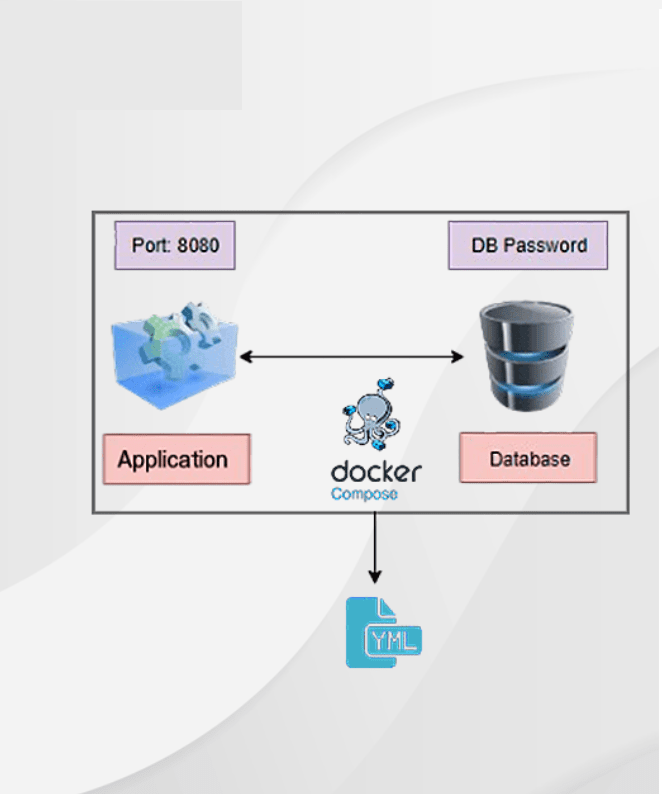
Docker Compose is a tool that simplifies the process of managing and orchestrating multi-container applications. It allows developers to define their application’s services, networks, and volumes in a single YAML configuration file. This eliminates the need to remember and execute complex command-line instructions for managing multiple containers.

Prerequisites

Before installing Docker Compose, it’s essential to have Docker installed on your system. Docker is a platform that enables developers to build, package, and distribute applications as containers. Containers are lightweight, portable, and isolated environments that ensure consistent behavior across different systems.

How to Install Docker Compose

To install Docker Compose, follow these steps:

  1. Open a terminal window: Launch your system’s terminal or command prompt. This is where you’ll input the commands to install Docker Compose.
  2. Download the Docker Compose binary: Use the provided command to download the latest Docker Compose binary. This binary is the executable file that allows you to use Docker Compose commands.
  3. Apply executable permissions: After downloading the binary, you need to make it executable so you can run Docker Compose commands from any directory in your terminal.

Verifying the Installation

Once you’ve installed Docker Compose, it’s important to verify that the installation was successful:

  1. Run the command: Enter the command ‘docker-compose --version‘ in your terminal. This command will display the version of Docker Compose that you installed. This step ensures that the installation process was completed without any issues.
How to install docker compose

Basic Usage of Docker Compose

Docker Compose simplifies the process of managing multiple containers as a single unit. Here’s a introductory example of how to use it:

  1. Create a project directory: Make a new directory for your project and navigate into it using the ‘mkdir‘ (make directory) and ‘cd‘ (change directory) commands.
  2. Define a ‘docker-compose.yml‘ file: Create a YAML file named ‘docker-compose.yml‘ in your project directory. In this file, you’ll define your application’s services, networks, and volumes.
  3. Run the application: Use the ‘docker-compose up‘ command in your project directory. This command reads the ‘docker-compose.yml‘ file and starts the defined services in separate containers.

Writing a Docker Compose File

A Docker Compose file is written in YAML (YAML Ain’t Markup Language) format. YAML is a human-readable data serialization language that is easy to understand and write. In the ‘docker-compose.yml‘ file, you define each service in your application, its associated image, environment variables, volumes, and network connections.

Building and Running Services

Docker Compose makes it easy to build and run services defined in your ‘docker-compose.yml‘ file. When you execute ‘docker-compose up‘, it not only starts the services but also builds their respective container images if they haven’t been built already. This ensures consistency and ease of deployment across different environments.

Scaling Services

With Docker Compose, scaling your services becomes effortless. By specifying the desired number of replicas for each service, you can horizontally scale your application to handle increased loads. Docker Compose automatically manages load balancing and network connectivity between the scaled service instances.

Managing Dependencies

Docker Compose intelligently manages dependencies between services. If one service depends on another, Docker Compose ensures that the dependent service starts only after its dependencies are up and running. This eliminates race conditions and ensures that your application components work harmoniously.

Compose Command Reference

Docker Compose offers a wide range of commands for managing multi-container applications. These commands include starting, stopping, scaling, rebuilding, and inspecting services defined in the ‘docker-compose.yml‘ file. Refer to the official documentation for a comprehensive list of available commands and their usage.

Troubleshooting

When working with multi-container applications, issues may arise. Docker Compose provides helpful tools for troubleshooting and debugging. It allows you to view logs, check the status of running containers, and diagnose problems that might occur during the deployment and execution of services.

Docker Compose vs. Docker Swarm

Docker Compose and Docker Swarm are both tools for orchestrating containers, but they serve different purposes. Docker Compose is geared towards local development and testing environments, while Docker Swarm is a full-fledged container orchestration platform for managing large-scale production deployments. Consider your requirements when choosing between the two.

Real-world Use Cases

Docker Compose finds application in various real-world scenarios. From developing microservices-based applications to creating consistent development environments across teams, Docker Compose streamlines the process of managing complex applications and their dependencies.

Best Practices for Using Docker Compose

To make the most of Docker Compose, consider these best practices:

  • Keep your ‘docker-compose.yml‘ file organized and well-commented.
  • Use environment variables to parameterize your configuration.
  • Utilize named volumes for persistent data storage.
  • Regularly update Docker Compose to benefit from new features and bug fixes.

Conclusion

Docker Compose is a important tool that simplifies the deployment and operation of multi-container applications. By following the steps outlined in this guide, you’ve learned how to install Docker Compose, define services using the ‘docker-compose.yml‘ file, and manage your containers effortlessly. This knowledge equips you to harness the benefits of containerization and streamline your development workflow.

FAQs

Q1: Is Docker Compose suitable for large-scale applications?

Docker Compose is best suited for development and testing environments. For large-scale production deployments, consider tools like Docker Swarm or Kubernetes.

Q2: Can I use Docker Compose to manage single-container applications?

Yes, you can. While Docker Compose is designed for multi-container applications, it can also manage single-container setups effectively.

Q3: How often is Docker Compose updated?

Docker Compose is updated regularly to add new features, fix bugs, and improve performance. It’s recommended to stay updated with the latest version.

Q4: Can I use environment variables in my Docker Compose file?

Absolutely. Docker Compose supports the use of environment variables, allowing you to customize your services’ configurations easily.

Q5: Does Docker Compose work with Windows?

Yes, Docker Compose is compatible with Windows, Linux, and macOS, providing flexibility across different operating systems.
Docker Compose Network Setup: Connecting Containers the Right Way

Introduction

In the world of containerization, Docker has revolutionized the way software applications are developed, shipped, and deployed. One of the key aspects of Docker’s power lies in its ability to interconnect various containers seamlessly using Docker Compose. In this comprehensive guide, we will walk you through the ins and outs of setting up a Docker Compose network that ensures smooth communication between containers. Whether you’re a seasoned developer or just diving into the world of containers, our step-by-step approach will equip you with the knowledge and expertise to connect containers the right way.

Docker Compose Network Setup: Connecting Containers the Right Way

Docker Compose simplifies the management of multi-container applications by allowing you to define your app’s services, networks, and volumes in a single docker-compose.yml file. This eliminates the complexities of manually configuring networks and ensures efficient communication between containers.

Understanding Docker Networking

Before diving into the setup process, it’s crucial to grasp the fundamentals of Docker networking. Docker employs a variety of network drivers, each with its own use case. Bridge networks are the default and are suitable for most applications. Host networks offer maximum performance but sacrifice container isolation. Overlay networks, on the other hand, are designed for multi-host communication. Depending on your project’s requirements, you can choose the appropriate network driver.

Writing the Docker Compose File

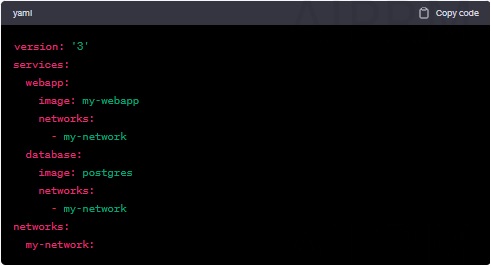
The heart of your Docker Compose network setup lies in the docker-compose.yml file. This YAML-based configuration file defines your application’s services, networks, and volumes. Each service corresponds to a container, while networks facilitate communication between these containers. Volumes ensure persistent data storage even when containers are replaced. Below is a simplified example of a docker-compose.yml file for a web application and database:

Docker Compose Network

Creating Custom Networks

To enhance container communication and security, Docker Compose allows you to create custom networks. This segregation prevents containers from different projects interfering with each other. You can create a custom network by adding a networks section to your docker-compose.yml file, as shown in the previous example.

Connecting Containers Across Networks

While containers within the same network can communicate effortlessly, there might be instances when you need to establish communication between containers on different networks. Docker Compose facilitates this by enabling containers to join multiple networks. This is especially useful when components of your application need to interact while maintaining network isolation.

Ensuring Network Security

Security is paramount in today’s digital landscape. Docker Compose provides features such as network segmentation and firewall rules to bolster your network’s security. By employing bridge networks, you create a barrier that isolates containers from external threats. Additionally, you can apply firewall rules to control inbound and outbound traffic, ensuring only authorized communication.

FAQs

How does Docker Compose differ from Docker Swarm?

Docker Compose is primarily used for defining and managing multi-container applications on a single host. Docker Swarm, on the other hand, is an orchestration tool used to manage multi-container applications across a cluster of Docker hosts.

Can I use Docker Compose to manage networks in a production environment?

While Docker Compose is excellent for local development and testing, it’s recommended to use more robust tools like Kubernetes for managing networks in production environments. Kubernetes offers advanced networking features and greater scalability.

How do I troubleshoot network communication issues between containers?

If you’re facing communication problems between containers, first ensure that they are connected to the same network. Double-check your docker-compose.yml file for any typos or misconfigurations. You can also use the docker exec command to access a container and perform network-related diagnostics.

Is it possible to create a network that spans multiple hosts?

Yes, Docker provides overlay networks that allow containers to communicate across multiple hosts. This is particularly useful for scenarios where you have containers distributed across different machines.

Can I modify network configurations without restarting containers?

Yes, Docker Compose allows you to modify network configurations without restarting containers. Simply update your docker-compose.yml file and execute the docker-compose up command with the --no-recreate flag.

How can I ensure secure communication between containers?

To ensure secure communication between containers, it’s advisable to use encrypted communication protocols such as HTTPS. Additionally, you can configure firewall rules and network policies to restrict unauthorized access.

Conclusion

Efficiently connecting containers is a cornerstone of successful containerization. With Docker Compose, you have a powerful tool at your disposal to achieve seamless communication between containers. By understanding the fundamentals of Docker networking, crafting a well-structured docker-compose.yml file, and leveraging custom networks, you can build robust and secure containerized applications. So go ahead, experiment, and embrace the world of Docker Compose networking to take your application deployment to the next level.

Docker Compose Up: Your Gateway to Efficient Container Orchestration

Containerization has revolutionized the world of software development, offering greater effectiveness, scalability, and consistency. Docker has emerged as a leader in this field, and with the introduction of Docker Compose, the process of container orchestration has become even more streamlined. In this article, we will explore the power of Docker Compose Up, how it contributes to efficient container orchestration, and its benefits for development teams.

Introduction to Docker Compose

Docker Compose is a powerful tool that allows developers to define and manage multi-container Docker applications. It provides a simple way to run multiple services as a single unit, defining their relationships and configurations in a single YAML file. This eliminates the complexity of managing containers individually and ensures consistency across different environments.

Understanding Container Orchestration

Container orchestration involves managing the deployment, scaling, and operation of containerized applications. It ensures that all components of an application work seamlessly together. While orchestration tools like Kubernetes exist, Docker Compose focuses on simplifying the process for smaller projects or development environments.

The Role of Docker Compose Up

docker-compose up is the command that brings your defined services to life. It reads the Docker Compose file and starts the containers with the specified configurations. This single command eliminates the need to set up each service separately, saving time and reducing errors.

Getting Started with Docker Compose Up

To get started, ensure you have Docker Compose installed on your system. Create a docker-compose.yml file to define your services, networks, and volumes. Then, by running docker-compose up, you start all services defined in the YAML file.

Docker Compose Up

Writing Your Docker Compose File

The Docker Compose file is where you define your application’s architecture. You can specify the base images, build contexts, ports, environment variables, and more. This declarative approach ensures consistency across development, testing, and production environments.

Managing Dependencies and Services

Docker Compose simplifies managing complex service dependencies. You can specify which services rely on others, ensuring proper initialization and shutdown sequences. This makes it easier to create intricate application architectures.

Scaling Your Applications Easily

As your application grows, you might need to scale certain services. Docker Compose makes scaling as simple as specifying the desired number of replicas in your YAML file. This ensures your application can handle increased load efficiently.

Networking Made Simple with Docker Compose

Docker Compose automatically creates a default network for your services, allowing them to communicate seamlessly. You can also define custom networks for more complex setups, ensuring isolation and security.

Environment Configuration and Secret Management

Storing configuration in environment variables is a best practice, and Docker Compose makes it effortless. You can also manage sensitive information like passwords and API keys securely using Docker’s built-in secret management.

Handling Data Volumes

Persistent data is crucial for many applications. Docker Compose enables you to define data volumes, ensuring that data persists even if containers are recreated. This is vital for databases and file storage.

Version Control and Collaboration

With the Docker Compose file stored in your version control system, collaboration becomes smoother. Team members can work on the same configuration, reducing conflicts and ensuring everyone uses the same environment.

Monitoring and Troubleshooting

Docker Compose provides tools to monitor and troubleshoot your applications. You can view logs, check resource usage, and quickly identify issues, making debugging more efficient.

Docker Compose Up vs. Other Orchestration Tools

While Docker Compose is suitable for smaller projects, larger applications might benefit from more robust orchestration tools like Kubernetes. Assess your project’s scale and complexity to determine the most appropriate solution.

Real-world Use Cases

Numerous real-world use cases showcase Docker Compose’s effectiveness. From deploying microservices to setting up development environments, its versatility shines through.

Conclusion

Docker Compose Up simplifies the process of container orchestration, making it accessible to developers of all levels. Its ability to define, manage, and scale multi-container applications from a single configuration file streamlines development workflows and ensures consistency across different environments.

FAQs

  1. Is Docker Compose suitable for production environments? While Docker Compose is excellent for development and testing, larger production setups often require more advanced orchestration tools like Kubernetes.
  2. Can I define my custom configurations for services? Absolutely! Docker Compose allows you to define various configurations such as ports, environment variables, and more in the YAML file.
  3. What happens if one service depends on another that’s not ready? Docker Compose handles dependencies intelligently. It waits until all required services are ready before starting dependent ones.
  4. Can I use Docker Compose with cloud services? Yes, you can deploy Docker Compose files to various cloud platforms, making it easier to manage your applications in the cloud.
  5. How do I update my application’s containers using Docker Compose? By running docker-compose up with the --build flag, you can rebuild and update your application’s containers based on the changes in your Docker Compose file.

Mastering Docker Compose Volumes: A Comprehensive Guide

If you’re delving into the world of containerization, chances are you’ve encountered Docker and its powerful toolset. Docker Compose is a crucial part of this ecosystem, allowing you to define and manage multi-container applications. In this comprehensive guide, we will explore Docker Compose volumes, a fundamental aspect of managing data within containers. By the end, you’ll have a solid understanding of how volumes work, why they’re important, and how to master them effectively.

Introduction to Docker Compose

What is Docker Compose?

Docker Compose is a tool that allows developers to define and manage multi-container applications using a simple YAML file. It streamlines the process of deploying complex applications by describing their components, services, networks, and other configuration aspects in a single file.

Containers have gained immense popularity due to their lightweight nature, portability, and reproducibility. They encapsulate an application and its dependencies, ensuring consistent behavior across different environments.

Understanding Docker Compose Volumes

What are Docker Compose Volumes?

Docker Compose volumes are a mechanism for persistently storing and sharing data between containers and the host system. They enable data to survive container restarts, updates, and even when containers are removed.

Why Do We Need Volumes?

In the world of containers, where containers are meant to be stateless and ephemeral, data persistence is a challenge. Volumes provide a solution by decoupling data from the container itself, allowing it to be managed separately.

Types of Volumes

Docker Compose supports different types of volumes, such as bind mounts, Docker named volumes, and anonymous volumes. Each type has its own use cases and benefits, catering to various application requirements.

Docker Compose Volumes

Getting Started with Volumes

Basic Syntax

Defining volumes in Docker Compose is straightforward. You specify the volume’s name and optionally its driver, as well as any other configuration settings required.

Creating Volumes

Creating a volume in Docker Compose is as simple as adding a volumes section to your docker-compose.yml file and specifying the volume’s name. Docker will take care of the rest.

Mounting Host Directories

Bind mounts allow you to mount a directory from the host machine into a container. This is useful for sharing configuration files, source code, or other data between the host and containers.

Persisting Data with Volumes

Data Persistence in Containers

Containers are designed to be transient, but many applications require data to persist. Volumes offer a way to keep data separate from containers, making it easier to manage and backup.

Managing Stateful Applications

Stateful applications, like databases, need consistent storage across container restarts. Volumes ensure that critical data remains intact, preventing data loss.

Bind Mounts vs. Volumes

While bind mounts offer simplicity and direct access to host files, Docker named volumes provide better management, portability, and compatibility across different environments.

Docker Compose Volume Configuration

Defining Volumes in docker-compose.yml

In your docker-compose.yml file, you can define volumes under the volumes section for each service. This allows you to control where data is stored and how it’s accessed by containers.

Specifying Volume Drivers

Docker supports various volume drivers that offer different storage backends, such as local storage, network-attached storage, and cloud-based storage solutions.

Controlling Permissions

Managing file permissions between the host and containers can be a challenge. Docker Compose provides options to set permissions, ensuring data security and accessibility.

Practical Use Cases

Sharing Configuration Files

Volumes make it easy to share configuration files between containers. This is particularly useful when you have multiple services that need access to common configuration data.

Database Management

Databases often require persistent storage. Docker named volumes can be used to ensure that database data survives container updates and restarts.

Logging and Monitoring

Containerized applications generate logs and monitoring data. By mapping volumes to host directories, you can easily access and analyze these logs.

Best Practices for Using Volumes

Isolating Data from Containers

Separating data from containers promotes a clean architecture and simplifies management. It also ensures that containers can be replaced or scaled without affecting data.

Backup and Restore Strategies

Regularly backing up volumes is essential to prevent data loss. Docker’s volume management features can be leveraged to create effective backup and restore strategies.

Security Considerations

When using volumes, consider data security. Encryption, access controls, and monitoring are crucial to ensure the integrity and confidentiality of your data.

Troubleshooting Volume Issues

Volume Mounting Errors

Sometimes, volume mounting can fail due to misconfigured paths or permissions. Understanding the common issues and solutions can save time in debugging.

Data Synchronization Problems

In certain cases, data within containers might not synchronize properly with the host. These issues can be resolved by verifying volume configurations.

Inspecting Volume Contents

You can inspect the contents of a volume by accessing it from the host system. This can help in diagnosing problems and understanding the data being stored.

Advanced Volume Features

Docker Named Volumes

Docker named volumes provide a way to refer to volumes by a user-friendly name rather than a cryptic ID. This improves readability and maintainability.

Anonymous Volumes

Anonymous volumes are useful when you don’t need to manage or reference a volume explicitly. Docker handles their creation and cleanup automatically.

Using External Volumes

External volumes, such as network-attached storage or cloud storage, can be integrated with Docker Compose to store data externally. This enhances scalability and redundancy.

Scaling and Load Balancing

Volumes in Clustered Environments

In clustered environments, managing volumes across nodes requires careful consideration. Docker’s swarm mode and Kubernetes integration provide solutions for volume distribution.

Handling Volume Consistency

Ensuring volume consistency across multiple containers or replicas is vital for maintaining data integrity. Strategies like shared volumes or distributed file systems can help.

Load Distribution and Failover

Load balancers and failover mechanisms can be integrated with Docker Compose to ensure high availability and performance, even in the presence of volume-related issues.

Conclusion

Mastering Docker Compose volumes is essential for effectively managing data within containerized applications. By understanding the various volume types, configuration options, best practices, and advanced features, you can confidently design, deploy, and scale your container-based solutions.

Empower your applications with the flexibility, resilience, and data management capabilities that Docker Compose volumes offer. As you embark on your containerization journey, remember that mastering volumes is a key step towards becoming a Docker virtuoso.

FAQs

Q1: Can I use Docker Compose volumes with Kubernetes?

A: While Docker Compose volumes are primarily designed for use with Docker, Kubernetes offers its own volume management system that can be used in conjunction with Docker containers.

Q2: Are Docker named volumes portable across different environments?

A: Yes, Docker named volumes are highly portable. They provide a consistent way to manage data, regardless of the underlying host or environment.

Q3: What is the difference between a bind mount and a Docker named volume?

A: Bind mounts directly link a directory on the host to a directory in the container, while Docker named volumes are managed by Docker and offer benefits such as better isolation and automated cleanup.

Q4: How do I secure data stored in Docker volumes?

A: Data security in Docker volumes can be achieved through encryption, proper access controls, and regular security audits. Consider using volume plugins that offer encryption at rest.

Q5: Can I change the location of a Docker named volume after it’s created?

A: Docker named volumes are managed by Docker and are usually stored in a specific location on the host. Changing their location after creation is not a recommended practice.

Docker Compose Ports Mapping: Best 4 Practices and Examples

If you’ve ever embarked on the journey of containerization with Docker compose ports, you’ll know that managing the interactions between your containerized applications and the outside world is an essential aspect. This is the area where port mapping comes into work. Docker Compose, a powerful tool for defining and running multi-container Docker applications, offers an elegant solution for handling port mappings effectively. In this article, we’re going to explore the best practices for Docker Compose ports mapping and provide you with some practical examples to solidify your understanding.

Why Port Mapping Matters

Before diving into the intricacies of port mapping in Docker Compose, let’s establish why it matters. Imagine you have a web application running inside a Docker container that you want to access from your host machine or expose to the public internet. Port mapping enables you to bridge the gap between the internal network of the container and the external network, allowing seamless communication between them.

The Basics of Docker Compose Ports Mapping

Docker Compose ports mapping is all about establishing a connection between ports inside your Docker containers and ports on your host machine. This connection is bidirectional, meaning data can flow both ways. The syntax is fairly straightforward: you define the port you want to expose on the host machine followed by a colon and the port within the container. For example, if you want to expose a web server running on port 80 inside the container to port 8080 on the host, you’d use the syntax 8080:80.

Best Practices for Effective Port Mapping

When it comes to port mapping in Docker Compose, following best practices can save you from future headaches. Here are some key tips:

1. Use Explicit Ports for Better Clarity

While Docker automatically assigns ports if not explicitly defined, it’s a good practice to specify the ports yourself. This not only provides better clarity but also makes it easier for other team members to understand your configuration.

2. Avoid Using Well-Known Ports

Well-known ports (those under 1024) are often reserved for system services. It’s generally a good idea to avoid using them for your applications to prevent conflicts with existing services.

Docker Compose Ports

3. Utilize Environment Variables for Flexibility

Sometimes, you might need to change the port your application uses without modifying the Docker Compose file. Using environment variables for port numbers allows you to achieve this flexibility without altering the configuration.

4. Document Your Port Mapping Choices

In a collaborative development environment, proper documentation is key. Alongside your Docker Compose file, make sure to document the purpose of each port mapping so that everyone working on the project understands its role.

Mapping Ports for Different Use Cases

Let’s explore various scenarios where Docker Compose ports mapping shines:

Mapping a Port for Web Applications

Suppose you’re running a web application within a container and want to access it from your host machine’s browser. By mapping the container’s port (e.g., 80) to a port on your host (e.g., 8080), you can effortlessly access the application at http://localhost:8080.

Mapping Ports for Database Connections

If your application relies on a database, you’ll likely need to map the database’s port to the host. This allows your application to communicate with the database, facilitating seamless data exchange.

Mapping Ports for Inter-Container Communication

In a microservices architecture, different services often need to communicate with each other. Port mapping lets you set up communication channels between containers, enabling efficient data sharing.

Debugging and Troubleshooting Port Mapping

Despite your best efforts, issues might arise with your port mapping setup. Here’s how to troubleshoot:

Checking Running Containers and Ports

Use the docker ps command to see the running containers and their associated ports. This helps ensure your containers are up and running as intended.

Checking Firewall and Security Groups

Firewalls or security groups might block the communication between your containers and the host. Make sure your firewall rules and security groups allow the required ports.

Inspecting Docker Compose Logs

Docker Compose logs provide insights into container behaviors. If a container fails to start due to port conflicts or other issues, the logs will give you valuable information for debugging.

Real-world Examples of Docker Compose Ports Mapping

Let’s dive into some practical examples to illustrate how Docker Compose ports mapping works:

WordPress with MySQL: A Classic Example

Suppose you want to set up a WordPress website with a MySQL database. By mapping the MySQL container’s port (e.g., 3306) to a port on your host, WordPress can communicate with the MySQL database seamlessly.

Microservices Architecture with Multiple Port Mappings

In a microservices architecture, you might have various services communicating with each other. By mapping the required ports, you enable smooth interaction between different services, ensuring the entire system functions harmoniously.

Security Considerations

While port mapping offers convenience, it’s essential to consider security implications:

Using Host Network Mode Cautiously

Using the host’s network mode allows containers to share the host’s network stack. While this can improve performance, it reduces isolation and can introduce security risks.

Implementing SSL/TLS with Port Mapping

If you’re exposing services to the public internet, consider implementing SSL/TLS encryption. This protects sensitive data and ensures secure communication.

Scaling Applications with Port Mapping

As your application grows, you might need to scale it by running multiple instances. Load balancing becomes crucial, and port mapping plays a role here:

Load Balancing Across Containers

By mapping the same port for multiple containers and using a load balancer, you distribute incoming traffic evenly across instances, ensuring efficient resource utilization.

Managing Ports in Swarm Mode

In Docker Swarm, which orchestrates multiple Docker containers, port mapping works similarly. Docker Swarm manages the port assignments, making scaling and load balancing easier.

Conclusion

Docker Compose ports mapping empowers you to create well-connected containerized environments, enabling your applications to communicate seamlessly with the outside world. By following best practices, you ensure clarity, flexibility, and security in your port mapping configurations. With real-world examples and troubleshooting tips, you’re now equipped to navigate the intricate landscape of Docker Compose ports mapping confidently.

FAQs

1. What is Docker Compose? Docker Compose is a tool for defining and running multi-container Docker applications. It simplifies the process of managing interconnected containers.

2. How does port mapping work in Docker Compose? Port mapping establishes a connection between a port inside a Docker container and a port on the host machine, facilitating communication.

3. Can I use the same port for multiple containers? No, each port on the host machine can only be mapped to one container’s port. Using the same port for multiple containers would lead to conflicts.

4. Is Docker Compose suitable for production environments? While Docker Compose is great for development and testing, for production setups, consider more advanced orchestration tools like Kubernetes.

5. Where can I learn more about Docker and containerization? To dive deeper into Docker and containerization concepts, explore the official Docker documentation and reputable online resources.