Digital Zone Blog: Your Guide to the Digital Frontier. Dive into the world of digital technology, uncovering trends, insights, and innovations that shape our digital future.”
Salesforce is the name most people think of first when they hear the word CRM. It is powerful, it has been around forever, and it can pretty much do anything you throw at it. But that power comes at a cost, literally. Between licensing fees, the need for trained developers, and add ons that quietly pile up on your bill, a lot of businesses start wondering if there is a simpler, cheaper, or just better fit for what they actually need.
The good news is you have options. Some businesses want to move away from Salesforce entirely and use a different CRM altogether. Others love their Salesforce setup but want a better way to let customers or partners interact with it, without paying Experience Cloud prices. So this list covers both kinds of alternatives, full CRM replacements and smarter portal solutions that work alongside Salesforce.
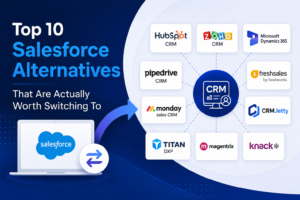
Here are ten Salesforce Alternatives that are genuinely worth a look.
HubSpot CRM
HubSpot is probably the most talked about Salesforce alternative out there, and for good reason. It offers a free tier that is actually usable, not just a stripped down demo, and the paid plans scale up nicely as your team grows. The interface feels a lot less intimidating than Salesforce, which makes onboarding new team members much faster. It is a strong pick for marketing and sales teams that want everything, email, pipelines, reporting, in one place without a steep learning curve.
Zoho CRM
Zoho has built a name for itself by offering an enormous amount of functionality at a fraction of Salesforce’s cost. It covers sales automation, analytics, and workflow management, and it plays nicely with the rest of the Zoho suite if you are already using their other tools. For small and mid sized businesses that want enterprise style features without an enterprise style price tag, Zoho is hard to beat.
Microsoft Dynamics 365
If your company already lives inside the Microsoft ecosystem, Dynamics 365 makes a lot of sense. It connects smoothly with Outlook, Teams, and Excel, so your sales and support teams are not constantly switching between apps. It is a more serious enterprise tool, similar in scale to Salesforce, but many businesses find the integration with tools they already use every day makes the transition worth it.
Pipedrive
Pipedrive was built with one goal in mind, helping sales teams manage their pipeline without extra clutter. It is visual, simple, and does not try to be everything for everyone. If your team finds Salesforce overwhelming and just wants a clean way to track deals and follow ups, Pipedrive is one of the easiest transitions you can make.
Freshsales by Freshworks
Freshsales brings built in phone and email tracking along with AI powered lead scoring, all wrapped in an interface that does not require a manual to figure out. It is a solid option for growing teams that want smart automation without needing a dedicated admin just to keep the system running.
monday sales CRM
monday.com expanded into CRM territory and brought its signature visual, flexible style with it. Teams that already use monday for project management often adopt the sales CRM because everything lives in one connected workspace. It is highly customizable, which makes it appealing to businesses with unique workflows that do not fit neatly into a traditional CRM structure.
Now, if switching your entire CRM feels like too big a leap, there is another path. A lot of businesses are perfectly happy with Salesforce as their core system but want a better, more affordable way to build customer and partner portals on top of it, instead of paying for Salesforce Experience Cloud. This next group of tools focuses on exactly that.
CRMJetty
CRMJetty specializes in building customer, partner, and vendor portals that connect directly to Salesforce, Dynamics 365, and Business Central. Instead of building a portal from scratch or paying for Experience Cloud licenses, businesses can get a launch-ready, no-code portal up and running in days. It comes with a drag-and-drop builder, flat fee pricing, and integrations with tools like Stripe, DocuSign, and SharePoint. Companies using it have reported things like fewer support tickets and faster partner onboarding, since customers and partners can self serve instead of waiting on your team. For businesses that want Salesforce data but not Salesforce-level portal costs, CRMJetty is worth a serious look.
Titan DXP
Titan DXP is built specifically for Salesforce and offers a strong no code, drag and drop portal builder. It is a great option if you know you want to stay fully inside the Salesforce ecosystem and just need a more flexible way to design portals and forms without writing code. The tradeoff is that it is Salesforce only, so it will not help if you are working with multiple CRMs.
Magentrix
Magentrix focuses heavily on partner relationship management, things like deal registration, partner training, and content sharing. It connects with several CRMs including Salesforce, SAP, Dynamics, and HubSpot, which makes it a good fit for companies that care about partner collaboration and community features as much as basic portal functionality.
Knack
Knack takes a different approach entirely. It is not tied to any single CRM, which gives you full control over how you build your portal or app and which systems you connect it to. That flexibility does come with a bit more setup work, since you will likely need some technical involvement to wire everything up. But for businesses that do not want to be locked into one CRM ecosystem long term, that independence can be a real advantage.
Which one is right for you
There is no single best answer here, it really depends on what problem you are trying to solve. If Salesforce itself feels too expensive or too complex for your team, HubSpot, Zoho, Pipedrive, Freshsales, monday sales CRM, or Dynamics 365 are all solid full replacements depending on your size and existing tools. If you actually like Salesforce and just want a better, more affordable portal experience for your customers or partners, CRMJetty, Titan DXP, Magentrix, and Knack each bring something different to the table depending on whether you need multi CRM flexibility, deep Salesforce integration, or strong partner focused features.
Take the time to think about your budget, how technical your team is, and what you actually need the tool to do day to day. The right fit usually becomes pretty obvious once you know what you are solving for.
Installing a solar photovoltaic (PV) system is one of the smartest long-term investments you can make for your home or business. A well-designed solar system can significantly reduce electricity bills, lower your carbon footprint, and provide reliable energy for 25 years or more. However, even the most efficient solar panels cannot perform at their best if dirt, dust, or debris blocks sunlight from reaching the photovoltaic cells.
Many solar system owners assume that rain keeps their panels clean. While rainfall can remove loose dust, it often leaves behind pollen, bird droppings, tree sap, mineral deposits, and other contaminants that gradually reduce energy production. In areas with high dust levels, heavy traffic, industrial pollution, or frequent bird activity, these deposits can build up much faster than many people realize.
During routine inspections, solar maintenance professionals often find that the dirtiest panels are not necessarily the oldest ones—they are the ones installed in environments where contamination accumulates quickly. A panel covered with bird droppings or a layer of dust may continue producing electricity, but its output can be noticeably lower than that of a clean panel operating under the same conditions.
Regular cleaning is therefore more than a cosmetic task. It is an important part of preventive maintenance that helps your system generate more electricity, reduces the risk of long-term surface damage, and protects the return on your solar investment.
In this guide, you’ll learn:
Why keeping solar panels clean matters
How dirt and debris affect electricity generation
How often solar panels should be cleaned
The safest cleaning methods
Common mistakes to avoid
When to hire a professional
Practical maintenance tips to maximize long-term performance
Whether you own a small residential rooftop system or manage a large commercial solar installation, these best practices will help you keep your system operating efficiently for years to come.
Why Solar Panel Cleaning Matters
Solar panels generate electricity when sunlight strikes photovoltaic cells beneath a layer of protective glass. The more sunlight that reaches these cells, the more electricity the system can produce.
Over time, however, airborne particles and environmental contaminants begin to accumulate on the glass surface. This process—known in the solar industry as soiling—reduces the amount of sunlight reaching the cells. While a light layer of dust may have only a modest effect, heavier contamination can significantly reduce energy production, particularly when it covers multiple cells or creates uneven shading.
Common sources of solar panel soiling include:
Wind-blown dust
Pollen
Bird droppings
Tree sap
Leaves and organic debris
Vehicle emissions
Industrial pollution
Salt spray in coastal regions
Construction dust
Ash from wildfires or agricultural burning
Snow and ice in colder climates
Each environment presents different maintenance challenges. For example, homes near farmland often experience increased pollen and soil deposits during planting and harvesting seasons, while properties close to busy roads may accumulate oily residue and airborne pollutants more quickly.
Ignoring these contaminants for long periods can gradually reduce your system’s efficiency and, in some cases, contribute to uneven heating that places additional stress on the affected solar cells.
How Dirty Solar Panels Affect Performance
One of the most common misconceptions among solar owners is that a little dirt makes no difference. In reality, even partial shading can affect how efficiently a photovoltaic panel generates electricity.
Solar cells within a panel are electrically connected. When one section receives less sunlight because of dirt or bird droppings, it can reduce the output of neighboring cells. This phenomenon is one reason why localized contamination often has a greater impact than many people expect.
The degree of energy loss depends on several factors, including:
The type of contaminant
The amount of surface coverage
Panel tilt angle
Local weather conditions
Rainfall frequency
Air pollution levels
Bird activity
Seasonal pollen
For example, a thin layer of dust spread evenly across a panel may reduce output only slightly. By contrast, thick bird droppings covering a small area can create concentrated shading that affects a disproportionately large portion of the panel’s performance.
Modern solar monitoring systems often allow homeowners to track daily and monthly energy production. If you notice a gradual decline in output despite similar weather conditions, accumulated dirt may be one of the first things to investigate.
Benefits of Regular Solar Panel Cleaning
Cleaning your solar panels on a regular schedule offers several important advantages beyond simply improving appearance.
1. Increased Energy Production
Clean panels allow more sunlight to reach the photovoltaic cells, helping the system generate electricity closer to its rated capacity. Although the exact improvement varies by location and environmental conditions, removing accumulated dirt can restore energy production that would otherwise be lost.
2. Better Return on Investment (ROI)
Solar systems represent a significant financial investment. Every additional kilowatt-hour your system produces offsets electricity purchased from the utility grid. Keeping panels clean helps maximize these savings throughout the system’s lifespan.
For homes participating in net metering or feed-in tariff programs, maintaining higher energy production may also increase the value of electricity exported back to the grid.
3. Longer Equipment Life
Routine cleaning provides an opportunity to inspect your system for potential problems such as cracked glass, loose mounting hardware, damaged wiring, corrosion, or deteriorating seals.
Identifying these issues early can prevent more expensive repairs and help extend the operational life of your solar installation.
4. Improved Safety
During scheduled maintenance, installers or homeowners can also identify hazards such as loose cables, nests built beneath panels, blocked drainage paths, or damaged roof flashing before they become serious problems.
5. Preserved Manufacturer Warranty
Many manufacturers recommend periodic inspections and proper maintenance throughout the life of the system. While routine cleaning alone may not be a warranty requirement, following the manufacturer’s care recommendations helps ensure the equipment remains in good condition.
Signs Your Solar Panels Need Cleaning
Solar panels don’t always look obviously dirty from the ground. In many cases, performance declines gradually before homeowners notice visible contamination.
Consider inspecting your panels if you observe any of the following:
Visible dust covering the glass
Bird droppings that remain after rainfall
Leaves or branches shading part of the array
Tree sap or sticky residue
Uneven discoloration across the panel surface
Mineral deposits or water spots
Noticeable decline in energy production
Heavy pollen accumulation during spring
Construction dust after nearby building work
Ash or soot following storms or wildfire events
Monitoring software provided with many modern inverters can be particularly helpful. If your system consistently generates less electricity than expected under similar weather conditions, a visual inspection is often the next logical step.
As a general rule, don’t wait until panels appear heavily soiled. A simple inspection every few months—especially after storms, high winds, or seasonal pollen events—can help identify when cleaning is actually needed rather than relying on a fixed schedule alone.
How Often Should You Clean Solar Panels?
There isn’t a one-size-fits-all cleaning schedule for every solar installation. The ideal frequency depends on your local environment, weather conditions, roof angle, and nearby sources of dust or debris.
For example, a home in a suburban neighborhood that receives regular rainfall may only need cleaning once or twice a year. On the other hand, a system installed near farmland, construction sites, factories, or busy roads may require much more frequent maintenance to maintain peak performance.
Rather than relying solely on a calendar, combine routine visual inspections with your solar monitoring data. If electricity production drops without an obvious change in weather or seasonal sunlight, it’s worth checking whether dirt or debris is affecting the panels.
Recommended Cleaning Frequency
Installation Environment
Suggested Inspection
Typical Cleaning Frequency
Residential areas with regular rainfall
Every 3 months
Every 6–12 months
Dusty or desert regions
Monthly
Every 2–4 months
Agricultural areas
Every 2 months
Every 3–6 months
Industrial locations
Monthly
Every 2–3 months
Coastal properties
Every 2–3 months
Every 3–4 months
Areas with frequent bird activity
Monthly
As needed after inspection
These are general recommendations. Always adjust your maintenance schedule based on actual panel condition and energy production rather than following fixed dates alone.
Factors That Influence Cleaning Frequency
Several environmental factors determine how quickly contaminants accumulate on solar panels.
Local Climate
Dry climates typically experience more airborne dust, while humid regions often see pollen, algae, or mold developing on panel surfaces. Coastal environments expose panels to salt deposits that can build up over time if not removed.
Roof Angle
Panels installed at steeper angles generally shed dust and rainwater more effectively than flat or low-slope installations. Flat-mounted systems usually require more frequent inspections because debris is less likely to wash away naturally.
Nearby Trees
Trees provide welcome shade for buildings, but they also increase maintenance needs. Leaves, pollen, seeds, and sticky tree sap can accumulate on panels throughout the year.
If birds frequently perch on nearby branches, droppings may also become a recurring issue.
Construction Activity
If new buildings, roads, or landscaping projects are taking place nearby, expect significantly higher levels of airborne dust. Temporary increases in cleaning frequency during construction can help prevent unnecessary energy losses.
Seasonal Changes
Many homeowners notice that their panels become dirtiest during specific times of the year rather than gradually throughout all seasons. Understanding these seasonal patterns helps create a more effective maintenance schedule.
Seasonal Solar Panel Cleaning Guide
Every season brings different maintenance challenges. Adjusting your inspections throughout the year helps keep your solar system operating efficiently.
Spring
Spring often brings large amounts of pollen, flower petals, and tree sap. These materials may not wash away completely with rain and can gradually form a sticky layer on the panel surface.
During spring inspections:
Remove pollen buildup.
Check for tree sap.
Inspect for nests built by birds beneath the panels.
Verify that nearby trees are not creating new shading.
Summer
Long daylight hours mean maximum energy production, making summer an important season for maintaining clean panels.
Look for:
Wind-blown dust
Bird droppings
Dry leaves
Insect residue
In particularly dry regions, dust can accumulate surprisingly quickly, even after only a few weeks without rain.
Autumn
Falling leaves and twigs are the biggest concern during autumn.
Inspect for:
Leaves trapped beneath panel frames
Organic debris blocking drainage
Branches creating shade
Moss growth in damp environments
Keeping debris off the roof also helps prevent water from pooling around the mounting system.
Winter
Winter maintenance varies greatly depending on location.
In areas that experience snow:
Allow snow to slide off naturally whenever possible.
Never use metal tools to remove ice.
Avoid striking frozen panels.
Inspect mounting hardware after severe storms.
Most modern solar panels are designed to withstand snow loads, but heavy accumulations may temporarily reduce electricity production until sunlight reaches the cells again.
Best Time of Day to Clean Solar Panels
Choosing the right time of day is almost as important as choosing the right cleaning method.
The safest and most effective times include:
Early morning
Late afternoon
Overcast days with mild temperatures
Avoid cleaning during the hottest part of the day.
When panels are exposed to intense sunlight, the glass surface can become extremely hot. Spraying cold water onto hot panels may create unnecessary thermal stress, while water evaporates so quickly that it often leaves mineral spots and streaks before cleaning is complete.
Cooler conditions allow water to remain on the surface longer, making it easier to loosen dirt and rinse away contaminants thoroughly.
Equipment You’ll Need
Using the correct equipment helps protect the anti-reflective coating found on most modern solar panels.
Professional installers typically recommend the following tools:
Soft microfiber cloths
Non-abrasive sponges
Soft-bristle brushes
Extension poles with padded cleaning heads
Rubber squeegee
Low-pressure garden hose
Bucket of clean water
Distilled or deionized water when available
Safety gloves
Non-slip footwear
Fall-protection equipment for roof work
For larger residential or commercial systems, water-fed pole systems using purified water can clean panels efficiently while minimizing streaks.
Step-by-Step Solar Panel Cleaning Process
Cleaning solar panels is relatively straightforward, but taking the proper approach helps prevent accidental damage.
Step 1: Review the Manufacturer’s Instructions
Before cleaning, check the maintenance recommendations provided by the panel manufacturer. Some manufacturers specify approved cleaning products or methods, while others recommend avoiding certain chemicals or equipment.
Following these guidelines helps protect both your equipment and any applicable warranty.
Step 2: Shut Down the Solar System
If your system requires roof access, follow the manufacturer’s shutdown procedure before beginning work.
Turning off the system reduces electrical risks while allowing you to work more safely around cables and connectors.
If you are unsure how to isolate the system safely, contact your installer before attempting maintenance.
Step 3: Perform a Visual Inspection
Before applying water, inspect the panels carefully.
Look for:
Cracked glass
Loose mounting brackets
Damaged wiring
Burn marks
Corrosion
Loose connectors
Animal nests
Signs of water intrusion
If you discover physical damage, postpone cleaning until the issue has been inspected by a qualified technician.
Step 4: Remove Loose Debris
Begin by gently rinsing the panels with clean, low-pressure water.
This removes:
Dust
Sand
Dry leaves
Loose dirt
Surface pollen
Removing loose particles first reduces the risk of scratching the glass during wiping.
Never use pressure washers, as high-pressure water can damage seals, electrical connections, and mounting components.
Step 5: Clean the Surface Gently
Using a soft sponge or microfiber cloth, clean the glass with clean water.
If necessary, use a small amount of mild soap approved by the panel manufacturer to loosen stubborn residue.
Avoid applying excessive pressure.
The goal is to lift contaminants from the surface—not scrub them aggressively.
Step 6: Remove Stubborn Bird Droppings
Bird droppings are one of the most common causes of localized shading.
Rather than scraping dried deposits, soak them with water for several minutes until they soften naturally.
Then wipe them away gently using a microfiber cloth or soft sponge.
Patience is far safer than force.
Step 7: Rinse Thoroughly
After cleaning, rinse the panels completely to remove any remaining soap or residue.
Leftover cleaning products can attract dirt over time or leave visible streaks that reduce light transmission.
Whenever possible, use deionized or distilled water for the final rinse, particularly in areas with hard water.
DIY vs. Professional Solar Panel Cleaning: Which Option Is Right for You?
One of the most common questions solar system owners ask is whether they should clean their panels themselves or hire a professional. The answer depends on several factors, including the size of the system, roof accessibility, the level of dirt buildup, and your comfort working at heights.
For many homeowners, light cleaning of easily accessible, ground-mounted solar panels can be done safely with the right tools and proper precautions. However, rooftop systems often present additional safety risks that make professional cleaning a worthwhile investment.
When DIY Cleaning Makes Sense
If your solar panels are easy to reach without climbing onto a steep roof, cleaning them yourself can be both practical and cost-effective.
DIY cleaning is generally suitable when:
The system is ground-mounted or installed on a single-story home.
The panels require only light cleaning.
You have the recommended cleaning equipment.
The manufacturer’s maintenance guidelines permit owner cleaning.
You can work safely without risking a fall.
A simple rinse followed by gentle cleaning with purified water and a microfiber cloth is often sufficient to remove dust and light debris.
However, safety should always take priority over saving money. If reaching the panels requires walking on a steep roof or working near electrical components, professional assistance is the safer choice.
When It’s Best to Hire a Professional
Professional solar panel cleaning companies have specialized equipment, safety training, and experience inspecting photovoltaic systems. In addition to cleaning the panels, technicians often identify maintenance issues that homeowners might overlook.
Professional cleaning is recommended for:
Multi-story homes
Commercial buildings
Large residential systems
Solar farms
Panels installed on steep or fragile roofs
Systems with significant bird droppings or tree sap
Installations requiring safety harnesses or elevated work platforms
Many service providers also perform basic system inspections during cleaning, checking for loose wiring, damaged mounting hardware, cracked glass, corrosion, or signs of water intrusion.
These preventive inspections can help identify small problems before they become expensive repairs.
Comparing DIY and Professional Cleaning
Factor
DIY Cleaning
Professional Cleaning
Initial Cost
Lower
Higher
Safety
Depends on roof access
High with trained technicians
Equipment Quality
Basic household tools
Specialized professional equipment
Inspection Included
Limited
Comprehensive visual inspection
Cleaning Quality
Good for light soiling
Excellent for heavy contamination
Risk of Damage
Higher if improper tools are used
Lower when performed by experienced professionals
For many homeowners, a practical approach is to perform regular visual inspections themselves while scheduling a professional cleaning and inspection once every year or two.
Solar Panel Cleaning Safety Tips
Solar panel maintenance should never compromise personal safety. Most injuries associated with solar cleaning are related to falls rather than the panels themselves.
Before beginning any cleaning project, consider the following safety guidelines.
1. Turn Off the System
Always follow the shutdown procedure recommended by your installer or equipment manufacturer before performing maintenance.
Although solar panels continue generating electricity when exposed to sunlight, isolating the system reduces unnecessary electrical risks while working around cables and connectors.
2. Never Walk on Solar Panels
Solar panels are engineered to withstand wind, hail, and snow loads—not the concentrated weight of a person.
Walking directly on the panels can:
Crack the protective glass
Damage photovoltaic cells
Void manufacturer warranties
Reduce long-term performance
Always work from the roof surface or use appropriate extension tools instead of stepping onto the panels.
3. Use Proper Fall Protection
If roof access is necessary:
Use a stable ladder.
Wear non-slip footwear.
Secure the ladder on a level surface.
Use an approved safety harness when appropriate.
Avoid working alone.
If conditions feel unsafe, postpone the work or hire a qualified professional.
4. Avoid Cleaning During Bad Weather
Never clean solar panels during:
Rain
High winds
Thunderstorms
Frost or icy conditions
Extreme heat
Wet roofs become extremely slippery, increasing the likelihood of accidents.
Cleaning Products You Should Never Use
Solar panels are protected by a durable, anti-reflective glass coating that helps maximize sunlight absorption. While this coating is designed to withstand outdoor conditions, harsh cleaning products can permanently damage it.
Avoid using:
Abrasive scouring pads
Steel wool
Wire brushes
Harsh household detergents
Bleach
Ammonia-based cleaners
Strong solvents
Acidic cleaning solutions
Pressure washers
High-pressure steam cleaners
Instead, use clean water, a soft microfiber cloth, and—if recommended by the manufacturer—a mild, non-abrasive cleaning solution specifically formulated for solar panels.
Common Solar Panel Cleaning Mistakes
Even well-intentioned maintenance can reduce panel performance if the wrong methods are used.
Cleaning During Midday
Cleaning hot panels causes water to evaporate quickly, leaving mineral deposits and streaks behind. Sudden temperature changes may also place unnecessary stress on the glass.
Using Hard Water Without Rinsing
Hard water contains minerals that remain on the surface after evaporation, reducing light transmission over time.
Whenever possible, perform a final rinse with distilled or deionized water.
Scrubbing Too Aggressively
Stubborn stains should be soaked and loosened rather than scrubbed with excessive force.
Aggressive scrubbing increases the risk of scratching the protective coating.
Ignoring Performance Monitoring
Many homeowners only inspect their panels when visible dirt appears.
Regularly checking your inverter or monitoring app helps identify gradual performance declines before they become significant.
Forgetting Nearby Vegetation
Trees continue growing long after a solar installation is completed.
Trim branches periodically to reduce shading, leaf accumulation, and bird activity above the panels.
Does Rain Clean Solar Panels?
Rain helps—but it should not be considered a complete cleaning solution.
Light rainfall usually removes loose dust from the surface, but it rarely eliminates contaminants such as:
Bird droppings
Sticky pollen
Tree sap
Industrial pollution
Salt deposits
Oily residue from vehicle emissions
In some regions, rainwater itself may contain airborne pollutants that leave additional residue after drying.
Think of rainfall as a natural rinse rather than a complete maintenance strategy.
Regular inspections remain the most reliable way to determine when manual cleaning is necessary.
Commercial Solar Panel Cleaning
Commercial and utility-scale solar installations require a more structured maintenance approach than residential systems.
Because these systems often consist of hundreds or thousands of panels, even small efficiency losses can translate into significant financial impacts over time.
Professional commercial maintenance programs typically include:
Scheduled cleaning based on environmental conditions
Drone-assisted visual inspections
Thermal imaging to identify hotspots
Performance benchmarking
Electrical safety inspections
Mounting structure assessments
Preventive maintenance reporting
Many commercial operators also use purified-water cleaning systems that leave no mineral residue, allowing large arrays to be cleaned efficiently without the need for detergents.
By combining routine inspections with scheduled cleaning, businesses can maintain consistent energy production, reduce downtime, and protect the long-term value of their solar investment.
Part 4: Cost, Maintenance Checklist, Environmental Benefits, FAQs & Conclusion
How Much Does Solar Panel Cleaning Cost?
The cost of professional solar panel cleaning varies depending on several factors, including the size of the solar array, roof accessibility, geographic location, and the amount of dirt or debris that has accumulated.
While prices differ between service providers, most homeowners find that routine cleaning is a relatively small expense compared to the long-term financial benefits of maintaining optimal energy production.
Factors that influence cleaning costs include:
Number of solar panels
Roof height and slope
Ease of roof access
Type and severity of contamination
Location of the property
Whether inspection services are included
Frequency of scheduled maintenance
Some cleaning companies offer annual maintenance plans that include regular inspections, panel cleaning, and basic system health checks. These plans can be particularly beneficial for homeowners living in dusty, coastal, or high-pollution environments where panels require more frequent attention.
Rather than focusing solely on the cost of cleaning, consider the value of maintaining consistent electricity generation throughout the system’s lifespan. Preventive maintenance often costs far less than the revenue or energy savings lost from reduced panel performance.
Solar Panel Maintenance Checklist
Cleaning is only one aspect of proper solar system maintenance. Performing regular inspections helps identify potential issues before they develop into expensive repairs.
Use the following checklist throughout the year:
Monthly
Review energy production using your monitoring system.
Look for sudden drops in performance.
Check for new shading caused by growing trees or nearby construction.
Every Three to Six Months
Inspect panel surfaces for dust, bird droppings, leaves, and tree sap.
Remove debris from around the array.
Check that rainwater drains freely around the panels.
Inspect visible wiring for signs of wear or animal damage.
Annually
Schedule a professional inspection if roof access is difficult.
Verify that mounting hardware remains secure.
Inspect roof penetrations and flashing for signs of leaks.
Check the inverter for warning lights or error messages.
Confirm that ventilation around electrical components remains unobstructed.
After Severe Weather
Following storms, hail, or strong winds:
Inspect the panels for cracks or chips.
Look for loose mounting brackets.
Check for fallen branches or debris.
Monitor system output over the following days for unexpected performance changes.
Keeping a simple maintenance log can also help identify gradual changes in system performance over time.
Environmental Benefits of Keeping Solar Panels Clean
A well-maintained solar energy system contributes more effectively to a cleaner and more sustainable energy future.
When solar panels operate efficiently, they produce more renewable electricity using the same amount of installed equipment. This helps reduce reliance on fossil fuel-generated power and lowers greenhouse gas emissions associated with traditional electricity production.
Regular cleaning also supports sustainability by:
Maximizing renewable energy generation.
Reducing unnecessary electricity imports from the grid.
Extending the service life of solar equipment.
Lowering the environmental impact associated with manufacturing replacement components.
Reducing electronic waste by helping systems remain operational for decades.
Although cleaning requires a small investment of time or resources, the long-term environmental benefits often outweigh the maintenance effort.
How Regular Cleaning Improves Return on Investment (ROI)
Installing a solar energy system is a long-term financial decision. Every kilowatt-hour generated helps offset electricity purchased from your utility provider.
When dirt, pollen, bird droppings, or other contaminants reduce panel performance, the system generates less electricity than it is capable of producing. Over months and years, these seemingly small losses can accumulate into a noticeable reduction in energy savings.
Routine cleaning helps maximize your return on investment by:
Increasing annual electricity production.
Shortening the system’s payback period.
Improving long-term energy savings.
Supporting higher export values for homes participating in net metering or feed-in tariff programs.
Helping maintain consistent performance throughout the system’s expected lifespan.
For businesses operating large solar installations, even modest improvements in system efficiency can translate into substantial financial gains over many years.
Frequently Asked Questions
Does rain clean solar panels?
Rain removes loose dust, but it typically does not remove bird droppings, tree sap, pollen, oily residue, or mineral deposits. Regular inspections remain the best way to determine whether manual cleaning is necessary.
How often should solar panels be cleaned?
Most residential systems benefit from cleaning every six to twelve months. However, installations in dusty, coastal, agricultural, or industrial environments may require more frequent maintenance.
Can dirty solar panels reduce electricity production?
Yes. Dirt and debris reduce the amount of sunlight reaching the photovoltaic cells, which can lower electricity generation. The degree of impact depends on the type and amount of contamination.
Is it safe to use a pressure washer?
No. High-pressure water can damage seals, electrical connections, and mounting components. A low-pressure hose or purified-water cleaning system is much safer.
Can I use dish soap?
If the panel manufacturer approves it, a small amount of mild, non-abrasive soap may be used when necessary. Avoid harsh detergents, bleach, ammonia, or solvent-based cleaners.
Should I walk on my solar panels?
No. Walking on solar panels can crack the glass, damage internal cells, and potentially void the manufacturer’s warranty.
What type of water is best?
Deionized or distilled water is ideal because it leaves minimal mineral residue after drying. If using tap water, rinse thoroughly to reduce spotting.
Does snow damage solar panels?
Most modern solar panels are engineered to withstand typical snow loads. However, heavy snow temporarily blocks sunlight until it melts or slides off naturally.
How do I know if my panels need cleaning?
Monitor your inverter or solar monitoring app. If electricity production declines despite similar weather conditions, inspect the panels for dirt or debris.
Is professional cleaning worth the cost?
For difficult roof access, large systems, or heavily soiled panels, professional cleaning often provides greater safety, a more thorough inspection, and better long-term maintenance.
Final Thoughts
Solar panels require relatively little maintenance compared with many other home improvements, but they should never be completely ignored.
Routine inspections, timely cleaning, and preventive maintenance help ensure that your system continues producing electricity efficiently year after year.
Whether you choose to clean your panels yourself or hire a qualified professional, the key is consistency. Removing dirt before it becomes severe, monitoring system performance regularly, and following manufacturer recommendations can extend the life of your solar installation while protecting the financial return on your investment.
Rather than waiting until energy production declines noticeably, make solar panel maintenance part of your regular property care routine. A small investment in preventive maintenance today can help your solar system deliver reliable, clean energy for decades to come.
Conclusion
Solar energy is one of the most dependable and cost-effective renewable energy solutions available today, but its long-term success depends on proper maintenance. Clean solar panels capture more sunlight, generate more electricity, and help maximize the value of your investment.
By understanding how environmental conditions affect panel performance, following safe cleaning practices, and scheduling regular inspections, homeowners and businesses can maintain high system efficiency while reducing the likelihood of costly repairs.
Whether your solar array is installed on a residential rooftop or a large commercial facility, a proactive maintenance plan will help ensure reliable energy production throughout its lifespan.
Remember: A clean solar panel isn’t just about appearance—it’s about protecting performance, extending equipment life, and getting the most from every ray of sunshine.
Camping in remote spots is one of the best ways to get away from noise and reconnect with nature. But remote places often lack power. That makes it hard to use devices, charge batteries, or run small appliances. Folding solar panels solve this problem. They are compact, lightweight, and easy to use. This blog explains why folding solar panels are an ideal choice for remote camping and for people who travel in caravans.
What are Folding Solar Panels?
A folding solar panel is a portable solar array built into a case or hinged sections. Each section has one or more solar cells. When folded, the unit becomes flat and compact. When opened, it exposes a larger surface to the sun. Many models include a carry handle, built-in kickstand, or protective cover. Some have an integrated charge controller and outputs for USB, 12V, or DC connectors.
Benefits for Remote Camping
Portability and Low Weight
Folding solar panels are light and easy to carry. Hikers and campers can put them in a backpack or vehicle without much hassle. This makes them perfect for tents, shelters, or off-grid cabins. You don’t need a heavy battery bank or a generator to get basic power.
Fast Setup and Use
Setting up a folding solar panel takes minutes. Lay it on the ground, angle it toward the sun, and connect your device. There is no need to install permanent mounts or run cables. This speed is useful for short stays or when you move campsites frequently.
Flexible Charging Options
Most folding solar panels offer multiple output ports. You can charge phones, tablets, cameras, and power banks through USB. Many models also provide 12V output or DC tips to charge portable fridges, lights, or battery packs used in caravans. This flexibility makes the folding solar panel fit different camping needs.
Good Efficiency for Small Loads
Modern folding solar panels use high-efficiency solar cells. These deliver enough power to keep devices charged during the day. For basic power needs—lighting, communications, and small appliances—a folding solar panel is often enough. When paired with a small battery or power bank, it provides reliable overnight power.
Durability and Weather Resistance
Many folding solar panels are built for outdoor use. They have weather-resistant materials, reinforced corners, and protective covers. Some come with dust- and water-resistance ratings. This helps them survive rough outdoor conditions common in remote camping.
Why Caravans Use Folding Solar Panels
Space-Saving Design
Caravans usually have limited storage space. Folding solar panels can be folded flat and stowed easily. They allow travelers to carry extra solar capacity without taking up permanent roof space. This is useful for people who rent or use multiple vehicles.
Supplemental Power
Folding solar panels for caravans provide supplemental power to the caravan’s main electrical system. They can top up leisure batteries during the day. This reduces the need to run the vehicle engine for charging or to rely on campsite hookups.
Portable Backup
A folding solar panel doubles as a portable backup if the caravan’s rooftop panels fail or produce less power. You can move the folding panel to a sunny spot on the ground while parked under trees or in partial shade. That flexibility lets you maximize solar gain in varied conditions.
What to Consider When Choosing a Folding Solar Panel
Power Output and Wattage
Choose a folding solar panel with enough wattage for your needs. Small units (10–30W) can charge phones and small devices. Medium units (50–120W) can run fridges, charge batteries, and support campervan appliances. Larger folding solar panels are available, but check the weight and size before buying.
Port Types and Compatibility
Check the output ports. USB-A and USB-C are handy for phones and tablets. 12V outputs and DC tips work with camping fridges, lights, and battery chargers. Some panels include an integrated MPPT or PWM charge controller; others require an external controller when charging 12V battery systems.
Build Quality and Durability
Look for robust materials and reinforced edges. Weather resistance ratings (IP ratings) are useful for rainy or dusty environments. Check how well the folding joints hold up under repeated use. Also confirm whether the surface is scratch-resistant and whether the panel includes a protective carrying case.
Weight and Packability
Balance power needs with weight. Higher wattage usually means heavier panels. For long treks, prioritize lightweight panels. For vehicle-based camping or caravans, you can choose heavier but higher-output models.
Compatibility with Battery Systems
If you plan to charge a caravan or portable battery, make sure the folding solar panel works with your battery type (lead-acid, AGM, GEL, or lithium). If the panel lacks an internal charge controller, buy an MPPT controller for improved charging efficiency and battery protection.
Practical Tips for Using Folding Solar Panels While Camping
Positioning for Maximum Sun
Point the panel toward the sun for the best output. Early morning and late afternoon produce less power than midday. Use a fold-out stand or prop the panel on rocks to get the ideal angle. For best results, reorient the panel every 1–2 hours as the sun moves.
Avoid Shade and Reflections
Even small shadows can cut output dramatically. Keep the panel clear of shade from trees, tents, and people. Avoid placing shiny objects nearby that can reflect light away from the panel surface.
Store and Transport Carefully
Folded panels are built to be transportable, but they still need care. Keep them in their case, and avoid placing heavy items on top. Clean the surface with a soft cloth to remove dust and dirt before and after use.
Use a Battery Buffer for Steady Power
Solar energy varies during the day. A battery bank or portable power station smooths out fluctuations and stores energy for night use. Even a small 20,000 mAh power bank can make a big difference for overnight lighting, phone charging, or running small devices.
Combine Panels When Needed
If one folding solar panel doesn’t supply enough power, connect two panels in parallel or series if the manufacturer supports it. This increases output or voltage to match larger battery systems. Always check compatibility before linking multiple panels.
Common Myths and Facts
Myth: Folding Panels Don’t Generate Enough Power
Fact: Modern folding solar panels can have high-efficiency cells that produce enough energy for common camping needs. Wattage and sunlight exposure determine real output.
Myth: They Are Fragile and Break Easily
Fact: Quality folding solar panels are designed for outdoor use and are rugged. Look for reinforced edges and good warranties.
Myth: Only Useful for Short Trips
Fact: With the right wattage and a battery buffer, folding solar panels can support longer off-grid trips and caravan stays.
Example Setup for a Weekend Camping Trip
Folding solar panel: 80W, folding design with carry handle.
MPPT charge controller: Matches panel to a 12V battery.
Battery pack: 100–200Wh portable power station or a 12V leisure battery.
Outputs: USB for phones, 12V for fridge, AC inverter only if needed.
Extras: Extra cables, a small folding stand, and a protective bag.
Conclusion
Folding solar panels bring practical power to remote camping. They are portable, easy to use, and flexible. For caravans, they add useful supplemental power and a portable backup option. Choosing the right wattage, connectors, and build quality will make a folding solar panel one of the most helpful tools on your next trip off the grid. Use a battery buffer for overnight needs and follow simple setup tips to get the most from your solar kit.
Tech professionals cannot be categorised as either passive or active candidates; they are always on. They are aware of their values and prepared to take the next opportunity at a moment’s notice, but this is bad news for you as a tech recruiter.
This scenario describes the “always-on” candidate, a high-value professional in the 2026 tech market who is continuously gauging their career value, making them nearly impossible to lock down until an offer is formally accepted.
So, how to succeed in the era of the always-on candidate? Let us know what professionals have to say about this. The expert tech recruiter tips are coming in this guide that can help you know how to hire top candidates.
How to Hire Top Candidates
Developing a Sourcing Strategy helps Engage Candidates Effectively.
Developing a proactive sourcing strategy improves candidate engagement by enabling targeted, personalized outreach to passive talent, reducing time-to-fill, and building diverse talent pipelines before vacancies occur. It moves beyond reactive, post-and-pray methods to establish meaningful, long-term relationships that increase the likelihood of attracting top-tier talent.
Tailoring communications to highlight candidate-specific skills rather than generic roles, which fosters higher response rates, is needed. Researching and nurturing potential candidates ahead of demand ensures a ready pipeline of qualified prospects, here is more:
A structured approach enables recruiters to spend their time on higher-value activities and provides a better experience for the candidate, leading to better hiring outcomes.
Analyzing which channels provide the best talent to refine and improve future engagement efforts needs to be done while recruiting.
Utilizing employee networks and previous applicants to find candidates who are already familiar with the company culture.
Engaging Potential Candidates on their Turf: Online Forums
Engaging potential candidates on their turf, such as online forums, niche communities, and discussion boards like Reddit or Discord, is important because it enables recruiters to connect with highly specialized, passive talent in an authentic, non-corporate environment. This approach fosters trust, improves candidate quality, and lowers the cost of acquisition compared to traditional job boards.
Top candidates often don’t browse job boards. They spend time in niche forums, GitHub, or Discord discussing industry trends, solving problems, and sharing work. Unlike cold LinkedIn messages, engaging in forums allows recruiters to connect in a more authentic, community-driven way. This builds rapport before asking for a resume.
Get Personal, Fast to build Alliances.
To succeed in the long term, every tech recruiter needs to dig in and build strong alliances with candidates, but how? By showing candidates that you are invested in their future and growth, not just the gig at hand.
Offering training and knowledge to the candidates, free tutoring can help them learn and grow along with the organization. Getting personal and building alliances fast is critical for top recruitment because it shifts the process from a transactional, resume-swapping activity to a trust-based partnership. In a competitive market, this approach, often referred to as strategic alliance building, allows recruiters to access passive talent, secure higher quality candidates, and fill roles 40-60% faster.
Massive Opportunity in Tech Equals High Turnover
The good news? Millions of coders, software architects, and CIOs are out there right now with a “never say never” attitude to new career opportunities. As of early 2026, this high turnover is fueled by a desire for new challenges, AI-driven opportunities, and the need for specialized skills, rather than just dissatisfaction. Median employee tenures at top tech companies have been very low, sometimes around 1 year.
While turnover is high, companies are shifting toward skills-based hiring, prioritizing specific expertise over degrees. The talent market is seen less as “frozen” and more as “redistributed,” with urgent demand for roles involving infrastructure, security, and AI.
Recruiters Must Get More Technical Than Ever
In the rapidly evolving talent landscape of 2026, recruiters must move beyond traditional “resume shuffling” and become deeply technical, both in their understanding of, and interaction with, new technologies.
With AI redefining hiring workflows, recruiters who succeed are those who build “AI twins” to handle manual tasks, allowing them to focus on high-value human interaction and complex, technical talent sourcing.Modern “Tech Recruitment Agencies” are building AI counterparts to handle 24/7 sourcing, screening, and follow-up, saving roughly 15 hours a week.
Recruiters must understand basic terminology like DevOps, backend/frontend, and specific frameworks like React or Node.js to convey credibility with candidates. These things will help hire top candidates for the organisation.
Artificial Intelligence has become a must have for businesses. It is no longer for big technology companies. Now every company needs Artificial Intelligence to stay competitive.
For Chief Executive Officers, understanding Artificial Intelligence is very important. They do not need to know how to build machines that can think. They need to know how Artificial Intelligence is changing the way companies work.
The companies that are doing well are not always the ones with the money. They are the companies that can adapt to technologies quickly.
As Artificial Intelligence keeps changing business leaders need to stay up to date with the trends. Here are some of the important Artificial Intelligence development trends every Chief Executive Officer should know.
Trends in Artificial Intelligence Development
1. Generative Artificial Intelligence Is Becoming a Help for Businesses
Generative Artificial Intelligence was first used to create content and images.. Now it is used for many other things.
Today businesses are using Generative Artificial Intelligence to:
* Make documents
* Create business reports
* Write software code
* Look at what customersre saying
* Make it easier for employees to talk to each other
The good thing about Generative Artificial Intelligence is that it does not replace employees. It helps employees focus on work while Artificial Intelligence does the boring tasks.
2. Artificial Intelligence Agents Are Changing the Way Companies Work
One of the growing trends in Artificial Intelligence development is the use of Artificial Intelligence agents.
Artificial Intelligence agents are not like chatbots. They can do tasks make decisions and work with systems without help.
Examples include:
* Scheduling meetings
* Managing customer support tickets
* Looking at business numbers
* Helping customers
* Creating reports
Many business leaders think of Artificial Intelligence agents like employees who work with human teams.
8. Artificial Intelligence Is Helping Employees Get More Work Done
One of the misconceptions about Artificial Intelligence is that it is going to replace employees.
In reality successful companies use Artificial Intelligence to help employees get work done.
Employees spend a lot of time doing tasks like:
* Writing reports
* Scheduling meetings
* Entering data
* Making documents
* Finding information
Artificial Intelligence can automate these tasks so employees can focus on work and solving problems.
The successful Chief Executive Officers understand that Artificial Intelligence works best when humans and technology work together.
9. Multimodal Artificial Intelligence Is Creating New Opportunities
Old Artificial Intelligence systems can only look at one type of information at a time.
Multimodal Artificial Intelligence can look at types of information at the same time including:
* Text
* Images
* Audio
* Video
* Documents
This creates opportunities for businesses.
For example customer support systems can look at a customers written message, uploaded image and spoken explanation all at the time to provide better help.
10. Artificial Intelligence Is Becoming a Core Business Strategy
The important trend that Chief Executive Officers need to understand is that Artificial Intelligence is not just a technology initiative.
It is becoming a business strategy.
Companies are using Artificial Intelligence to:
* Make customer experiences better
* Get work done
* Create ways to make money
* Make innovation happen faster
* Stay competitive
Companies that invest in Artificial Intelligence development services in USA are starting to see Artificial Intelligence as a long-term plan for growth than just a short-term technology project.
The companies that will succeed in the future are the ones that make Artificial Intelligence a part of their plan.
The Human Side of Artificial Intelligence
While people often talk about the technology side of Artificial Intelligence the human side is just as important.
Employees might worry about their jobs.
Managers might struggle with changing processes.
Customers might have concerns about privacy and trust.
Successful Chief Executive Officers understand that Artificial Intelligence is ultimately about people.
It is easier for companies to adopt Artificial Intelligence when leaders communicate clearly provide training and show how Artificial Intelligence can create opportunities.
Artificial Intelligence is changing the way businesses work, compete and grow.
From Generative Artificial Intelligence and Artificial Intelligence agents to cybersecurity, personalization and predictive analytics the trends shaping Artificial Intelligence development today will have an impact on business success tomorrow.
For Chief Executive Officers understanding these trends is not about becoming experts. It is about making informed decisions that will help their companies grow and succeed in the long term.
Companies that use Artificial Intelligence in a responsible and strategic way will be better prepared to navigate the opportunities and challenges of the digital future.
Asked Questions (FAQs)
1. Why should Chief Executive Officers pay attention to Artificial Intelligence development trends?
Artificial Intelligence is changing customer expectations, how companies work and how they make decisions. Chief Executive Officers who understand Artificial Intelligence trends can make strategic decisions.
2. What is the biggest Artificial Intelligence trend affecting businesses today?
Generative Artificial Intelligence and Artificial Intelligence agents are two of the important trends right now. They are changing productivity, automation and customer engagement.
3. How can Artificial Intelligence improve business operations?
Artificial Intelligence can automate tasks make customer experiences better improve forecasting strengthen cybersecurity and provide business insights.
4. Should small and medium-sized businesses invest in Artificial Intelligence?
Yes. Modern Artificial Intelligence solutions are becoming more accessible and affordable so businesses of all sizes can benefit from automation and smart decision-making.
5. How can a custom Artificial Intelligence development company help businesses?
A custom Artificial Intelligence development partner can build tailored Artificial Intelligence solutions integrate Artificial Intelligence into existing systems provide guidance and ensure that Artificial Intelligence is implemented in a way that aligns with business goals.
Call to Action (CTA)
Artificial Intelligence is changing industries very quickly. Whether you are exploring Generative Artificial Intelligence, automation, predictive analytics or enterprise Artificial Intelligence solutions working with the right experts can help you succeed.
Mobile learning has quietly become one of the most powerful shifts in modern education. What once started as simple video lessons on smartphones has now evolved into fully interactive, AI-powered learning ecosystems.
In 2026, mobile learning apps are no longer just supporting education—they are reshaping it.
Students, professionals, and organizations now rely on mobile platforms for continuous learning. Whether it is upskilling for a new job, corporate training, or academic preparation, learning has become more flexible, personalized, and accessible than ever before.
Behind this transformation is rapid innovation in AI, cloud computing, adaptive learning systems, and immersive technologies. And at the center of this ecosystem are companies providing advanced solutions like elearning app development company and specialized digital learning platforms.
Let’s explore what the future of mobile learning apps looks like in 2026—and why it matters more than ever.
The Future of Mobile Learning Apps in 2026
AI Is Redefining the Learning Experience
Artificial Intelligence is no longer a “future feature” in education apps—it is the core engine driving personalization.
Modern learning platforms now use AI to:
Analyze learner behavior
Identify strengths and weaknesses
Recommend personalized learning paths
Adjust difficulty levels dynamically
Provide real-time feedback
This shift is making learning feel less like a rigid system and more like a guided journey.
Many organizations are partnering with an e-learning app development company to integrate AI-driven personalization into their education platforms.
The result is simple: learners stay engaged longer and perform better because the content adapts to them—not the other way around.
Rise of Hyper-Personalized Learning Paths
One of the strongest trends in 2026 is hyper-personalization.
No two learners are the same. Some prefer video-based learning, others prefer reading or interactive simulations.
Modern mobile learning apps now build personalized ecosystems based on:
Learning speed
Knowledge gaps
Preferred content formats
Performance history
Behavioral patterns
This level of personalization is being delivered through custom e-learning app development solutions that allow businesses to design tailored educational journeys.
Instead of a fixed curriculum, learners now experience dynamic education systems that evolve with them.
Microlearning Is Becoming the Standard
Attention spans are shrinking, but learning demands are increasing.
This contradiction has made microlearning one of the most dominant trends in mobile education.
Instead of long lessons, users now prefer:
3–7 minute video modules
Quick quizzes
Flashcards
Scenario-based exercises
Daily learning challenges
Microlearning is especially effective for working professionals who want to learn during short breaks or commutes.
They provide AI integration, scalable architecture, gamification systems, and immersive learning features.
4. Are mobile learning apps effective for corporate training?
Yes, they improve flexibility, engagement, and completion rates for employee training programs.
5. What technologies are shaping the future of edtech apps?
AI, AR/VR, cloud computing, analytics, and adaptive learning systems are the key technologies.
Call to Action (CTA)
Ready to Build the Future of Learning?
The future of education is mobile, intelligent, and personalized.
If you are planning to build a next-generation learning platform, partnering with a professional e-learning app development company can help you bring your vision to life.
We specialize in building scalable, AI-powered, and interactive learning solutions designed for modern learners.
E-learning is no longer something “optional” in the digital economy. It has quietly become the backbone of modern education, corporate training, and skill development.
What’s interesting is how fast learner behavior has changed. People don’t want long classroom sessions anymore. They want short, interactive, personalized, and mobile-first learning experiences that fit into their daily routine.
In 2026, e-learning apps are no longer just digital libraries of videos and PDFs. They are intelligent ecosystems powered by AI, data, and behavioral insights.
And behind these platforms, there is a growing demand for an experienced elearning app development company that understands not only technology but also how humans actually learn.
Let’s explore the key trends shaping this industry.
1. AI-Powered Learning Is Becoming the Core Engine
Artificial Intelligence is no longer a feature—it is the foundation of modern e-learning platforms.
Today’s systems can:
Track learner progress
Detect weak areas
Adjust difficulty levels
Recommend personalized lessons
This shift is making learning more adaptive and less frustrating.
Businesses investing in elearning app development services are now prioritizing AI-driven personalization because it directly improves completion rates and learner engagement.
Instead of forcing everyone through the same path, AI creates unique learning journeys for each user.
2. Microlearning Is Changing How Content Is Delivered
Attention spans are shorter than ever.
So instead of long modules, modern apps focus on:
3–5 minute lessons
Quick quizzes
Flashcards
Scenario-based content
This method fits perfectly into busy lifestyles.
Companies adopting custom elearning app development services are building content systems designed around microlearning behavior, not traditional classroom formats.
The result is better retention and higher engagement.
3. AI Tutors Are Becoming Standard in Learning Apps
One of the biggest shifts in 2026 is the rise of AI tutors.
These systems act like personal learning assistants that:
Explain concepts instantly
Answer questions anytime
Provide step-by-step guidance
Suggest learning paths
This removes dependency on fixed schedules or human availability.
Video meeting apps have become an essential part of how people communicate, collaborate, and conduct business. What started as a convenient way to connect remotely has evolved into a critical tool for organizations worldwide.
Whether it’s a remote team discussing a project, a teacher conducting an online class, a healthcare professional consulting a patient, or a business leader meeting with international clients, video communication has become a normal part of everyday life.
But what actually makes a great video meeting app?
Many businesses focus on adding more features, yet users often care about something much simpler: reliability, ease of use, and a seamless communication experience.
Organizations investing in video conferencing app development are increasingly discovering that success isn’t about building the most complicated platform—it’s about creating one that people genuinely enjoy using.
Let’s explore the features and qualities that matter most.
Video Meeting Apps
Clear Audio Is More Important Than Perfect Video
When people think about video calls, they usually focus on visuals.
However, audio quality often has a greater impact on the overall meeting experience.
The best video meeting apps don’t constantly remind users they’re using technology.
Instead, they fade into the background and allow people to focus entirely on communication.
That’s what great design looks like.
Looking Ahead
The future of video communication will likely include:
Smarter AI assistance
Better collaboration tools
Improved security
More immersive experiences
Faster global connectivity
However, the fundamentals will remain unchanged.
People want reliable, simple, and effective communication.
The platforms that understand this will continue to succeed.
Conclusion
Video meeting apps have become one of the most important communication tools in the modern world.
From clear audio and strong security to collaboration features and AI-powered productivity tools, every element contributes to the overall user experience.
The goal is helping people communicate, collaborate, and connect more effectively.
The most successful platforms are the ones that make technology feel invisible and conversations feel effortless.
Frequently Asked Questions (FAQ)
1. What is video conferencing app development?
Video conferencing app development involves creating software solutions that enable users to communicate through real-time video, audio, messaging, and collaboration features.
2. Why is WebRTC commonly used in video conferencing platforms?
WebRTC enables real-time communication directly through browsers and applications, providing low latency, high performance, and cross-platform compatibility.
3. What security features should a video meeting app include?
Essential features include end-to-end encryption, authentication controls, password protection, participant management, and secure data transmission.
4. Can video conferencing apps support large-scale events?
Yes. Modern platforms can support webinars, virtual conferences, live streaming events, and thousands of concurrent participants when built with scalable infrastructure.
5. How long does it take to develop a video conferencing application?
The timeline depends on complexity, features, integrations, and scalability requirements. Basic platforms may take a few months, while enterprise-grade systems require longer development cycles.
Call To Action
Build a Powerful Video Conferencing Solution with Expert Guidance
Whether you’re planning a telemedicine platform, virtual classroom, collaboration tool, or enterprise communication system, choosing the right technology foundation is essential.
When people join a video call today, they expect everything to happen instantly.
They click a link, enter a meeting, and begin talking within seconds. There is very little patience for delays, buffering screens, or poor-quality connections.
But achieving this seamless experience isn’t as simple as it appears.
Behind every smooth video call is a complex system working hard to deliver audio and video in real time. One of the technologies that has revolutionized this process is WebRTC (Web Real-Time Communication).
WebRTC has become the backbone of many modern communication platforms, enabling businesses to build reliable, low-latency communication solutions. Companies investing in video conferencing app development often choose WebRTC because of its ability to provide fast, browser-based communication without requiring complicated installations.
Let’s explore how WebRTC works and why it plays such an important role in making video streaming faster.
Understanding the Challenge of Real-Time Video Communication
Streaming a movie and conducting a live video meeting may seem similar, but technically they are very different experiences.
Movie streaming platforms can preload content several seconds ahead.
Video meetings cannot.
In a conversation, every millisecond matters.
If a participant speaks and the response arrives several seconds later, communication becomes frustrating and unnatural.
This challenge is exactly what WebRTC was designed to solve.
Many organizations pursuing video conferencing software development rely on WebRTC because it focuses specifically on reducing delays and improving communication quality.
WebRTC Creates Direct Communication Paths
One of the primary reasons WebRTC delivers faster video communication is its peer-to-peer architecture.
Instead of sending data through multiple intermediate servers whenever possible, WebRTC attempts to establish direct communication between participants.
Think of it this way:
Traditional communication routes can resemble traveling through several connecting flights before reaching a destination.
WebRTC attempts to create the equivalent of a direct flight.
This reduces:
Network hops
Transmission delays
Processing overhead
Latency
As a result, conversations feel more natural and responsive.
This direct communication approach is a major reason why modern conferencing software development projects increasingly rely on WebRTC technology.
Lower Latency Means Better Conversations
Latency refers to the time it takes for information to travel from one participant to another.
Even small delays can impact communication.
For example:
Participants accidentally interrupt each other.
Conversations become awkward.
Real-time collaboration suffers.
Customer interactions feel less natural.
WebRTC was built with low latency as a core objective.
By minimizing delays, it enables communication that feels almost instantaneous.
For businesses, this translates into better user experiences and more effective collaboration.
Adaptive Streaming Keeps Calls Running Smoothly
Internet connections constantly change.
A user’s bandwidth may fluctuate due to:
Wi-Fi congestion
Network traffic
Mobile signal changes
Device limitations
Rather than allowing calls to fail, WebRTC adapts automatically.
It can:
Reduce video resolution temporarily
Adjust bitrate dynamically
Prioritize audio quality
Optimize network usage
Experienced video conferencing software developers often leverage these capabilities to ensure communication remains stable even under less-than-ideal network conditions.
Users may never notice these adjustments happening behind the scenes.
They simply experience fewer interruptions.
Audio Quality Takes Priority
Interestingly, WebRTC recognizes that audio is usually more important than video.
Most users can tolerate:
Slightly reduced video quality
Lower frame rates
Temporary visual adjustments
However, poor audio immediately disrupts communication.
That’s why WebRTC often prioritizes audio transmission when network conditions become challenging.
This design philosophy reflects a deep understanding of human communication.
The goal isn’t perfect visuals.
The goal is helping people understand each other.
Intelligent Network Optimization
Modern communication systems face a wide range of networking challenges.
WebRTC includes several built-in optimization mechanisms that improve performance automatically.
These include:
Echo Cancellation
Prevents users from hearing their own voices repeated.
Noise Suppression
Reduces background sounds such as:
Traffic
Keyboard typing
Office conversations
Household noise
Automatic Gain Control
Balances audio volume levels for clearer communication.
These optimizations help create professional communication experiences without requiring technical adjustments from users.
Organizations involved in video conferencing development often consider these capabilities essential for delivering enterprise-grade communication platforms.
Why Businesses Depend on WebRTC
WebRTC powers a wide range of modern applications, including:
Remote Work Platforms
Distributed teams collaborate in real time.
Telemedicine Solutions
Healthcare professionals connect with patients remotely.
Online Education
Students participate in live virtual classrooms.
Customer Support Systems
Businesses provide instant assistance through video interactions.
Browser-Based Communication Simplifies User Experience
One of WebRTC’s greatest strengths is accessibility.
Users often do not need:
Browser plugins
Additional software
Complex configurations
In many cases, communication happens directly within modern browsers.
This reduces barriers to adoption and improves user engagement.
The easier it is to join a call, the more likely users are to participate consistently.
Mobile Compatibility Supports Modern Work Styles
Today’s workforce is highly mobile.
People join meetings from:
Smartphones
Tablets
Laptops
Desktop computers
WebRTC supports communication across multiple devices and operating systems.
This flexibility helps businesses serve users wherever they are.
As remote and hybrid work continue to grow, mobile-friendly communication experiences become increasingly important.
Security Without Sacrificing Performance
Fast communication is valuable.
Secure communication is essential.
WebRTC includes built-in encryption protocols designed to protect:
Video streams
Audio streams
Shared data
These security mechanisms operate automatically while maintaining high-performance communication.
Industries such as healthcare, finance, education, and enterprise collaboration depend on these protections to maintain compliance and user trust.
The Human Impact of Faster Video Streaming
Technology discussions often focus on infrastructure, protocols, and performance metrics.
But the real impact of WebRTC is human.
Consider the experiences it enables:
A doctor consulting a patient remotely.
A teacher engaging students in a virtual classroom.
A family connecting across continents.
A company interviewing global talent.
A customer receiving immediate assistance.
In each case, communication quality directly affects outcomes.
When technology works smoothly, people focus on the conversation rather than the platform.
That’s the true value WebRTC delivers.
The Future of WebRTC
The demand for real-time communication continues growing.
Future innovations are expected to include:
AI-enhanced video conferencing
Real-time language translation
Improved collaboration tools
Advanced video quality optimization
Immersive virtual meeting experiences
As organizations continue investing in video conferencing software development, WebRTC will likely remain a foundational technology powering next-generation communication platforms.
Conclusion
WebRTC has fundamentally changed the way video communication works.
By creating direct connections, reducing latency, adapting to changing network conditions, and optimizing audio and video delivery, it enables the fast, responsive experiences users now expect.
Whether supporting remote work, telemedicine, online education, or customer engagement, WebRTC helps make communication feel immediate and natural.
For businesses exploring video conferencing app development, understanding the value of WebRTC is essential because the future of communication depends on technologies that bring people together without delay.
The best communication technology isn’t the one users notice.
It’s the one that allows them to focus entirely on the conversation.
Frequently Asked Questions (FAQ)
1. What is WebRTC?
WebRTC (Web Real-Time Communication) is an open-source technology that enables real-time audio, video, and data communication directly through web browsers and applications.
2. Why is WebRTC important for video conferencing?
WebRTC reduces latency, improves communication quality, and allows users to connect without installing additional plugins or software.
3. How does WebRTC make video streaming faster?
WebRTC creates direct peer-to-peer connections, minimizes network delays, adapts to bandwidth changes, and prioritizes real-time communication.
4. Is WebRTC secure?
Yes. WebRTC includes built-in encryption and security mechanisms that help protect audio, video, and data transmissions.
5. Which industries benefit from WebRTC solutions?
Healthcare, education, finance, customer support, remote work platforms, and enterprise collaboration tools commonly use WebRTC-powered solutions.
Call To Action
Build Faster and Smarter Video Communication Solutions
If you’re planning to launch a custom video conferencing platform, choosing the right technology foundation is critical.
The e-learning industry has evolved far beyond simple online video lessons. Today’s learners expect interactive, personalized, and flexible digital experiences that feel engaging rather than repetitive. Whether it is a school student attending virtual classes, a working professional upgrading skills, or a company training employees remotely, users now expect e-learning apps to provide convenience without sacrificing learning quality.
But creating a successful e-learning app is not only about adding videos and quizzes. Many platforms launch with good intentions yet struggle to retain users because they fail to understand one important reality: learning is deeply human.
People lose motivation easily when content feels overwhelming. Students disengage when navigation becomes confusing. Employees avoid training apps that feel like extra work instead of useful support.
This is why the most successful e-learning apps focus equally on technology, psychology, usability, and human behavior.
The difference between a good e-learning app and a forgettable one often comes down to how naturally it fits into people’s daily lives.
User-Friendly Interface and Simple Navigation
One of the most important features of any successful e-learning app is simplicity.
No matter how advanced the technology is, users will quickly leave if the app feels confusing or difficult to navigate.
Students should be able to:
Find lessons easily
Track progress clearly
Access assignments quickly
Continue learning without frustration
A clean interface reduces cognitive overload. Learners already spend mental energy understanding educational content. They should not also struggle to understand how the app itself works.
Interestingly, some of the best educational apps succeed because they feel almost effortless to use. Good design often becomes invisible.
Simple navigation is especially important for younger students and non-technical users who may feel intimidated by overly complex digital platforms.
Personalized Learning Experience
Not everyone learns the same way.
Some students prefer visual learning. Others absorb information better through reading, repetition, or hands-on exercises. A successful e-learning app recognizes these differences instead of forcing every learner into a single structure.
Personalization has become one of the defining features of modern digital learning platforms.
This may include:
AI-based lesson recommendations
Adaptive difficulty levels
Personalized learning paths
Skill-based content suggestions
Progress-based assessments
When learners feel content matches their pace and abilities, engagement improves naturally.
There is also an emotional elearning app development company benefit to personalization. Students often feel more confident when they are not constantly compared to others in real-time classroom environments.
Self-paced learning reduces unnecessary pressure while encouraging consistency.
High-Quality Video and Interactive Content
Content quality directly affects user retention.
Today’s learners are surrounded by highly engaging digital experiences on platforms like YouTube, Netflix, and social media. Educational apps compete for attention in the same digital environment.
This means learning content must feel interactive rather than passive.
Successful e-learning apps often include:
HD video lessons
Interactive exercises
Animations
Visual explanations
Live sessions
Scenario-based learning
Gamified learning modules
The goal is not simply to present information but to keep learners mentally involved throughout the learning process.
Interactive content improves knowledge retention because users actively participate instead of just watching or reading.
For example, coding apps allow users to write code inside lessons. Language apps use pronunciation exercises and instant feedback. Medical education platforms simulate real-life procedures visually.
These experiences create deeper engagement because learners feel involved rather than instructed.
Mobile Accessibility
Mobile learning is no longer optional.
Many users now access educational content primarily through smartphones rather than desktops or laptops. This is especially true for working professionals, remote learners, and users in regions where mobile devices are more accessible than computers.
A successful e-learning app must work smoothly across:
Smartphones
Tablets
Desktop devices
Different operating systems
Responsive design is critical.
Learners should be able to switch devices without losing progress or experiencing usability problems.
Offline learning support is also becoming e-learning app development company increasingly important. Users may not always have stable internet access, especially while traveling or living in low-connectivity areas.
Allowing learners to download lessons or access limited offline content improves flexibility significantly.
Progress Tracking and Performance Analytics
One reason people abandon online courses is that they lose motivation over time.
Progress tracking helps solve this issue by giving learners a visible sense of achievement.
Features often include:
Completion percentages
Daily learning streaks
Certificates
Assessment reports
Skill progression dashboards
Personalized performance feedback
These small indicators create psychological encouragement.
Humans naturally respond to visible progress. Even simple milestones can motivate users to continue learning consistently.
For businesses and educational institutions, analytics also help instructors monitor learner performance and identify students who may need additional support.
The data becomes useful not just for reporting, but for improving educational outcomes.
Live Classes and Real-Time Communication
Despite the rise of self-paced learning, human interaction still matters.
Students often need clarification, discussion, encouragement, and real-time communication with instructors or peers e learning app development company
Successful e-learning apps frequently include:
Live video classes
Chat systems
Discussion forums
Community groups
Teacher messaging
Interactive webinars
These features reduce the feeling of isolation that sometimes happens in fully digital learning environments.
Interestingly, many learners stay engaged not only because of the content itself, but because they feel connected to a learning community.
That emotional connection plays a larger role in education than technology alone.
Gamification Features
Gamification has become one of the most effective ways to improve engagement in e-learning platforms.
Features like:
Badges
Rewards
Leaderboards
Achievement systems
Daily challenges
Point systems
help transform learning into a more interactive experience.
However, successful gamification is subtle.
If overused, it can make learning elearning app development feel artificial or distracting. The best educational apps use gamification to encourage consistency without overshadowing actual learning goals.
For younger learners especially, these elements can significantly improve attention and participation.
Parents, schools, businesses, and institutions need confidence that learner data is protected properly.
Trust becomes especially important when apps serve children or enterprise training programs.
AI and Smart Learning Features
Artificial Intelligence is increasingly becoming part of modern e-learning systems.
AI-powered features may include:
Smart tutoring systems
Automated assessments
Personalized recommendations
Learning behavior analysis
AI chat support
Speech recognition
These technologies help create more adaptive learning experiences.
But interestingly, the best AI-powered e-learning app development services education platforms do not try to replace teachers completely. Instead, they assist educators by handling repetitive tasks and improving personalization.
Technology works best when it supports human teaching rather than attempting to remove the human element entirely.
Scalability and Future Readiness
A successful e-learning app should not e learning mobile app development company
only work for current users but also support future growth.
As user bases expand, platforms must handle:
Increased traffic
More course content
Live session scalability
Multi-language support
Global accessibility
Third-party integrations
Scalable infrastructure becomes essential for long-term success.
Many platforms fail not because the concept is weak, but because the technology cannot handle rapid growth or changing user expectations.
Future-ready platforms remain flexible enough to evolve with educational trends and technological changes.
Final Thoughts
Building a successful e-learning app requires much more than technical development.
The most effective platforms understandlms mobile app development serviceshow people learn, what motivates them, and what makes education feel accessible rather than overwhelming.
Features like personalization, mobile accessibility, interactive content, progress tracking, live communication, and AI-driven learning all contribute to better user experiences. But behind every successful educational platform is still a strong understanding of human behavior.
Education is emotional as much as intellectual. Students need motivation, encouragement, flexibility, and clarity — not just information delivery.
Technology can make learning faster and more accessible, but truly successful e-learning apps are the ones that make learners feel supported throughout the journey.
Education has changed dramatically over the past decade, but the pace of transformation accelerated even more in recent years. What once depended entirely on classrooms, printed textbooks, fixed schedules, and face-to-face interaction is now becoming increasingly flexible, digital, and personalized. At the center of this shift are e-learning apps.
For many people, learning is no longer tied to a specific place or time. A student can attend a coding class from a small town, a working professional can complete certifications during lunch breaks, and children can practice math through interactive games on a tablet at home. Education has slowly moved from being location-based to experience-based.
This growing demand has also increased the need for every modern elearning app development company to create scalable and engaging educational platforms that support different learning environments.
But the real impact of e-learning apps goes far beyond convenience. These platforms are changing how people absorb information, stay motivated, interact with educators, and balance learning with real life.
Modern education is no longer simply about memorizing information. It is becoming more adaptive, accessible, and continuous.
The Traditional Classroom Is No Longer the Only Option
For decades, education followed a familiar structure. Students gathered in classrooms, followed the same schedule, learned at the same pace, and were evaluated through standardized systems.
While this model worked for many learners, it also had limitations.
Not every student learns in the same way. Some understand concepts quickly, while others need repetition and additional practice. Some students thrive in group environments, while others feel anxious speaking up in crowded classrooms.
Modern e-learning app development company solutions are helping educational institutions create more flexible learning environments that adapt to different student needs.
With digital learning platforms, students can:
Replay lessons multiple times
Learn at their own pace
Access educational content anytime
Practice interactively
Learn remotely from anywhere
Explore subjects beyond school curriculums
This flexibility is one reason e-learning adoption continues to grow across schools, universities, businesses, and independent learning communities.
Interestingly, many people using e-learning platforms today are not traditional students at all. Parents, professionals, freelancers, retirees, and career changers have all become part of the online learning ecosystem.
That shift reflects something deeper: learning is becoming lifelong rather than limited to specific stages of life.
Personalized Learning Is Improving Student Engagement
In traditional classrooms, teachers often manage large groups of students with different skill levels, learning speeds, and communication styles. Giving equal individual attention to everyone becomes difficult.
E-learning platforms use technology to create more customized experiences.
For example:
AI systems recommend lessons based on performance
Quizzes adapt to a student’s skill level
Learning paths adjust automatically
Students receive instant feedback
Weak areas are identified more quickly
This personalized approach helps students feel less pressured compared to traditional learning environments.
Many learners who struggle academically in classrooms often perform much better with self-paced learning because they feel more comfortable exploring concepts without fear of embarrassment or judgment.
That emotional comfort can significantly affect confidence and long-term motivation.
Sometimes the biggest barrier to learning is not intelligence — it is anxiety, pressure, or lack of flexibility.
Mobile Learning Fits Real Life Better
One major reason e-learning apps continue growing is because mobile learning fits naturally into modern lifestyles.
People no longer need formal study environments or desktop computers to learn effectively. Students now watch lessons while commuting, complete quizzes during breaks, or study late at night from their phones.
This convenience has changed learning habits entirely.
Microlearning — small, focused educational content — has become especially popular because it matches how people consume information today.
Instead of spending several uninterrupted hours studying, learners often prefer:
5-minute tutorials
Short interactive quizzes
Bite-sized lessons
Quick practice exercises
Daily learning streaks
This approach feels more manageable and less overwhelming.
It also helps people build consistency. Sometimes learning regularly for 15 minutes every day becomes more effective than studying intensely once a week.
E-learning apps understand this behavioral shift and are increasingly designed around real human routines instead of idealized study schedules.
Interactive Features Make Learning More Engaging
One challenge with traditional education is that passive learning can sometimes feel repetitive.
These features create active participation rather than passive observation.
For example, language learning apps encourage repetition through games and voice interaction. Coding platforms allow learners to write code directly inside lessons. Medical training apps simulate real-life patient scenarios.
This hands-on learning approach improves engagement because learners feel involved rather than simply instructed.
People generally remember experiences better than information delivered passively.
Learning Management Systems Are Becoming Smarter
Educational institutions and businesses are increasingly investing in lms mobile app development services to improve training and digital education management.
Modern LMS platforms help:
Track learner progress
Manage assignments
Automate assessments
Conduct virtual classrooms
Deliver personalized content
Generate performance analytics
These systems are especially valuable for businesses managing employee training programs and educational organizations handling large numbers of learners.
The integration of AI and analytics is also making LMS platforms smarter over time, helping educators identify learning gaps earlier and improve student engagement.
Teachers Are Adapting Alongside Technology
When discussions about educational technology happen, people often focus mostly on students. But teachers and educators are also experiencing major e learning mobile app development company solutions help educators:
Manage assignments more efficiently
Track student progress
Conduct virtual classrooms
Share resources instantly
Automate grading
Identify struggling students earlier
This reduces administrative pressure and allows teachers to spend more time focusing on actual teaching and mentorship.
At the same time, adapting to digital education was not easy for every educator.
Many teachers initially struggled with virtual classrooms, online engagement, and technology management. But over time, educators discovered creative ways to connect with students digitally.
Some teachers became more interactive online than they were in traditional classrooms. Others started using multimedia content, collaborative tools, and discussion-based teaching methods more frequently.
Technology did not replace teachers. It expanded how they teach.
That distinction matters.
Accessibility Is Expanding Educational Opportunities
Perhaps one of the most important impacts of e-learning apps is accessibility.
In many regions, quality education may not always be easily available due to financial limitations, geographic distance, or infrastructure challenges.
Digital learning platforms help reduce some of these barriers.
Students from smaller towns can now access courses from global institutions. Professionals can improve skills without leaving jobs. People with mobility limitations can participate more comfortably in education.
This wider access has created opportunities that traditional systems often struggled to provide equally.
Of course, challenges still exist. Internet access, device affordability, and digital literacy remain important concerns in many areas. But compared to older limitations, e-learning has opened educational access to millions of people worldwide.
Final Thoughts
The growth of elearning app development is transforming modern education by making learning more flexible, interactive, accessible, and personalized.
E-learning apps are helping students learn beyond classroom walls, allowing professionals to continuously upgrade their skills, and giving educators new tools to teach more creatively.
But the deeper transformation is not just technological.
It is cultural.
Education is slowly shifting from something people complete during one phase of life into something they continue throughout life. Learning is becoming more integrated into everyday routines, personal goals, and career development.
And perhaps that is the most important change of all.
FAQ
1. What are e-learning apps?
E-learning apps are digital platforms that allow users to access educational content, virtual classrooms, quizzes, and online training programs through mobile or web applications.
2. Why are e-learning apps becoming popular?
E-learning apps offer flexibility, personalized learning experiences, remote accessibility, and interactive education features that match modern learning habits.
3. What features should a modern e-learning app include?
Modern e-learning apps should include video lessons, live classes, AI-based recommendations, quizzes, gamification, progress tracking, and mobile accessibility.
4. How do LMS mobile apps help educational institutions?
LMS apps help manage assignments, virtual classes, student tracking, assessments, and educational content delivery efficiently.
5. Are e-learning apps replacing traditional classrooms?
Not completely. Most experts believe hybrid education models combining digital learning and classroom learning will become more common in the future.
CTA Section
Looking to Build a Powerful E-Learning Platform?
Whether you need a custom LMS, educational mobile application, virtual classroom solution, or AI-powered learning platform, the right development strategy can transform digital education experiences.
Real-time communication has become part of everyday life in ways most people barely notice anymore. Video meetings, online classrooms, virtual doctor consultations, live customer support, and remote collaboration now happen so naturally that users expect instant connectivity without thinking about the technology behind it.
But creating communication that feels immediate, smooth, and reliable is far more difficult than it appears.
Behind many modern communication platforms is a technology called WebRTC.
WebRTC, or Web Real-Time Communication, has become one of the most important technologies powering video conferencing apps, voice communication systems, live collaboration tools, and browser-based communication platforms. Businesses investing in webrtc development services are increasingly using this technology to create scalable real-time communication experiences for users across industries.
The reason WebRTC matters is not simply because it enables communication. It matters because people now expect communication to happen instantly, naturally, and without friction.
That shift in human expectation is changing how businesses build digital platforms.
What Is WebRTC?
WebRTC is an open-source technology that enables real-time audio, video, and data sharing directly between browsers and applications.
In simple terms, it allows users to:
Make video calls
Join voice chats
Share screens
Exchange files
Send real-time messages
Unlike older communication systems, WebRTC works without requiring additional plugins or complicated software installations.
That simplicity changed user expectations dramatically.
Years ago, joining online meetings often meant downloading applications, configuring settings, or troubleshooting browser compatibility. Today, people expect communication platforms to work instantly after clicking a link.
WebRTC helped create that seamless experience.
Why Real-Time Communication Is More Important Than Ever
The demand for real-time communication platforms has increased across nearly every industry.
Businesses now rely on instant communication for:
Remote work collaboration
Online education
Telemedicine
Customer support
Live commerce
Virtual events
Financial consultations
Social networking
Users also have less patience for communication delays than ever before.
If video freezes during a business presentation or audio drops during a healthcare consultation, trust in the platform declines immediately. People may not understand the technical reasons behind the problem, but they instantly feel the frustration.
Real-time communication is no longer simply about functionality.
It is about creating natural human interaction through technology.
That is one reason businesses increasingly work with a specialized webrtc app development company to build reliable communication infrastructure.
Low Latency Makes Communication Feel Natural
One of WebRTC’s biggest advantages is low-latency communication.
Latency refers to the delay between sending and receiving information. In video and voice communication, even small delays affect how conversations feel.
Awkward pauses, delayed reactions, or unsynchronized audio can quickly make conversations feel unnatural.
WebRTC minimizes these delays through peer-to-peer communication architecture whenever possible.
This creates:
Faster video transmission
Better audio synchronization
Reduced buffering
Smoother conversations
More natural interaction
Users rarely think about latency directly. What they notice instead is whether communication feels effortless.
That human experience matters more than many businesses initially realize.
Why Businesses Are Choosing WebRTC
Businesses increasingly prefer WebRTC because it supports scalable communication without forcing users through complicated setup processes.
This makes it ideal for:
Telemedicine platforms
Online learning systems
Video conferencing tools
Customer support applications
Internal collaboration software
Live streaming platforms
For example, healthcare providers rely on stable video consultations between doctors and patients. Online classrooms need smooth interaction between teachers and students. Customer support systems increasingly use live video assistance for better problem resolution.
In all these cases, communication quality directly affects customer trust and user satisfaction.
What companies often discover is that users rarely praise communication technology when it works perfectly. Instead, they only notice it when something fails.
That makes reliability extremely important.
WebRTC and the Growth of Video Conferencing Platforms
The rapid growth of video conferencing platforms accelerated WebRTC adoption globally.
Interestingly, poor communication tools create more than technical problems. They create emotional fatigue.
Frequent call drops, lagging video, or echo-filled meetings slowly reduce productivity and increase frustration across teams. Employees lose focus. Meetings become inefficient. Collaboration suffers.
Smooth communication systems reduce that invisible operational stress.
That human factor is one reason real-time communication technology continues evolving rapidly.
Security Is Another Major Advantage
Modern communication platforms often handle sensitive conversations.
Healthcare consultations, financial discussions, enterprise meetings, and customer support interactions all require secure infrastructure.
WebRTC includes built-in encryption for:
Video streams
Audio communication
Data transmission
This built-in security foundation makes WebRTC attractive for industries where privacy and compliance matter.
However, businesses still need proper implementation practices, secure infrastructure management, and strong backend architecture.
Technology alone does not create trust.
Reliable performance and secure communication together build long-term user confidence.
WebRTC Flexibility Across Industries
One reason WebRTC continues growing is its flexibility.
Developers can integrate WebRTC into:
Web applications
Mobile apps
SaaS platforms
CRM systems
Learning management systems
Customer service portals
Enterprise collaboration tools
This flexibility allows businesses to build highly customized communication experiences.
For example:
A telemedicine platform prioritizes secure patient communication
A gaming platform focuses on voice synchronization
An e-learning system requires screen sharing and virtual classrooms
A sales platform may integrate live customer consultations
Different industries require different communication experiences, but WebRTC provides the real-time foundation behind all of them.
Challenges of Scaling WebRTC Platforms
Despite its advantages, WebRTC development is not always simple.
As platforms scale, businesses face challenges like:
Network optimization
Bandwidth management
Cross-browser compatibility
Infrastructure scaling
Device performance variation
Global latency optimization
This is why companies often partner with experienced teams offering webrtc-video-app-development-usa instead of trying to manage everything internally.
Building a communication platform for a few hundred users is very different from supporting thousands of simultaneous real-time participants globally.
Scalability becomes one of the most technically demanding parts of communication platform development.
The Human Side of Real-Time Communication
What makes WebRTC truly important is not only the technology itself.
It is the role the technology plays in human connection.
People now attend interviews, consult doctors, collaborate with coworkers, join classrooms, and maintain relationships entirely through digital communication platforms. In many cases, users never think about the infrastructure supporting those experiences.
And that is actually the point.
The best communication technology becomes almost invisible because it allows people to focus on the conversation itself instead of the platform.
That is why WebRTC continues powering the future of real-time communication apps.
Final Thoughts
WebRTC has become one of the most important technologies behind modern communication platforms because it enables secure, low-latency, scalable real-time interaction across devices and industries.
As businesses continue investing in remote collaboration, virtual healthcare, online learning, customer engagement, and live communication experiences, the demand for reliable WebRTC infrastructure will continue growing.
But beyond the technical capabilities, WebRTC succeeds because it supports something fundamentally human: the need for natural, immediate communication.
People do not simply want communication tools anymore.
They want conversations that feel smooth, responsive, and real — even when happening entirely through a screen.
FAQ
1. What is WebRTC used for?
WebRTC is used for real-time audio, video, and data communication inside web and mobile applications without requiring additional plugins.
2. Why is WebRTC important for communication apps?
WebRTC enables low-latency communication, making video calls, voice chats, and live collaboration feel more natural and responsive.
3. Which industries use WebRTC technology?
Industries including healthcare, education, customer support, fintech, gaming, and enterprise collaboration commonly use WebRTC-powered platforms.
4. Is WebRTC secure?
Yes, WebRTC includes built-in encryption for audio, video, and data communication, making it suitable for secure communication applications.
5. Why do businesses choose WebRTC development services?
Businesses choose WebRTC development services to build scalable, reliable, and customized real-time communication platforms for their users.
CTA Section
Looking to Build a Real-Time Communication Platform?
Whether you need video conferencing software, telemedicine solutions, live collaboration tools, or browser-based communication apps, WebRTC can power secure and scalable real-time experiences for your users.